
/carbon-accessibility
Run focused CARBON Accessibility testing and generate branded accessibility, WCAG 2.2, and VPAT 2.5Rev-aligned Accessibility Conformance Report artifacts.
 Alejandro · AccessibilityExperience & accessibility
When to use it
You need contextual accessibility evidence beyond simple rules.
Before you start
Include keyboard and focus flows, text resizing and reflow, contrast, and whether alternative text conveys useful meaning. Request WCAG A/AA and relevant AAA coverage, a draft VPAT/ACR, and company/location context for legal-exposure triage. Human review is still required.
Try this in your coding agent.
/carbon-accessibility Check the sign-in form for keyboard access, text resizing and useful labels.Replace sample paths with your project. Slash names are shorthand; your host may use a plugin prefix or a skill picker. Invocation help →
Beyond a rules-only scan.
Meaning
Is the alternative text accurate and useful in context—not merely present?
Dynamic experience
Can people complete the flow with keyboard navigation, resized text and reflow?
Reviewable reporting
Map evidence to WCAG A/AA and relevant AAA criteria. Produce a draft VPAT-aligned ACR with unresolved criteria visible.
Exposure triage
Use company type, location and product context to frame potential legal exposure for expert review. This is not legal advice or certification.
ILLUSTRATIVE WALKTHROUGH
TestBucks sign-in accessibility
An expanded teaching example, not a recorded or live execution. The report stays visible while the replay explains how to read it.
- 01Read context
- 02Investigate
- 03Show evidence
- 04Report
Coding-agent conversation

Example report
Illustration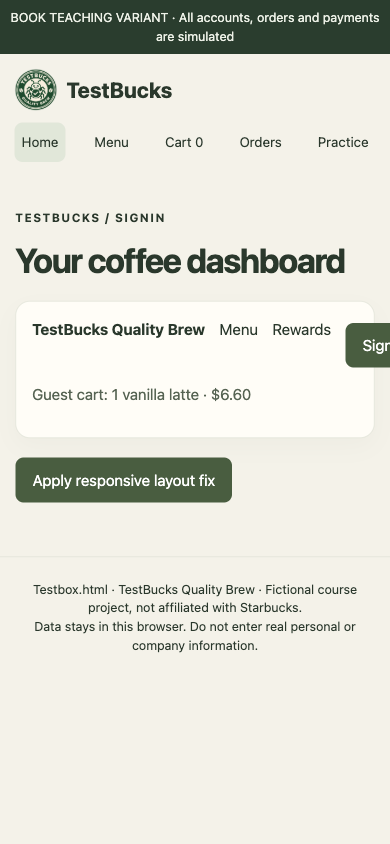
Captured TestBucks teaching fixture: deliberate overflow, then its responsive-layout fix. Not a production-app finding.
- 390px viewport
- Action clips
- Wrap restores action
Illustrated outcome
The course fixture clips the sign-in action at 390px. Broader review also examines text resizing and useful alt text.
Evidence to inspect
Captured course screen → clipped action → responsive fix. Extend the review with keyboard, AA/relevant AAA checks and draft VPAT/ACR entries.
Still untested / not established
The screen comparison is not a complete accessibility audit. Legal exposure needs company/location context and expert review, not an automated legal verdict.
Ready. Read the full example or play its steps.
What a useful result contains
A bounded claim
For testbucks sign-in accessibility, state the target, revision, environment and actual work performed. Keep planned, executed, blocked and untested work separate.
An inspectable trail
Captured course screen → clipped action → responsive fix. Extend the review with keyboard, AA/relevant AAA checks and draft VPAT/ACR entries. In a real run, retain the source, trace, screenshot or fixture behind the conclusion.
The qualification
The screen comparison is not a complete accessibility audit. Legal exposure needs company/location context and expert review, not an automated legal verdict.
The next decision
Decide whether the evidence calls for a focused check, a reviewed fix or more context. Do not convert a plausible example into a verified finding.
Adapt the example to your project
- Replace testbucks sign-in accessibility with a real feature, path or decision in your project.
- State the expected rule and its source. Include safe fixtures, constraints and a budget where appropriate.
- Ask for exact evidence and remaining gaps. Approve consequential actions separately.
/jay Review the /carbon-accessibility result. Separate observed evidence, assumptions and untested scope, then recommend the next useful check.Where to go next
/carbon-ui →/carbon-test →Content checked against the local command definition: skills/carbon-accessibility/SKILL.md. Examples adapted from the homepage’s TestBucks walkthroughs. Availability is edition- and host-dependent.