Jay examines the project and current changes, prioritizes consequential risks, coordinates the available sub-agents and reports back with evidence, trends and a qualified opinion on shipworthiness.
Install the appropriate CARBON edition in a supported host, open the project and use its command or skill picker. This booklet does not install CARBON or run tests.
Claude
Commands commonly use the plugin prefix, such as /carbon:carbon or /carbon:jay. Use the name shown by your installed plugin.
Codex
Choose the CARBON skill, or use its supported $carbon form. Names and invocation UI are host-controlled.
Other configured hosts
Use the installed integration’s prompt, command or tool picker. A slash shorthand in this guide is not a universal terminal command.
Your access, your limits
Keep your existing frameworks. Your host supplies tools and model access; model usage, credentials and permissions remain under that host’s policies.
Read results, not just green checks.
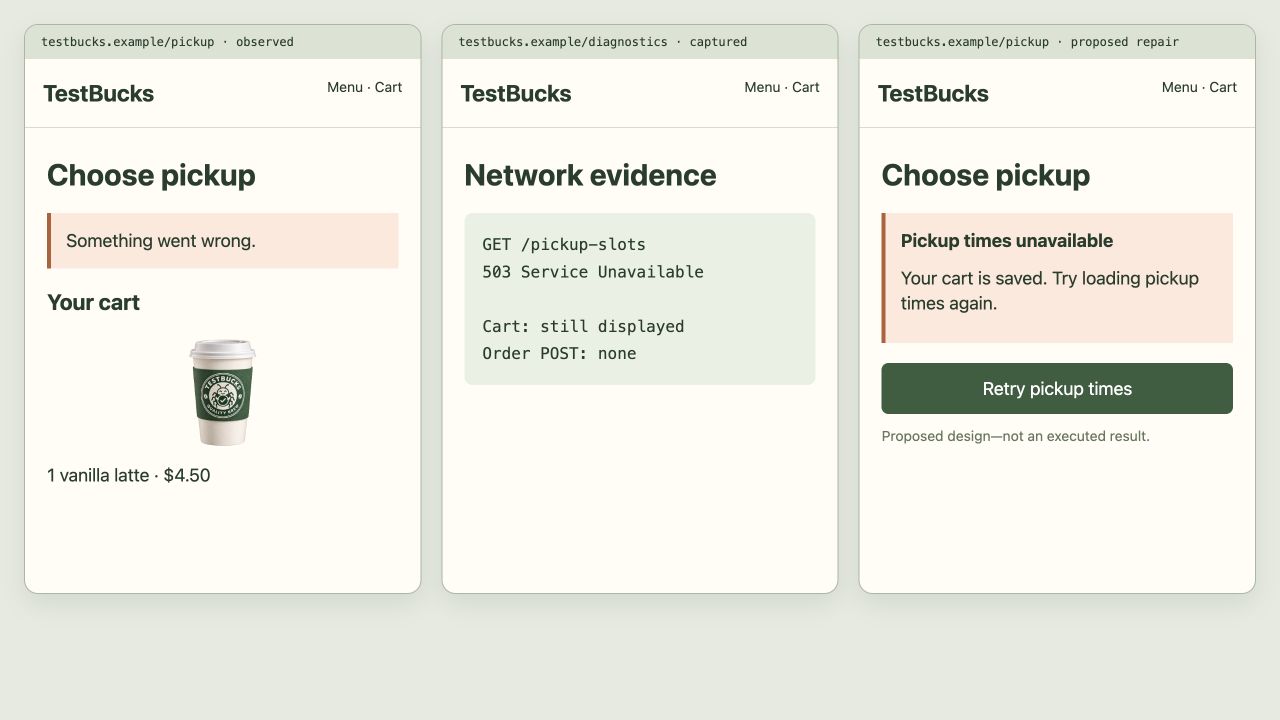
Observed
A check ran, with a recorded outcome and evidence.
Proposed
A test or fix is suggested. It has not yet established anything.
Blocked / untested
Access, tools or scope prevented execution. Missing evidence is not a pass.
Qualified confidence
A judgment tied to evidence, assumptions and known gaps—not a guarantee of defect-free software.
Contents
/j is an alias for /jay. These 60 chapters cover the current command surface.
CHAPTER 01 / 60 Core + Pro
/carbon
Test a project or verify a recent feature or bug fix with Jay: risk-based checks, reproducible findings and confidence in a visual report.
Jay · Your AI test managerStart & investigate
When to use it
You have a change to validate but do not yet know where testing effort belongs.
Before you start
Give Jay the changed area and the user outcome that must still work. Check that the report distinguishes executed checks from source inspection and deferred risks.
Try this in your coding agent.
/carbon Review my changes in src/checkout and test the highest-risk purchase flow.
Replace sample paths with your project. Slash names are shorthand; your host may use a plugin prefix or a skill picker. Invocation help →
ILLUSTRATIVE WALKTHROUGH
Checkout changes
An expanded teaching example, not a recorded or live execution. The report stays visible while the replay explains how to read it.
01Understand change
02Rank risk
03Run checks
04Reproduce
05Report
Coding-agent conversation
Understand change
I’m reviewing checkout changes. I’ll keep the scope and permissions explicit.
Rank risk
I’m prioritizing incorrect totals and lost cart state before cosmetic differences.
Run checks
Run checks: Review my changes in src/checkout and test the highest-risk purchase flow.
Reproduce
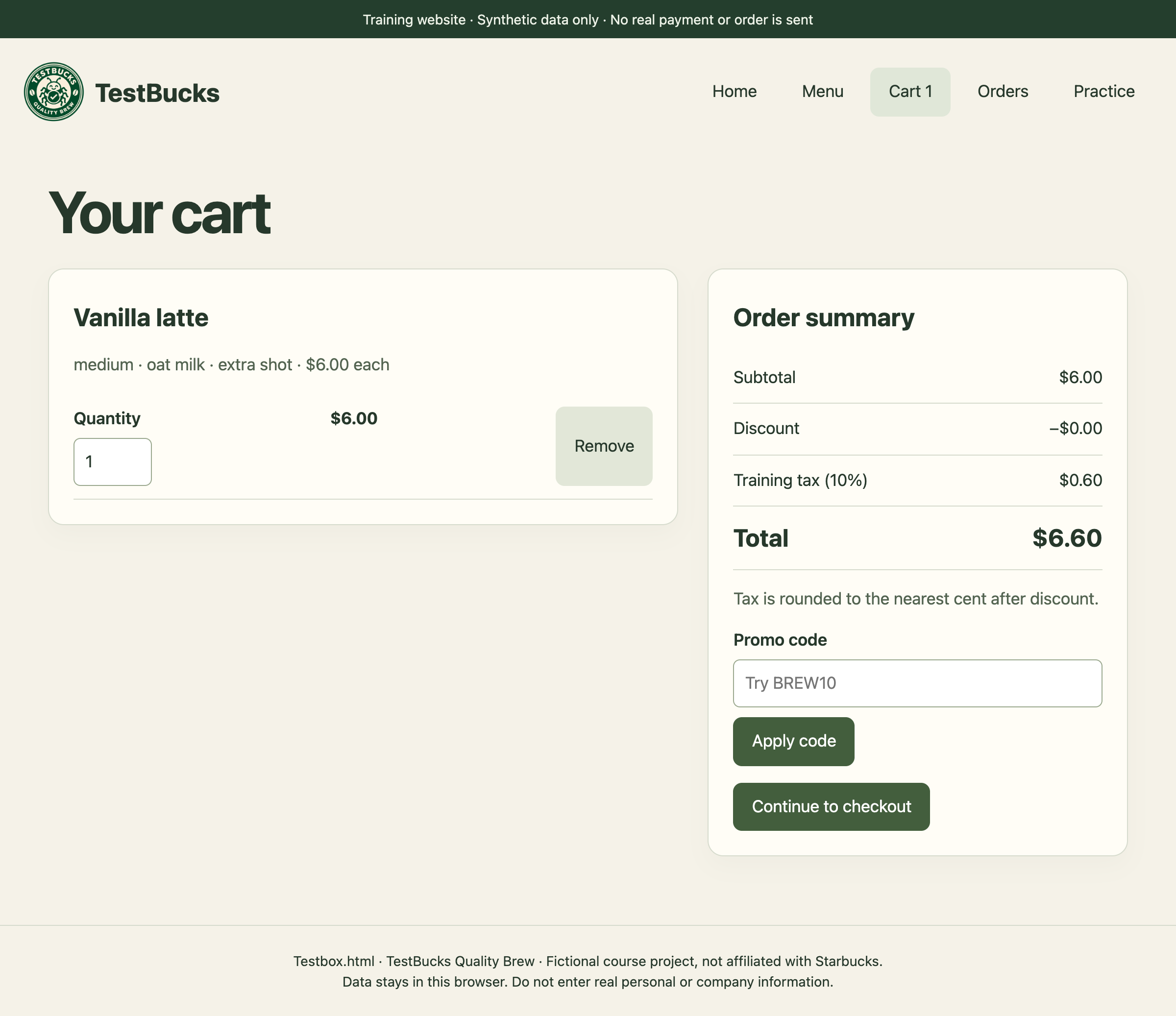
Here is the evidence trail to inspect: Cart: coffee + mug → apply MUG10 → remove mug → discount remains.
Report
A discount survives after its eligible item is removed. Payment-provider behavior is outside this local example.
Example report
Illustration
Follow the cart state
TestBucks course screen with illustrative analysis. The screenshot supplies context; the demo does not establish a newly observed bug.
Cart input
Totals & state
Checkout evidence
Illustrated outcome
A discount survives after its eligible item is removed.
Payment-provider behavior is outside this local example.
Ready. Read the full example or play its steps.
What a useful result contains
A bounded claim
For checkout changes, state the target, revision, environment and actual work performed. Keep planned, executed, blocked and untested work separate.
An inspectable trail
Cart: coffee + mug → apply MUG10 → remove mug → discount remains. In a real run, retain the source, trace, screenshot or fixture behind the conclusion.
The qualification
Payment-provider behavior is outside this local example.
The next decision
Decide whether the evidence calls for a focused check, a reviewed fix or more context. Do not convert a plausible example into a verified finding.
Adapt the example to your project
Replace checkout changes with a real feature, path or decision in your project.
State the expected rule and its source. Include safe fixtures, constraints and a budget where appropriate.
Ask for exact evidence and remaining gaps. Approve consequential actions separately.
/jay Review the /carbon result. Separate observed evidence, assumptions and untested scope, then recommend the next useful check.
Content checked against the local command definition: skills/carbon/SKILL.md. Examples adapted from the homepage’s TestBucks walkthroughs. Availability is edition- and host-dependent.
CHAPTER 02 / 60 Core + Pro
/jay
Talk directly to Jay, CARBON's AI test manager: ask questions, discuss evidence, choose what to test, or request an assessment.
Jay · Your AI test managerStart & investigate
When to use it
You want a testing conversation: what matters, what happened, or what to investigate next.
Before you start
Ask a question to discuss evidence, or explicitly ask Jay to test a target. A conversation does not silently authorize tests or fixes. /j is the same entry point.
Try this in your coding agent.
/jay Test the sign-in feature in src/auth and explain what is still untested.
Replace sample paths with your project. Slash names are shorthand; your host may use a plugin prefix or a skill picker. Invocation help →
ILLUSTRATIVE WALKTHROUGH
Sign-in feature
An expanded teaching example, not a recorded or live execution. The report stays visible while the replay explains how to read it.
01Read context
02Analyze
03Show evidence
04Report
Coding-agent conversation
Read context
I’m reviewing sign-in feature. I’ll keep the scope and permissions explicit.
Analyze
Analyze: Test the sign-in feature in src/auth and explain what is still untested.
Show evidence
Here is the evidence trail to inspect: Plan: valid credentials, invalid credentials, session expiry, return URL.
Report
Jay assigns form and security checks; expired sessions need follow-up. No claim about production identity-provider configuration.
Example report
Illustration
Inspect the identity boundary
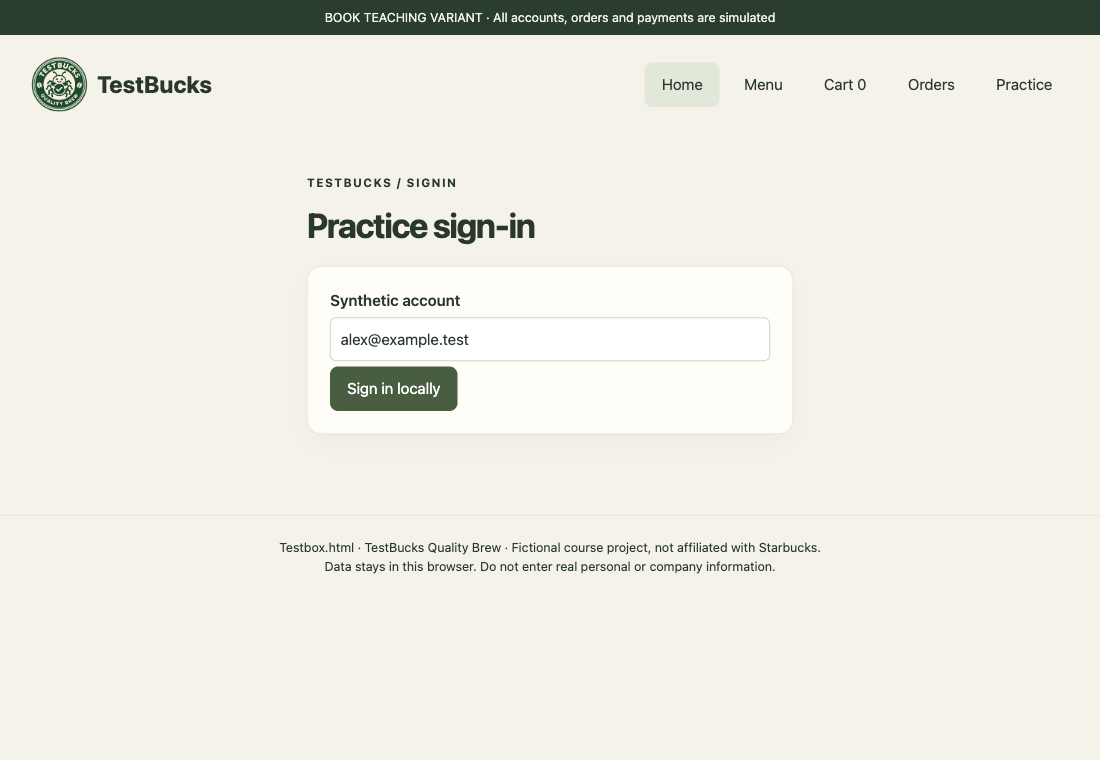
TestBucks course screen with illustrative analysis. The screenshot supplies context; the demo does not establish a newly observed bug.
User action
Identity / validation
Allowed outcome
Illustrated outcome
Jay assigns form and security checks; expired sessions need follow-up.
No claim about production identity-provider configuration.
Ready. Read the full example or play its steps.
What a useful result contains
A bounded claim
For sign-in feature, state the target, revision, environment and actual work performed. Keep planned, executed, blocked and untested work separate.
An inspectable trail
Plan: valid credentials, invalid credentials, session expiry, return URL. In a real run, retain the source, trace, screenshot or fixture behind the conclusion.
The qualification
No claim about production identity-provider configuration.
The next decision
Decide whether the evidence calls for a focused check, a reviewed fix or more context. Do not convert a plausible example into a verified finding.
Adapt the example to your project
Replace sign-in feature with a real feature, path or decision in your project.
State the expected rule and its source. Include safe fixtures, constraints and a budget where appropriate.
Ask for exact evidence and remaining gaps. Approve consequential actions separately.
/jay Review the /jay result. Separate observed evidence, assumptions and untested scope, then recommend the next useful check.
Content checked against the local command definition: skills/jay/SKILL.md. Examples adapted from the homepage’s TestBucks walkthroughs. Availability is edition- and host-dependent.
CHAPTER 03 / 60 Core + Pro
/full
Run CARBON's comprehensive, resumable testing campaign with Jay, parallel specialists, broad risk-ranked coverage, verified and triaged findings, and a live report.
Jay · Your AI test managerStart & investigate
When to use it
You need a coordinated campaign rather than a bounded first look.
Before you start
Identify the project and optional time limit. Two separate confirmations precede testing. Check the campaign checkpoints, blocked environments and cumulative evidence, then resume deliberately if interrupted.
Try this in your coding agent.
/full Run a testing campaign for the cart and checkout flows in this project.
Replace sample paths with your project. Slash names are shorthand; your host may use a plugin prefix or a skill picker. Invocation help →
ILLUSTRATIVE WALKTHROUGH
Cart-to-checkout campaign
An expanded teaching example, not a recorded or live execution. The report stays visible while the replay explains how to read it.
01Scope
02Map journeys
03Assign agents
04Execute
05Regressions
06Report
Coding-agent conversation
Scope
I’m reviewing cart-to-checkout campaign. I’ll keep the scope and permissions explicit.
Map journeys
I’m mapping menu → customization → cart → checkout → confirmation, including recovery paths.
Assign agents
Priya handles cart state, Hassan follows checkout, and Arjun compares totals across boundaries.
Execute
The sample journey changes a quantity, removes a discounted item, and retries the checkout boundary.
Regressions
Here is the evidence trail to inspect: Risk map → cart checks → browser journey → reproduction → report.
Report
The campaign links a cart defect to a proposed regression test. Unavailable browsers remain marked untested.
Example report
Illustration
Follow the cart state
TestBucks course screen with illustrative analysis. The screenshot supplies context; the demo does not establish a newly observed bug.
Cart input
Totals & state
Checkout evidence
Illustrated outcome
The campaign links a cart defect to a proposed regression test.
For cart-to-checkout campaign, state the target, revision, environment and actual work performed. Keep planned, executed, blocked and untested work separate.
An inspectable trail
Risk map → cart checks → browser journey → reproduction → report. In a real run, retain the source, trace, screenshot or fixture behind the conclusion.
The qualification
Unavailable browsers remain marked untested.
The next decision
Decide whether the evidence calls for a focused check, a reviewed fix or more context. Do not convert a plausible example into a verified finding.
Adapt the example to your project
Replace cart-to-checkout campaign with a real feature, path or decision in your project.
State the expected rule and its source. Include safe fixtures, constraints and a budget where appropriate.
Ask for exact evidence and remaining gaps. Approve consequential actions separately.
/jay Review the /full result. Separate observed evidence, assumptions and untested scope, then recommend the next useful check.
Content checked against the local command definition: skills/full/SKILL.md. Examples adapted from the homepage’s TestBucks walkthroughs. Availability is edition- and host-dependent.
CHAPTER 04 / 60 Core + Pro
/carbon-test
Test only a named feature, user flow, API, page, component, behavior, or change using CARBON Focused mode and optional named quality domains.
Richard · FormsStart & investigate
When to use it
You need a strict boundary around one feature or behavior.
Before you start
Name the feature, expected outcome and relevant quality concerns. Reject unrelated findings as a reason to silently broaden scope; keep them as follow-up candidates.
Try this in your coding agent.
/carbon-test Test password reset in src/auth, including expired reset links.
Replace sample paths with your project. Slash names are shorthand; your host may use a plugin prefix or a skill picker. Invocation help →
ILLUSTRATIVE WALKTHROUGH
Password reset
An expanded teaching example, not a recorded or live execution. The report stays visible while the replay explains how to read it.
01Read context
02Investigate
03Show evidence
04Report
Coding-agent conversation
Read context
I’m reviewing password reset. I’ll keep the scope and permissions explicit.
Investigate
Follow the weakest evidence link and record what remains blocked.
Show evidence
Here is the evidence trail to inspect: Synthetic expired token → submit → success message → old password still required.
Report
An expired reset link shows success but leaves the password unchanged. Real email delivery is excluded.
Example report
Illustration
Inspect the identity boundary
TestBucks course screen with illustrative analysis. The screenshot supplies context; the demo does not establish a newly observed bug.
User action
Identity / validation
Allowed outcome
Illustrated outcome
An expired reset link shows success but leaves the password unchanged.
Evidence to inspect
Synthetic expired token → submit → success message → old password still required.
Still untested / not established
Real email delivery is excluded.
Ready. Read the full example or play its steps.
What a useful result contains
A bounded claim
For password reset, state the target, revision, environment and actual work performed. Keep planned, executed, blocked and untested work separate.
An inspectable trail
Synthetic expired token → submit → success message → old password still required. In a real run, retain the source, trace, screenshot or fixture behind the conclusion.
The qualification
Real email delivery is excluded.
The next decision
Decide whether the evidence calls for a focused check, a reviewed fix or more context. Do not convert a plausible example into a verified finding.
Adapt the example to your project
Replace password reset with a real feature, path or decision in your project.
State the expected rule and its source. Include safe fixtures, constraints and a budget where appropriate.
Ask for exact evidence and remaining gaps. Approve consequential actions separately.
/jay Review the /carbon-test result. Separate observed evidence, assumptions and untested scope, then recommend the next useful check.
Content checked against the local command definition: skills/carbon-test/SKILL.md. Examples adapted from the homepage’s TestBucks walkthroughs. Availability is edition- and host-dependent.
CHAPTER 05 / 60 Pro
/carbon-functionality
Run focused CARBON Functionality testing and generate a branded functionality report.
Priya · Shopping cartStart & investigate
When to use it
You know the behavior to verify, including its edge and failure cases.
Before you start
Write down the rule before looking at implementation. For cart totals, include quantity changes, item removal and discount eligibility—not just the happy-path screenshot.
Try this in your coding agent.
/carbon-functionality Check that the cart updates quantities, discounts and totals correctly.
Replace sample paths with your project. Slash names are shorthand; your host may use a plugin prefix or a skill picker. Invocation help →
ILLUSTRATIVE WALKTHROUGH
Cart arithmetic
An expanded teaching example, not a recorded or live execution. The report stays visible while the replay explains how to read it.
01Read context
02Investigate
03Show evidence
04Report
Coding-agent conversation
Read context
I’m reviewing cart arithmetic. I’ll keep the scope and permissions explicit.
Investigate
Follow the weakest evidence link and record what remains blocked.
Show evidence
Here is the evidence trail to inspect: 2 × $12 = $24; 10% discount should be $2.40, not the previous $1.20.
Report
Changing quantity does not refresh the displayed discount. Tax rounding and multi-currency rules need separate fixtures.
Example report
Illustration
Follow the cart state
TestBucks course screen with illustrative analysis. The screenshot supplies context; the demo does not establish a newly observed bug.
Cart input
Totals & state
Checkout evidence
Illustrated outcome
Changing quantity does not refresh the displayed discount.
Evidence to inspect
2 × $12 = $24; 10% discount should be $2.40, not the previous $1.20.
Still untested / not established
Tax rounding and multi-currency rules need separate fixtures.
Ready. Read the full example or play its steps.
What a useful result contains
A bounded claim
For cart arithmetic, state the target, revision, environment and actual work performed. Keep planned, executed, blocked and untested work separate.
An inspectable trail
2 × $12 = $24; 10% discount should be $2.40, not the previous $1.20. In a real run, retain the source, trace, screenshot or fixture behind the conclusion.
The qualification
Tax rounding and multi-currency rules need separate fixtures.
The next decision
Decide whether the evidence calls for a focused check, a reviewed fix or more context. Do not convert a plausible example into a verified finding.
Adapt the example to your project
Replace cart arithmetic with a real feature, path or decision in your project.
State the expected rule and its source. Include safe fixtures, constraints and a budget where appropriate.
Ask for exact evidence and remaining gaps. Approve consequential actions separately.
/jay Review the /carbon-functionality result. Separate observed evidence, assumptions and untested scope, then recommend the next useful check.
Content checked against the local command definition: skills/carbon-functionality/SKILL.md. Examples adapted from the homepage’s TestBucks walkthroughs. Availability is edition- and host-dependent.
CHAPTER 06 / 60 Pro
/carbon-browser
Test a live website, local app, preview, page, element, or user flow with the coding agent's installed local browser.
Hassan · CheckoutStart & investigate
When to use it
The answer depends on interacting with a rendered page.
Before you start
Provide a reachable URL and safe test account or fixture. Record the actual clicks, inputs, observed result and browser context. Source inspection alone is not a browser test.
Try this in your coding agent.
/carbon-browser Test the checkout page in my local preview with an empty cart.
Replace sample paths with your project. Slash names are shorthand; your host may use a plugin prefix or a skill picker. Invocation help →
ILLUSTRATIVE WALKTHROUGH
Empty-cart checkout
An expanded teaching example, not a recorded or live execution. The report stays visible while the replay explains how to read it.
01Read context
02Investigate
03Show evidence
04Report
Coding-agent conversation
Read context
I’m reviewing empty-cart checkout. I’ll keep the scope and permissions explicit.
Investigate
Follow the weakest evidence link and record what remains blocked.
Show evidence
Here is the evidence trail to inspect: Open checkout → remove final item → Continue → empty order preview.
Report
Continue remains enabled after the last item is removed. No real order is submitted.
Example report
Illustration
Follow the cart state
TestBucks course screen with illustrative analysis. The screenshot supplies context; the demo does not establish a newly observed bug.
Cart input
Totals & state
Checkout evidence
Illustrated outcome
Continue remains enabled after the last item is removed.
Evidence to inspect
Open checkout → remove final item → Continue → empty order preview.
Still untested / not established
No real order is submitted.
Ready. Read the full example or play its steps.
What a useful result contains
A bounded claim
For empty-cart checkout, state the target, revision, environment and actual work performed. Keep planned, executed, blocked and untested work separate.
An inspectable trail
Open checkout → remove final item → Continue → empty order preview. In a real run, retain the source, trace, screenshot or fixture behind the conclusion.
The qualification
No real order is submitted.
The next decision
Decide whether the evidence calls for a focused check, a reviewed fix or more context. Do not convert a plausible example into a verified finding.
Adapt the example to your project
Replace empty-cart checkout with a real feature, path or decision in your project.
State the expected rule and its source. Include safe fixtures, constraints and a budget where appropriate.
Ask for exact evidence and remaining gaps. Approve consequential actions separately.
/jay Review the /carbon-browser result. Separate observed evidence, assumptions and untested scope, then recommend the next useful check.
Content checked against the local command definition: skills/carbon-browser/SKILL.md. Examples adapted from the homepage’s TestBucks walkthroughs. Availability is edition- and host-dependent.
CHAPTER 07 / 60 Core + Pro
/carbon-issues
Hunt reproducible bugs with protected stateful multi-step journeys, persona-led exploration, directed AI-code probes, and evidence confirmation. No automatic fixes or issue-tracker writes.
Richard · FormsStart & investigate
When to use it
You want bug discovery, including surprising multi-step journeys.
Before you start
Give an exploration boundary, not only a checklist. The default investigation protects time for stateful journeys and persona-led exploration; require a reproduction or source-level justification for each finding.
Try this in your coding agent.
/carbon-issues Explore sign-in and account recovery; find reproducible bugs.
Replace sample paths with your project. Slash names are shorthand; your host may use a plugin prefix or a skill picker. Invocation help →
ILLUSTRATIVE WALKTHROUGH
Account recovery journey
An expanded teaching example, not a recorded or live execution. The report stays visible while the replay explains how to read it.
01Read context
02Investigate
03Show evidence
04Report
Coding-agent conversation
Read context
I’m reviewing account recovery journey. I’ll keep the scope and permissions explicit.
Investigate
Follow the weakest evidence link and record what remains blocked.
Show evidence
Here is the evidence trail to inspect: Enter email → Forgot password → Back → email field empty.
Report
Returning from recovery clears the typed sign-in email. This is one exploratory path, not exhaustive coverage.
Example report
Illustration
Inspect the identity boundary
TestBucks course screen with illustrative analysis. The screenshot supplies context; the demo does not establish a newly observed bug.
User action
Identity / validation
Allowed outcome
Illustrated outcome
Returning from recovery clears the typed sign-in email.
Evidence to inspect
Enter email → Forgot password → Back → email field empty.
Still untested / not established
This is one exploratory path, not exhaustive coverage.
Ready. Read the full example or play its steps.
What a useful result contains
A bounded claim
For account recovery journey, state the target, revision, environment and actual work performed. Keep planned, executed, blocked and untested work separate.
An inspectable trail
Enter email → Forgot password → Back → email field empty. In a real run, retain the source, trace, screenshot or fixture behind the conclusion.
The qualification
This is one exploratory path, not exhaustive coverage.
The next decision
Decide whether the evidence calls for a focused check, a reviewed fix or more context. Do not convert a plausible example into a verified finding.
Adapt the example to your project
Replace account recovery journey with a real feature, path or decision in your project.
State the expected rule and its source. Include safe fixtures, constraints and a budget where appropriate.
Ask for exact evidence and remaining gaps. Approve consequential actions separately.
/jay Review the /carbon-issues result. Separate observed evidence, assumptions and untested scope, then recommend the next useful check.
Content checked against the local command definition: skills/carbon-issues/SKILL.md. Examples adapted from the homepage’s TestBucks walkthroughs. Availability is edition- and host-dependent.
CHAPTER 08 / 60 Core + Pro
/carbon-demo
Create a fresh, disposable CARBON demo project when the user has no code to test yet, choose a bundled website, SPA, API, eval harness, or large codebase, optionally include a representative existing suite, then run CARBON First Look against the copy.
Jay · Your AI test managerStart & investigate
When to use it
You have no project handy, or want to learn the evidence loop safely.
Before you start
Choose a disposable website, SPA, API, eval harness or larger fixture. Keep seeded demo defects separate from claims about a real product. Inspect the generated project before adapting its tests.
Try this in your coding agent.
/carbon-demo Create a disposable coffee-shop demo and test its checkout flow.
Replace sample paths with your project. Slash names are shorthand; your host may use a plugin prefix or a skill picker. Invocation help →
ILLUSTRATIVE WALKTHROUGH
Disposable coffee-shop app
An expanded teaching example, not a recorded or live execution. The report stays visible while the replay explains how to read it.
01Create fixture
02Choose flow
03Test
04Report
Coding-agent conversation
Create fixture
I’m reviewing disposable coffee-shop app. I’ll keep the scope and permissions explicit.
Choose flow
Choose flow: Create a disposable coffee-shop demo and test its checkout flow.
Test
Here is the evidence trail to inspect: Create fixture → remove discounted item → inspect stale total.
Report
A seeded cart defect makes the evidence-to-regression loop tangible. The project is disposable and uses synthetic data.
Example report
Illustration
Follow the cart state
TestBucks course screen with illustrative analysis. The screenshot supplies context; the demo does not establish a newly observed bug.
Cart input
Totals & state
Checkout evidence
Illustrated outcome
A seeded cart defect makes the evidence-to-regression loop tangible.
Evidence to inspect
Create fixture → remove discounted item → inspect stale total.
Still untested / not established
The project is disposable and uses synthetic data.
Ready. Read the full example or play its steps.
What a useful result contains
A bounded claim
For disposable coffee-shop app, state the target, revision, environment and actual work performed. Keep planned, executed, blocked and untested work separate.
An inspectable trail
Create fixture → remove discounted item → inspect stale total. In a real run, retain the source, trace, screenshot or fixture behind the conclusion.
The qualification
The project is disposable and uses synthetic data.
The next decision
Decide whether the evidence calls for a focused check, a reviewed fix or more context. Do not convert a plausible example into a verified finding.
Adapt the example to your project
Replace disposable coffee-shop app with a real feature, path or decision in your project.
State the expected rule and its source. Include safe fixtures, constraints and a budget where appropriate.
Ask for exact evidence and remaining gaps. Approve consequential actions separately.
/jay Review the /carbon-demo result. Separate observed evidence, assumptions and untested scope, then recommend the next useful check.
Content checked against the local command definition: skills/carbon-demo/SKILL.md. Examples adapted from the homepage’s TestBucks walkthroughs. Availability is edition- and host-dependent.
CHAPTER 09 / 60 Pro
/carbon-more
Continue a prior broad CARBON run with the next highest-value deferred candidates without repeating the initial pass.
Jay · Your AI test managerStart & investigate
When to use it
A previous assessment left useful checks unexecuted.
Before you start
Keep the earlier run and project revision available. Ask for the next highest-risk gap rather than repeating already-covered happy paths. A prior pass does not automatically apply to changed code.
Try this in your coding agent.
/carbon-more Continue the last checkout assessment with the next highest-risk gap.
Replace sample paths with your project. Slash names are shorthand; your host may use a plugin prefix or a skill picker. Invocation help →
ILLUSTRATIVE WALKTHROUGH
Next gap in checkout evidence
An expanded teaching example, not a recorded or live execution. The report stays visible while the replay explains how to read it.
01Read context
02Investigate
03Show evidence
04Report
Coding-agent conversation
Read context
I’m reviewing next gap in checkout evidence. I’ll keep the scope and permissions explicit.
Investigate
Follow the weakest evidence link and record what remains blocked.
Show evidence
Here is the evidence trail to inspect: Prior report: quantity covered; refresh untested → add item → refresh → inspect cart.
Report
The next investigation follows the uncovered refresh path. Prior findings are reused, not counted as new tests.
Example report
Illustration
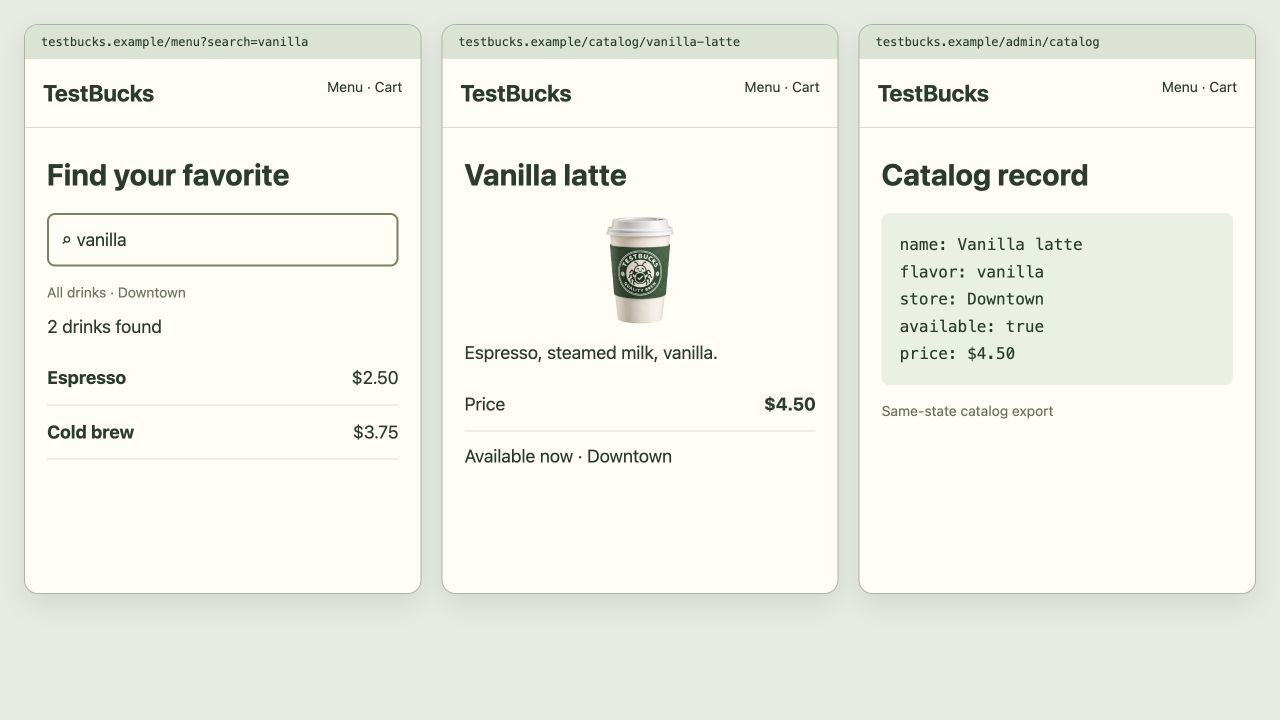
Query → catalog → visible result
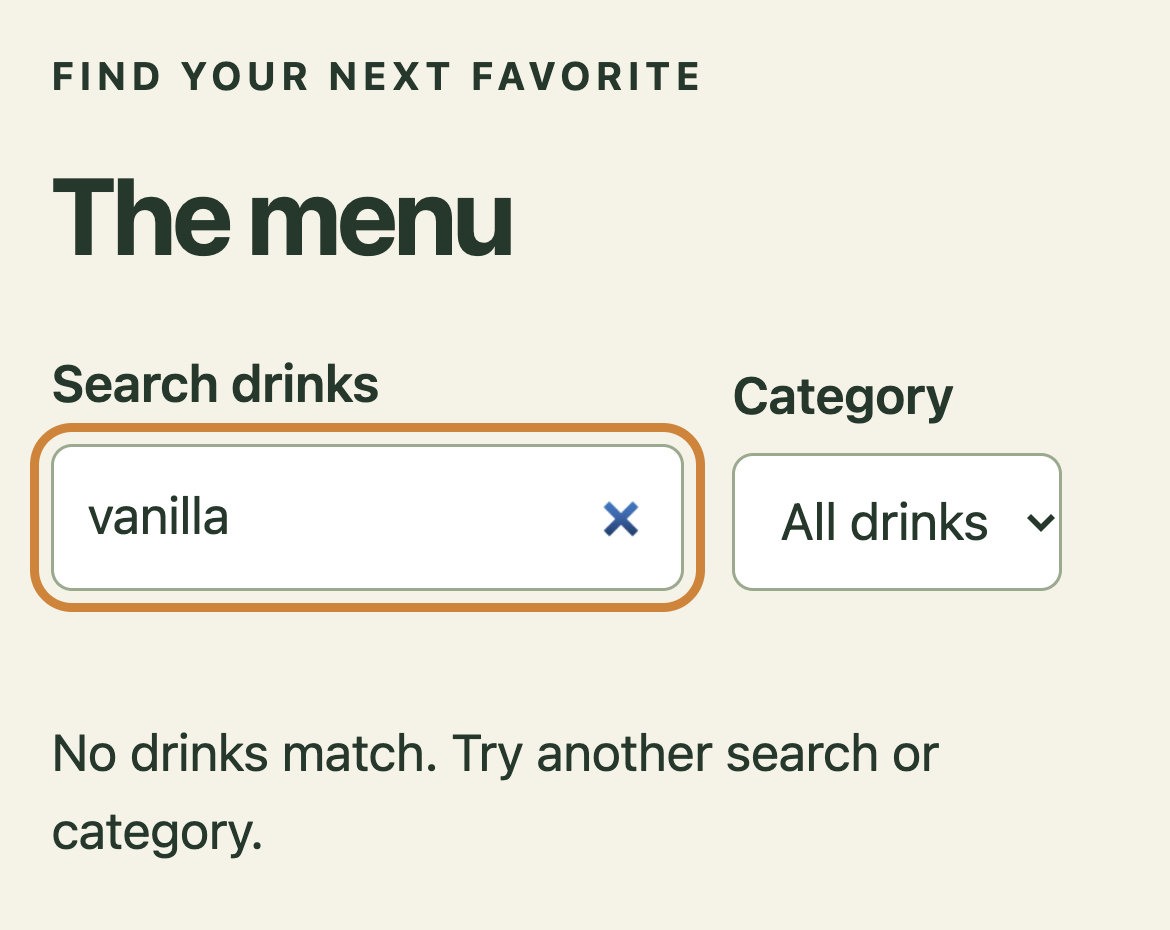
TestBucks course screen with illustrative analysis. The screenshot supplies context; the demo does not establish a newly observed bug.
Query intent
Catalog / processing
Visible result
Illustrated outcome
The next investigation follows the uncovered refresh path.
Prior findings are reused, not counted as new tests.
Ready. Read the full example or play its steps.
What a useful result contains
A bounded claim
For next gap in checkout evidence, state the target, revision, environment and actual work performed. Keep planned, executed, blocked and untested work separate.
An inspectable trail
Prior report: quantity covered; refresh untested → add item → refresh → inspect cart. In a real run, retain the source, trace, screenshot or fixture behind the conclusion.
The qualification
Prior findings are reused, not counted as new tests.
The next decision
Decide whether the evidence calls for a focused check, a reviewed fix or more context. Do not convert a plausible example into a verified finding.
Adapt the example to your project
Replace next gap in checkout evidence with a real feature, path or decision in your project.
State the expected rule and its source. Include safe fixtures, constraints and a budget where appropriate.
Ask for exact evidence and remaining gaps. Approve consequential actions separately.
/jay Review the /carbon-more result. Separate observed evidence, assumptions and untested scope, then recommend the next useful check.
Content checked against the local command definition: skills/carbon-more/SKILL.md. Examples adapted from the homepage’s TestBucks walkthroughs. Availability is edition- and host-dependent.
CHAPTER 10 / 60 Core + Pro
/carbon-help
Analyze the current project, current change, existing tests, UI, API, and AI surfaces, CARBON state, confidence state, automation, and risk signals, then recommend the best CARBON commands and prioritized next steps.
Jay · Your AI test managerStart & investigate
When to use it
You are unsure which workflow matches the problem.
Before you start
Explain the symptom and the evidence you already have. Look for a small, justified next step; recommendations themselves are not executed tests.
Try this in your coding agent.
/carbon-help Which command should I use to investigate our new search feature?
Replace sample paths with your project. Slash names are shorthand; your host may use a plugin prefix or a skill picker. Invocation help →
ILLUSTRATIVE WALKTHROUGH
Search-feature investigation
An expanded teaching example, not a recorded or live execution. The report stays visible while the replay explains how to read it.
01Read context
02Analyze
03Show evidence
04Report
Coding-agent conversation
Read context
I’m reviewing search-feature investigation. I’ll keep the scope and permissions explicit.
Analyze
Analyze: Which command should I use to investigate our new search feature?
Show evidence
Here is the evidence trail to inspect: Question: missing results or confusing UI? Suggested commands: /carbon-issues, /carbon-api.
Report
Jay recommends an exploratory pass before focused API checks. A recommendation is not an executed check.
Example report
Illustration
Query → catalog → visible result
TestBucks course screen with illustrative analysis. The screenshot supplies context; the demo does not establish a newly observed bug.
Query intent
Catalog / processing
Visible result
Illustrated outcome
Jay recommends an exploratory pass before focused API checks.
Evidence to inspect
Question: missing results or confusing UI? Suggested commands: /carbon-issues, /carbon-api.
Still untested / not established
A recommendation is not an executed check.
Ready. Read the full example or play its steps.
What a useful result contains
A bounded claim
For search-feature investigation, state the target, revision, environment and actual work performed. Keep planned, executed, blocked and untested work separate.
An inspectable trail
Question: missing results or confusing UI? Suggested commands: /carbon-issues, /carbon-api. In a real run, retain the source, trace, screenshot or fixture behind the conclusion.
The qualification
A recommendation is not an executed check.
The next decision
Decide whether the evidence calls for a focused check, a reviewed fix or more context. Do not convert a plausible example into a verified finding.
Adapt the example to your project
Replace search-feature investigation with a real feature, path or decision in your project.
State the expected rule and its source. Include safe fixtures, constraints and a budget where appropriate.
Ask for exact evidence and remaining gaps. Approve consequential actions separately.
/jay Review the /carbon-help result. Separate observed evidence, assumptions and untested scope, then recommend the next useful check.
Content checked against the local command definition: skills/carbon-help/SKILL.md. Examples adapted from the homepage’s TestBucks walkthroughs. Availability is edition- and host-dependent.
CHAPTER 11 / 60 Core + Pro
/carbon-accessibility
Run focused CARBON Accessibility testing and generate branded accessibility, WCAG 2.2, and VPAT 2.5Rev-aligned Accessibility Conformance Report artifacts.
You need contextual accessibility evidence beyond simple rules.
Before you start
Include keyboard and focus flows, text resizing and reflow, contrast, and whether alternative text conveys useful meaning. Request WCAG A/AA and relevant AAA coverage, a draft VPAT/ACR, and company/location context for legal-exposure triage. Human review is still required.
Try this in your coding agent.
/carbon-accessibility Check the sign-in form for keyboard access, text resizing and useful labels.
Replace sample paths with your project. Slash names are shorthand; your host may use a plugin prefix or a skill picker. Invocation help →
Beyond a rules-only scan.
Meaning
Is the alternative text accurate and useful in context—not merely present?
Dynamic experience
Can people complete the flow with keyboard navigation, resized text and reflow?
Reviewable reporting
Map evidence to WCAG A/AA and relevant AAA criteria. Produce a draft VPAT-aligned ACR with unresolved criteria visible.
Exposure triage
Use company type, location and product context to frame potential legal exposure for expert review. This is not legal advice or certification.
ILLUSTRATIVE WALKTHROUGH
TestBucks sign-in accessibility
An expanded teaching example, not a recorded or live execution. The report stays visible while the replay explains how to read it.
01Read context
02Investigate
03Show evidence
04Report
Coding-agent conversation
Read context
I’m reviewing testbucks sign-in accessibility. I’ll keep the scope and permissions explicit.
Investigate
Follow the weakest evidence link and record what remains blocked.
Show evidence
Here is the evidence trail to inspect: Captured course screen → clipped action → responsive fix. Extend the review with keyboard, AA/relevant AAA checks and draft VPAT/ACR entries.
Report
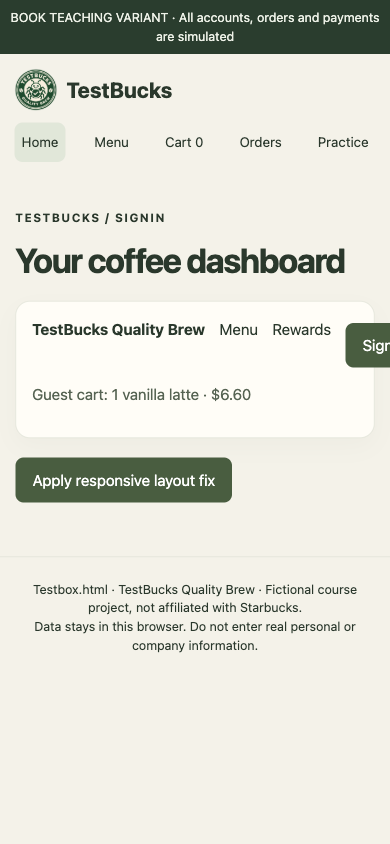
The course fixture clips the sign-in action at 390px. Broader review also examines text resizing and useful alt text. The screen comparison is not a complete accessibility audit. Legal exposure needs company/location context and expert review, not an automated legal verdict.
Example report
Illustration
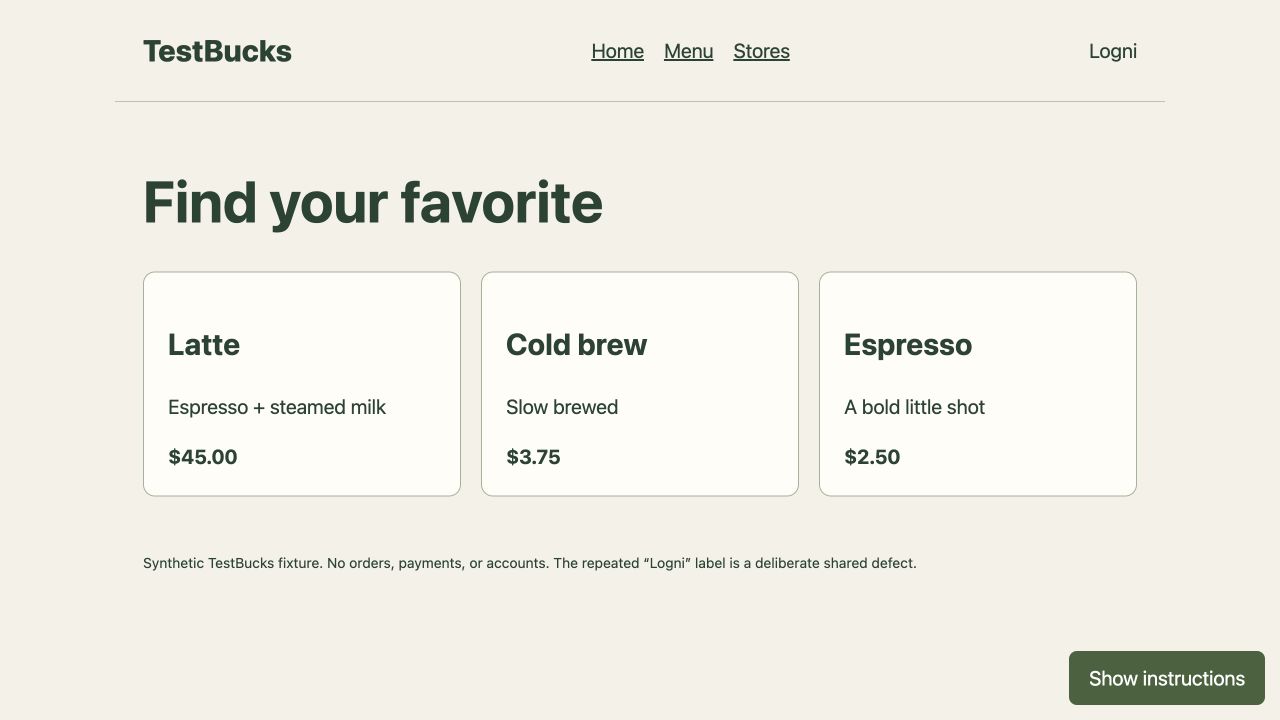
Clipped action → responsive layout
Captured TestBucks teaching fixture: deliberate overflow, then its responsive-layout fix. Not a production-app finding.
390px viewport
Action clips
Wrap restores action
Illustrated outcome
The course fixture clips the sign-in action at 390px. Broader review also examines text resizing and useful alt text.
Evidence to inspect
Captured course screen → clipped action → responsive fix. Extend the review with keyboard, AA/relevant AAA checks and draft VPAT/ACR entries.
Still untested / not established
The screen comparison is not a complete accessibility audit. Legal exposure needs company/location context and expert review, not an automated legal verdict.
Ready. Read the full example or play its steps.
What a useful result contains
A bounded claim
For testbucks sign-in accessibility, state the target, revision, environment and actual work performed. Keep planned, executed, blocked and untested work separate.
An inspectable trail
Captured course screen → clipped action → responsive fix. Extend the review with keyboard, AA/relevant AAA checks and draft VPAT/ACR entries. In a real run, retain the source, trace, screenshot or fixture behind the conclusion.
The qualification
The screen comparison is not a complete accessibility audit. Legal exposure needs company/location context and expert review, not an automated legal verdict.
The next decision
Decide whether the evidence calls for a focused check, a reviewed fix or more context. Do not convert a plausible example into a verified finding.
Adapt the example to your project
Replace testbucks sign-in accessibility with a real feature, path or decision in your project.
State the expected rule and its source. Include safe fixtures, constraints and a budget where appropriate.
Ask for exact evidence and remaining gaps. Approve consequential actions separately.
/jay Review the /carbon-accessibility result. Separate observed evidence, assumptions and untested scope, then recommend the next useful check.
Content checked against the local command definition: skills/carbon-accessibility/SKILL.md. Examples adapted from the homepage’s TestBucks walkthroughs. Availability is edition- and host-dependent.
CHAPTER 12 / 60 Pro
/carbon-ui
Run focused CARBON UI testing and generate a branded ui report.
Mia · UsabilityExperience & accessibility
When to use it
You suspect clipping, overlap, visual inconsistency or broken responsive states.
Before you start
Specify widths, content extremes and states such as loading, empty and error. Capture comparable before/after screenshots; a desktop pass does not establish phone behavior.
Try this in your coding agent.
/carbon-ui Inspect the dashboard at phone widths for clipped text and overlapping controls.
Replace sample paths with your project. Slash names are shorthand; your host may use a plugin prefix or a skill picker. Invocation help →
ILLUSTRATIVE WALKTHROUGH
TestBucks mobile dashboard
An expanded teaching example, not a recorded or live execution. The report stays visible while the replay explains how to read it.
01Read context
02Investigate
03Show evidence
04Report
Coding-agent conversation
Read context
I’m reviewing testbucks mobile dashboard. I’ll keep the scope and permissions explicit.
Investigate
Follow the weakest evidence link and record what remains blocked.
Show evidence
Here is the evidence trail to inspect: Before: nowrap row clips the action. After the course fix: wrapping keeps the action visible.
Report
The course fixture’s single-line navigation pushes Sign in beyond the 390px viewport. Other breakpoints and actual-device rendering remain to be checked.
Example report
Illustration
Clipped action → responsive layout
Captured TestBucks teaching fixture: deliberate overflow, then its responsive-layout fix. Not a production-app finding.
390px viewport
Action clips
Wrap restores action
Illustrated outcome
The course fixture’s single-line navigation pushes Sign in beyond the 390px viewport.
Evidence to inspect
Before: nowrap row clips the action. After the course fix: wrapping keeps the action visible.
Still untested / not established
Other breakpoints and actual-device rendering remain to be checked.
Ready. Read the full example or play its steps.
What a useful result contains
A bounded claim
For testbucks mobile dashboard, state the target, revision, environment and actual work performed. Keep planned, executed, blocked and untested work separate.
An inspectable trail
Before: nowrap row clips the action. After the course fix: wrapping keeps the action visible. In a real run, retain the source, trace, screenshot or fixture behind the conclusion.
The qualification
Other breakpoints and actual-device rendering remain to be checked.
The next decision
Decide whether the evidence calls for a focused check, a reviewed fix or more context. Do not convert a plausible example into a verified finding.
Adapt the example to your project
Replace testbucks mobile dashboard with a real feature, path or decision in your project.
State the expected rule and its source. Include safe fixtures, constraints and a budget where appropriate.
Ask for exact evidence and remaining gaps. Approve consequential actions separately.
/jay Review the /carbon-ui result. Separate observed evidence, assumptions and untested scope, then recommend the next useful check.
Content checked against the local command definition: skills/carbon-ui/SKILL.md. Examples adapted from the homepage’s TestBucks walkthroughs. Availability is edition- and host-dependent.
CHAPTER 13 / 60 Pro
/carbon-ux
Run focused CARBON UX testing and generate a branded ux report.
Mia · UsabilityExperience & accessibility
When to use it
A sequence works technically but feels confusing or untrustworthy.
Before you start
Describe the user goal and follow the entire journey, including waiting and recovery. Separate observed friction from hypotheses about abandonment or satisfaction.
Try this in your coding agent.
/carbon-ux Review the checkout journey for confusing steps and missing feedback.
Replace sample paths with your project. Slash names are shorthand; your host may use a plugin prefix or a skill picker. Invocation help →
ILLUSTRATIVE WALKTHROUGH
Checkout feedback
An expanded teaching example, not a recorded or live execution. The report stays visible while the replay explains how to read it.
01Read context
02Investigate
03Show evidence
04Report
Coding-agent conversation
Read context
I’m reviewing checkout feedback. I’ll keep the scope and permissions explicit.
Investigate
Follow the weakest evidence link and record what remains blocked.
Show evidence
Here is the evidence trail to inspect: Submit → waiting state has no progress message → repeated action becomes likely.
Report
A slow response leaves users unsure whether the order was submitted. Behavioral impact is a hypothesis until studied with users.
Example report
Illustration
Failure → evidence → recovery
TestBucks course screen with illustrative analysis. The screenshot supplies context; the demo does not establish a newly observed bug.
Failed request
Preserved state
Safe retry
Illustrated outcome
A slow response leaves users unsure whether the order was submitted.
Evidence to inspect
Submit → waiting state has no progress message → repeated action becomes likely.
Still untested / not established
Behavioral impact is a hypothesis until studied with users.
Ready. Read the full example or play its steps.
What a useful result contains
A bounded claim
For checkout feedback, state the target, revision, environment and actual work performed. Keep planned, executed, blocked and untested work separate.
An inspectable trail
Submit → waiting state has no progress message → repeated action becomes likely. In a real run, retain the source, trace, screenshot or fixture behind the conclusion.
The qualification
Behavioral impact is a hypothesis until studied with users.
The next decision
Decide whether the evidence calls for a focused check, a reviewed fix or more context. Do not convert a plausible example into a verified finding.
Adapt the example to your project
Replace checkout feedback with a real feature, path or decision in your project.
State the expected rule and its source. Include safe fixtures, constraints and a budget where appropriate.
Ask for exact evidence and remaining gaps. Approve consequential actions separately.
/jay Review the /carbon-ux result. Separate observed evidence, assumptions and untested scope, then recommend the next useful check.
Content checked against the local command definition: skills/carbon-ux/SKILL.md. Examples adapted from the homepage’s TestBucks walkthroughs. Availability is edition- and host-dependent.
CHAPTER 14 / 60 Pro
/carbon-usability
Run focused CARBON Usability testing and generate a branded usability report.
Mia · UsabilityExperience & accessibility
When to use it
You want to know whether a person can find and complete a task.
Before you start
State the user knowledge level and task. Inspect discoverability, wording, feedback and recovery. Simulated judgments complement rather than replace research with real people.
Try this in your coding agent.
/carbon-usability Evaluate whether a first-time user can find and use password reset.
Replace sample paths with your project. Slash names are shorthand; your host may use a plugin prefix or a skill picker. Invocation help →
ILLUSTRATIVE WALKTHROUGH
First-time password recovery
An expanded teaching example, not a recorded or live execution. The report stays visible while the replay explains how to read it.
01Read context
02Investigate
03Show evidence
04Report
Coding-agent conversation
Read context
I’m reviewing first-time password recovery. I’ll keep the scope and permissions explicit.
Investigate
Follow the weakest evidence link and record what remains blocked.
Show evidence
Here is the evidence trail to inspect: First-time task: recover access → inspect error, link wording and placement.
Report
The recovery link is hard to find after a failed sign-in. An AI review does not replace a human usability study.
Example report
Illustration
Inspect the identity boundary
TestBucks course screen with illustrative analysis. The screenshot supplies context; the demo does not establish a newly observed bug.
User action
Identity / validation
Allowed outcome
Illustrated outcome
The recovery link is hard to find after a failed sign-in.
Evidence to inspect
First-time task: recover access → inspect error, link wording and placement.
Still untested / not established
An AI review does not replace a human usability study.
Ready. Read the full example or play its steps.
What a useful result contains
A bounded claim
For first-time password recovery, state the target, revision, environment and actual work performed. Keep planned, executed, blocked and untested work separate.
An inspectable trail
First-time task: recover access → inspect error, link wording and placement. In a real run, retain the source, trace, screenshot or fixture behind the conclusion.
The qualification
An AI review does not replace a human usability study.
The next decision
Decide whether the evidence calls for a focused check, a reviewed fix or more context. Do not convert a plausible example into a verified finding.
Adapt the example to your project
Replace first-time password recovery with a real feature, path or decision in your project.
State the expected rule and its source. Include safe fixtures, constraints and a budget where appropriate.
Ask for exact evidence and remaining gaps. Approve consequential actions separately.
/jay Review the /carbon-usability result. Separate observed evidence, assumptions and untested scope, then recommend the next useful check.
Content checked against the local command definition: skills/carbon-usability/SKILL.md. Examples adapted from the homepage’s TestBucks walkthroughs. Availability is edition- and host-dependent.
CHAPTER 15 / 60 Pro
/carbon-personas
Generate context-specific AI persona feedback for the current work or a named app, API, screenshot, document, design, or concept.
Mia · UsabilityExperience & accessibility
When to use it
Different user goals or contexts may reveal overlooked friction.
Before you start
Provide realistic goals, constraints and background. Compare agreements and disagreements across simulated perspectives instead of averaging them into an invented user-satisfaction score.
Try this in your coding agent.
/carbon-personas Review onboarding from the perspectives of a new user and a busy admin.
Replace sample paths with your project. Slash names are shorthand; your host may use a plugin prefix or a skill picker. Invocation help →
ILLUSTRATIVE WALKTHROUGH
Onboarding perspectives
An expanded teaching example, not a recorded or live execution. The report stays visible while the replay explains how to read it.
01Read context
02Investigate
03Show evidence
04Report
Coding-agent conversation
Read context
I’m reviewing onboarding perspectives. I’ll keep the scope and permissions explicit.
Investigate
Follow the weakest evidence link and record what remains blocked.
Show evidence
Here is the evidence trail to inspect: New user: unexplained workspace term. Admin: no visible bulk-invite route.
Report
The new-user and busy-admin perspectives reveal different friction. These are simulated perspectives, not interviews.
Example report
Illustration
Meaning, price and presentation
TestBucks course screen with illustrative analysis. The screenshot supplies context; the demo does not establish a newly observed bug.
User intent
Visible content
Meaning / consistency
Illustrated outcome
The new-user and busy-admin perspectives reveal different friction.
Evidence to inspect
New user: unexplained workspace term. Admin: no visible bulk-invite route.
Still untested / not established
These are simulated perspectives, not interviews.
Ready. Read the full example or play its steps.
What a useful result contains
A bounded claim
For onboarding perspectives, state the target, revision, environment and actual work performed. Keep planned, executed, blocked and untested work separate.
An inspectable trail
New user: unexplained workspace term. Admin: no visible bulk-invite route. In a real run, retain the source, trace, screenshot or fixture behind the conclusion.
The qualification
These are simulated perspectives, not interviews.
The next decision
Decide whether the evidence calls for a focused check, a reviewed fix or more context. Do not convert a plausible example into a verified finding.
Adapt the example to your project
Replace onboarding perspectives with a real feature, path or decision in your project.
State the expected rule and its source. Include safe fixtures, constraints and a budget where appropriate.
Ask for exact evidence and remaining gaps. Approve consequential actions separately.
/jay Review the /carbon-personas result. Separate observed evidence, assumptions and untested scope, then recommend the next useful check.
Content checked against the local command definition: skills/carbon-personas/SKILL.md. Examples adapted from the homepage’s TestBucks walkthroughs. Availability is edition- and host-dependent.
CHAPTER 16 / 60 Pro
/carbon-compatibility
Run focused CARBON Compatibility testing and generate a branded compatibility report.
Nia · CompatibilityExperience & accessibility
When to use it
A feature must work across specific environments.
Before you start
Define the browser/device/input matrix and record what actually ran. Distinguish an emulated viewport from a physical phone and unavailable runners from passing environments.
Try this in your coding agent.
/carbon-compatibility Check the checkout flow across available browsers and mobile viewports.
Replace sample paths with your project. Slash names are shorthand; your host may use a plugin prefix or a skill picker. Invocation help →
ILLUSTRATIVE WALKTHROUGH
Checkout compatibility
An expanded teaching example, not a recorded or live execution. The report stays visible while the replay explains how to read it.
01Read context
02Investigate
03Show evidence
04Report
Coding-agent conversation
Read context
I’m reviewing checkout compatibility. I’ll keep the scope and permissions explicit.
Investigate
Follow the weakest evidence link and record what remains blocked.
Show evidence
Here is the evidence trail to inspect: Example matrix: Chromium checked; WebKit blocked by missing runner; Firefox untested.
Report
A date picker needs a browser-specific follow-up. Unavailable environments are not counted as passing.
Example report
Illustration
Clipped action → responsive layout
Captured TestBucks teaching fixture: deliberate overflow, then its responsive-layout fix. Not a production-app finding.
390px viewport
Action clips
Wrap restores action
Illustrated outcome
A date picker needs a browser-specific follow-up.
Evidence to inspect
Example matrix: Chromium checked; WebKit blocked by missing runner; Firefox untested.
Still untested / not established
Unavailable environments are not counted as passing.
Ready. Read the full example or play its steps.
What a useful result contains
A bounded claim
For checkout compatibility, state the target, revision, environment and actual work performed. Keep planned, executed, blocked and untested work separate.
An inspectable trail
Example matrix: Chromium checked; WebKit blocked by missing runner; Firefox untested. In a real run, retain the source, trace, screenshot or fixture behind the conclusion.
The qualification
Unavailable environments are not counted as passing.
The next decision
Decide whether the evidence calls for a focused check, a reviewed fix or more context. Do not convert a plausible example into a verified finding.
Adapt the example to your project
Replace checkout compatibility with a real feature, path or decision in your project.
State the expected rule and its source. Include safe fixtures, constraints and a budget where appropriate.
Ask for exact evidence and remaining gaps. Approve consequential actions separately.
/jay Review the /carbon-compatibility result. Separate observed evidence, assumptions and untested scope, then recommend the next useful check.
Content checked against the local command definition: skills/carbon-compatibility/SKILL.md. Examples adapted from the homepage’s TestBucks walkthroughs. Availability is edition- and host-dependent.
CHAPTER 17 / 60 Pro
/carbon-intl
Assess an app's internationalization (INTL/i18n) readiness and completion against intended locales and markets. Inspect architecture, string externalization, locale handling, formatting, Unicode, RTL, testing and delivery gaps; produce a branded readiness report.
Lucia · LocalizationExperience & accessibility
When to use it
You are preparing the architecture for more markets.
Before you start
List intended locales and inspect externalized strings, Unicode, currencies, dates, text expansion and direction. A readiness matrix should separate implementation gaps from verified runtime behavior.
Try this in your coding agent.
/carbon-intl Review src/checkout for hard-coded currency, dates and text-direction assumptions.
Replace sample paths with your project. Slash names are shorthand; your host may use a plugin prefix or a skill picker. Invocation help →
ILLUSTRATIVE WALKTHROUGH
Currency and direction readiness
An expanded teaching example, not a recorded or live execution. The report stays visible while the replay explains how to read it.
01Read context
02Investigate
03Show evidence
04Report
Coding-agent conversation
Read context
I’m reviewing currency and direction readiness. I’ll keep the scope and permissions explicit.
Investigate
Follow the weakest evidence link and record what remains blocked.
Show evidence
Here is the evidence trail to inspect: Source: "$" + amount → review currency and RTL layout assumptions.
Report
A dollar sign is embedded in the component instead of locale formatting. No claim that all locales were executed.
Example report
Illustration
Meaning, price and presentation
TestBucks course screen with illustrative analysis. The screenshot supplies context; the demo does not establish a newly observed bug.
User intent
Visible content
Meaning / consistency
Illustrated outcome
A dollar sign is embedded in the component instead of locale formatting.
For currency and direction readiness, state the target, revision, environment and actual work performed. Keep planned, executed, blocked and untested work separate.
An inspectable trail
Source: "$" + amount → review currency and RTL layout assumptions. In a real run, retain the source, trace, screenshot or fixture behind the conclusion.
The qualification
No claim that all locales were executed.
The next decision
Decide whether the evidence calls for a focused check, a reviewed fix or more context. Do not convert a plausible example into a verified finding.
Adapt the example to your project
Replace currency and direction readiness with a real feature, path or decision in your project.
State the expected rule and its source. Include safe fixtures, constraints and a budget where appropriate.
Ask for exact evidence and remaining gaps. Approve consequential actions separately.
/jay Review the /carbon-intl result. Separate observed evidence, assumptions and untested scope, then recommend the next useful check.
Content checked against the local command definition: skills/carbon-intl/SKILL.md. Examples adapted from the homepage’s TestBucks walkthroughs. Availability is edition- and host-dependent.
CHAPTER 18 / 60 Pro
/carbon-localization
Find localization blockers and contextually incorrect translations with CARBON.
Lucia · LocalizationExperience & accessibility
When to use it
Translations exist but may be wrong in product context.
Before you start
Provide source and target locales plus the real action behind each string. Inspect semantic reversals, terminology, plurals, placeholders and truncation. Escalate uncertain linguistic judgments to a qualified reviewer.
Try this in your coding agent.
/carbon-localization Review the Spanish checkout copy for meaning, context and truncation.
Replace sample paths with your project. Slash names are shorthand; your host may use a plugin prefix or a skill picker. Invocation help →
ILLUSTRATIVE WALKTHROUGH
Spanish checkout
An expanded teaching example, not a recorded or live execution. The report stays visible while the replay explains how to read it.
01Read context
02Investigate
03Show evidence
04Report
Coding-agent conversation
Read context
I’m reviewing spanish checkout. I’ll keep the scope and permissions explicit.
Investigate
Follow the weakest evidence link and record what remains blocked.
Show evidence
Here is the evidence trail to inspect: Compare source intent, Spanish label and the action triggered; inspect truncation.
Report
The translated action describes saving rather than placing an order. A native-language reviewer should validate final copy.
Example report
Illustration
Meaning, price and presentation
TestBucks course screen with illustrative analysis. The screenshot supplies context; the demo does not establish a newly observed bug.
User intent
Visible content
Meaning / consistency
Illustrated outcome
The translated action describes saving rather than placing an order.
Evidence to inspect
Compare source intent, Spanish label and the action triggered; inspect truncation.
Still untested / not established
A native-language reviewer should validate final copy.
Ready. Read the full example or play its steps.
What a useful result contains
A bounded claim
For spanish checkout, state the target, revision, environment and actual work performed. Keep planned, executed, blocked and untested work separate.
An inspectable trail
Compare source intent, Spanish label and the action triggered; inspect truncation. In a real run, retain the source, trace, screenshot or fixture behind the conclusion.
The qualification
A native-language reviewer should validate final copy.
The next decision
Decide whether the evidence calls for a focused check, a reviewed fix or more context. Do not convert a plausible example into a verified finding.
Adapt the example to your project
Replace spanish checkout with a real feature, path or decision in your project.
State the expected rule and its source. Include safe fixtures, constraints and a budget where appropriate.
Ask for exact evidence and remaining gaps. Approve consequential actions separately.
/jay Review the /carbon-localization result. Separate observed evidence, assumptions and untested scope, then recommend the next useful check.
Content checked against the local command definition: skills/carbon-localization/SKILL.md. Examples adapted from the homepage’s TestBucks walkthroughs. Availability is edition- and host-dependent.
CHAPTER 19 / 60 Pro
/carbon-content
Run focused CARBON Content testing and generate a branded content report.
Sophia · ContentExperience & accessibility
When to use it
Copy, links or product claims might mislead users.
Before you start
Follow the same fact through the page, FAQ, error messages and checkout. Record the exact conflicting text and source; visual consistency is not proof that a commercial claim is true.
Try this in your coding agent.
/carbon-content Check the pricing page for inconsistent plan names and unclear billing copy.
Replace sample paths with your project. Slash names are shorthand; your host may use a plugin prefix or a skill picker. Invocation help →
ILLUSTRATIVE WALKTHROUGH
Pricing-page copy
An expanded teaching example, not a recorded or live execution. The report stays visible while the replay explains how to read it.
01Read context
02Investigate
03Show evidence
04Report
Coding-agent conversation
Read context
I’m reviewing pricing-page copy. I’ll keep the scope and permissions explicit.
Investigate
Follow the weakest evidence link and record what remains blocked.
Show evidence
Here is the evidence trail to inspect: Trace the same plan name and billing period across card, FAQ and checkout copy.
Report
The plan card says monthly, while checkout help says annual. The billing configuration must be checked separately.
Example report
Illustration
Meaning, price and presentation
TestBucks course screen with illustrative analysis. The screenshot supplies context; the demo does not establish a newly observed bug.
User intent
Visible content
Meaning / consistency
Illustrated outcome
The plan card says monthly, while checkout help says annual.
Evidence to inspect
Trace the same plan name and billing period across card, FAQ and checkout copy.
Still untested / not established
The billing configuration must be checked separately.
Ready. Read the full example or play its steps.
What a useful result contains
A bounded claim
For pricing-page copy, state the target, revision, environment and actual work performed. Keep planned, executed, blocked and untested work separate.
An inspectable trail
Trace the same plan name and billing period across card, FAQ and checkout copy. In a real run, retain the source, trace, screenshot or fixture behind the conclusion.
The qualification
The billing configuration must be checked separately.
The next decision
Decide whether the evidence calls for a focused check, a reviewed fix or more context. Do not convert a plausible example into a verified finding.
Adapt the example to your project
Replace pricing-page copy with a real feature, path or decision in your project.
State the expected rule and its source. Include safe fixtures, constraints and a budget where appropriate.
Ask for exact evidence and remaining gaps. Approve consequential actions separately.
/jay Review the /carbon-content result. Separate observed evidence, assumptions and untested scope, then recommend the next useful check.
Content checked against the local command definition: skills/carbon-content/SKILL.md. Examples adapted from the homepage’s TestBucks walkthroughs. Availability is edition- and host-dependent.
CHAPTER 20 / 60 Pro
/carbon-geo
Evaluate GEO (generative engine optimization) and AI-search SEO for a webpage or site: crawl/indexing eligibility, answer usefulness, entity and source credibility, structured-data truth, and evidence-qualified AI citations or visibility. Produce prioritized fixes and a branded GEO report; use carbon-agentic instead for agents operating UI or APIs.
Yuki · Landing pagesExperience & accessibility
When to use it
You want to improve the evidence a search or answer system can find.
Before you start
Inspect crawl eligibility, semantic text, entity clarity, source credibility and structured-data truth. Separate observed citations from readiness suggestions; do not promise rankings.
Try this in your coding agent.
/carbon-geo Review the public product page for clear AI-search discovery and source attribution.
Replace sample paths with your project. Slash names are shorthand; your host may use a plugin prefix or a skill picker. Invocation help →
ILLUSTRATIVE WALKTHROUGH
Product discovery
An expanded teaching example, not a recorded or live execution. The report stays visible while the replay explains how to read it.
01Read context
02Investigate
03Show evidence
04Report
Coding-agent conversation
Read context
I’m reviewing product discovery. I’ll keep the scope and permissions explicit.
Investigate
Follow the weakest evidence link and record what remains blocked.
Show evidence
Here is the evidence trail to inspect: Rendered page vs semantic document: pricing and supported hosts only inside a graphic.
Report
Key product facts are absent from crawlable page text. No guaranteed search ranking or AI citation.
Example report
Illustration
Meaning, price and presentation
TestBucks course screen with illustrative analysis. The screenshot supplies context; the demo does not establish a newly observed bug.
User intent
Visible content
Meaning / consistency
Illustrated outcome
Key product facts are absent from crawlable page text.
Evidence to inspect
Rendered page vs semantic document: pricing and supported hosts only inside a graphic.
Still untested / not established
No guaranteed search ranking or AI citation.
Ready. Read the full example or play its steps.
What a useful result contains
A bounded claim
For product discovery, state the target, revision, environment and actual work performed. Keep planned, executed, blocked and untested work separate.
An inspectable trail
Rendered page vs semantic document: pricing and supported hosts only inside a graphic. In a real run, retain the source, trace, screenshot or fixture behind the conclusion.
The qualification
No guaranteed search ranking or AI citation.
The next decision
Decide whether the evidence calls for a focused check, a reviewed fix or more context. Do not convert a plausible example into a verified finding.
Adapt the example to your project
Replace product discovery with a real feature, path or decision in your project.
State the expected rule and its source. Include safe fixtures, constraints and a budget where appropriate.
Ask for exact evidence and remaining gaps. Approve consequential actions separately.
/jay Review the /carbon-geo result. Separate observed evidence, assumptions and untested scope, then recommend the next useful check.
Content checked against the local command definition: skills/carbon-geo/SKILL.md. Examples adapted from the homepage’s TestBucks walkthroughs. Availability is edition- and host-dependent.
CHAPTER 21 / 60 Pro
/carbon-security
Run focused CARBON Security testing and generate a branded security report.
Sharon · SecuritySecurity & resilience
When to use it
You need a scoped review of application trust boundaries.
Before you start
Identify authorized targets, roles and synthetic accounts. Trace authorization on the server, not just hidden UI controls. Static suspicions require safe reproduction before a runtime exploit is claimed.
Try this in your coding agent.
/carbon-security Review src/auth for session and authorization weaknesses; stay read-only.
Replace sample paths with your project. Slash names are shorthand; your host may use a plugin prefix or a skill picker. Invocation help →
ILLUSTRATIVE WALKTHROUGH
Authorization boundary
An expanded teaching example, not a recorded or live execution. The report stays visible while the replay explains how to read it.
01Read context
02Investigate
03Show evidence
04Report
Coding-agent conversation
Read context
I’m reviewing authorization boundary. I’ll keep the scope and permissions explicit.
Investigate
Follow the weakest evidence link and record what remains blocked.
Show evidence
Here is the evidence trail to inspect: Read-only source trace: request accountId → order lookup without visible ownership check.
Report
The server route appears to trust a client-supplied account identifier. A suspected vulnerability needs authorized reproduction; no exploit is run here.
Example report
Illustration
Inspect the identity boundary
TestBucks course screen with illustrative analysis. The screenshot supplies context; the demo does not establish a newly observed bug.
User action
Identity / validation
Allowed outcome
Illustrated outcome
The server route appears to trust a client-supplied account identifier.
Evidence to inspect
Read-only source trace: request accountId → order lookup without visible ownership check.
Still untested / not established
A suspected vulnerability needs authorized reproduction; no exploit is run here.
Ready. Read the full example or play its steps.
What a useful result contains
A bounded claim
For authorization boundary, state the target, revision, environment and actual work performed. Keep planned, executed, blocked and untested work separate.
An inspectable trail
Read-only source trace: request accountId → order lookup without visible ownership check. In a real run, retain the source, trace, screenshot or fixture behind the conclusion.
The qualification
A suspected vulnerability needs authorized reproduction; no exploit is run here.
The next decision
Decide whether the evidence calls for a focused check, a reviewed fix or more context. Do not convert a plausible example into a verified finding.
Adapt the example to your project
Replace authorization boundary with a real feature, path or decision in your project.
State the expected rule and its source. Include safe fixtures, constraints and a budget where appropriate.
Ask for exact evidence and remaining gaps. Approve consequential actions separately.
/jay Review the /carbon-security result. Separate observed evidence, assumptions and untested scope, then recommend the next useful check.
Content checked against the local command definition: skills/carbon-security/SKILL.md. Examples adapted from the homepage’s TestBucks walkthroughs. Availability is edition- and host-dependent.
CHAPTER 22 / 60 Pro
/carbon-security-review
Review AI systems for prompt injection, untrusted channels, data leakage, cross-tenant access, tool permissioning, unsafe side effects, containment, privacy, physical security, and user trust.
Diego · AI chatbotSecurity & resilience
When to use it
AI inputs, retrieval or tool calls introduce new trust boundaries.
Before you start
Map untrusted text to privileged actions and data access. Use isolated adversarial fixtures, check containment, and keep external side effects outside the test unless explicitly approved.
Try this in your coding agent.
/carbon-security-review Review the support chatbot for prompt injection and unintended data access.
Replace sample paths with your project. Slash names are shorthand; your host may use a plugin prefix or a skill picker. Invocation help →
ILLUSTRATIVE WALKTHROUGH
Support-agent trust boundaries
An expanded teaching example, not a recorded or live execution. The report stays visible while the replay explains how to read it.
01Read context
02Investigate
03Show evidence
04Report
Coding-agent conversation
Read context
I’m reviewing support-agent trust boundaries. I’ll keep the scope and permissions explicit.
Investigate
Follow the weakest evidence link and record what remains blocked.
Show evidence
Here is the evidence trail to inspect: Untrusted document → instruction-like content → proposed account-change tool call.
Report
Retrieved text can influence a privileged tool request. Use a sandbox and approved test scope before executing adversarial cases.
Example report
Illustration
Answer vs supporting source
TestBucks course screen with illustrative analysis. The screenshot supplies context; the demo does not establish a newly observed bug.
Question / intent
Reference evidence
Scoring & uncertainty
Illustrated outcome
Retrieved text can influence a privileged tool request.
Use a sandbox and approved test scope before executing adversarial cases.
Ready. Read the full example or play its steps.
What a useful result contains
A bounded claim
For support-agent trust boundaries, state the target, revision, environment and actual work performed. Keep planned, executed, blocked and untested work separate.
An inspectable trail
Untrusted document → instruction-like content → proposed account-change tool call. In a real run, retain the source, trace, screenshot or fixture behind the conclusion.
The qualification
Use a sandbox and approved test scope before executing adversarial cases.
The next decision
Decide whether the evidence calls for a focused check, a reviewed fix or more context. Do not convert a plausible example into a verified finding.
Adapt the example to your project
Replace support-agent trust boundaries with a real feature, path or decision in your project.
State the expected rule and its source. Include safe fixtures, constraints and a budget where appropriate.
Ask for exact evidence and remaining gaps. Approve consequential actions separately.
/jay Review the /carbon-security-review result. Separate observed evidence, assumptions and untested scope, then recommend the next useful check.
Content checked against the local command definition: skills/carbon-security-review/SKILL.md. Examples adapted from the homepage’s TestBucks walkthroughs. Availability is edition- and host-dependent.
CHAPTER 23 / 60 Pro
/carbon-privacy
Run focused CARBON Privacy testing and generate a branded privacy report.
Pete · PrivacySecurity & resilience
When to use it
You need to understand where personal data goes.
Before you start
Use synthetic values to trace collection, processing, storage, analytics and deletion. Review retention and consent separately. Do not put real customer data into a shareable example report.
Try this in your coding agent.
/carbon-privacy Trace what customer data the checkout flow collects, stores and sends.
Replace sample paths with your project. Slash names are shorthand; your host may use a plugin prefix or a skill picker. Invocation help →
ILLUSTRATIVE WALKTHROUGH
Checkout data flow
An expanded teaching example, not a recorded or live execution. The report stays visible while the replay explains how to read it.
01Read context
02Investigate
03Show evidence
04Report
Coding-agent conversation
Read context
I’m reviewing checkout data flow. I’ll keep the scope and permissions explicit.
Investigate
Follow the weakest evidence link and record what remains blocked.
Show evidence
Here is the evidence trail to inspect: Synthetic email field → event payload trace → third-party analytics sink.
Report
An analytics payload includes an unnecessary email address. Retention and processor settings require separate access and review.
Example report
Illustration
Trace the data boundary
TestBucks course screen with illustrative analysis. The screenshot supplies context; the demo does not establish a newly observed bug.
Synthetic input
Processing boundary
Allowed destination
Illustrated outcome
An analytics payload includes an unnecessary email address.
Retention and processor settings require separate access and review.
Ready. Read the full example or play its steps.
What a useful result contains
A bounded claim
For checkout data flow, state the target, revision, environment and actual work performed. Keep planned, executed, blocked and untested work separate.
An inspectable trail
Synthetic email field → event payload trace → third-party analytics sink. In a real run, retain the source, trace, screenshot or fixture behind the conclusion.
The qualification
Retention and processor settings require separate access and review.
The next decision
Decide whether the evidence calls for a focused check, a reviewed fix or more context. Do not convert a plausible example into a verified finding.
Adapt the example to your project
Replace checkout data flow with a real feature, path or decision in your project.
State the expected rule and its source. Include safe fixtures, constraints and a budget where appropriate.
Ask for exact evidence and remaining gaps. Approve consequential actions separately.
/jay Review the /carbon-privacy result. Separate observed evidence, assumptions and untested scope, then recommend the next useful check.
Content checked against the local command definition: skills/carbon-privacy/SKILL.md. Examples adapted from the homepage’s TestBucks walkthroughs. Availability is edition- and host-dependent.
CHAPTER 24 / 60 Pro
/carbon-state
Hunt lost, inconsistent, stale or invalid application state through read-only code inspection and scoped browser/API scenarios. Test multi-tab and independent-user interleavings, save/reload, export/reimport, persistence, invalid stored data and recovery. Preserve originals and use isolated synthetic state for corruption or destructive checks.
Arjun · Data integritySecurity & resilience
When to use it
The problem appears after refresh, navigation, sign-in or concurrent activity.
Before you start
Write the state sequence and expected invariants. Test guest/account handoff, separate users, tabs, save/reload and round trips. Use isolated records for malformed-state or destructive cases.
Try this in your coding agent.
/carbon-state Check whether cart contents survive refresh, back navigation and sign-in.
Replace sample paths with your project. Slash names are shorthand; your host may use a plugin prefix or a skill picker. Invocation help →
ILLUSTRATIVE WALKTHROUGH
Cart state transitions
An expanded teaching example, not a recorded or live execution. The report stays visible while the replay explains how to read it.
01Read context
02Investigate
03Show evidence
04Report
Coding-agent conversation
Read context
I’m reviewing cart state transitions. I’ll keep the scope and permissions explicit.
Investigate
Follow the weakest evidence link and record what remains blocked.
Show evidence
Here is the evidence trail to inspect: Guest cart → sign-in → account cart → compare item IDs and quantities.
Report
Signing in replaces the guest cart without a visible merge rule. Concurrent sessions and offline sync remain untested.
Example report
Illustration
Follow the cart state
TestBucks course screen with illustrative analysis. The screenshot supplies context; the demo does not establish a newly observed bug.
Cart input
Totals & state
Checkout evidence
Illustrated outcome
Signing in replaces the guest cart without a visible merge rule.
Concurrent sessions and offline sync remain untested.
Ready. Read the full example or play its steps.
What a useful result contains
A bounded claim
For cart state transitions, state the target, revision, environment and actual work performed. Keep planned, executed, blocked and untested work separate.
An inspectable trail
Guest cart → sign-in → account cart → compare item IDs and quantities. In a real run, retain the source, trace, screenshot or fixture behind the conclusion.
The qualification
Concurrent sessions and offline sync remain untested.
The next decision
Decide whether the evidence calls for a focused check, a reviewed fix or more context. Do not convert a plausible example into a verified finding.
Adapt the example to your project
Replace cart state transitions with a real feature, path or decision in your project.
State the expected rule and its source. Include safe fixtures, constraints and a budget where appropriate.
Ask for exact evidence and remaining gaps. Approve consequential actions separately.
/jay Review the /carbon-state result. Separate observed evidence, assumptions and untested scope, then recommend the next useful check.
Content checked against the local command definition: skills/carbon-state/SKILL.md. Examples adapted from the homepage’s TestBucks walkthroughs. Availability is edition- and host-dependent.
CHAPTER 25 / 60 Pro
/carbon-reliability
Run focused CARBON Reliability testing and generate a branded reliability report.
Fatima · Error UXSecurity & resilience
When to use it
You care about recovery and consistent behavior when dependencies fail.
Before you start
Define safe retry and idempotency expectations. Use local stubs or disposable fixtures for timeouts and partial failures. Record whether the system recovers without losing or duplicating work.
Try this in your coding agent.
/carbon-reliability Check how checkout handles timeouts and repeated submit attempts in a local test.
Replace sample paths with your project. Slash names are shorthand; your host may use a plugin prefix or a skill picker. Invocation help →
ILLUSTRATIVE WALKTHROUGH
Checkout recovery
An expanded teaching example, not a recorded or live execution. The report stays visible while the replay explains how to read it.
01Read context
02Investigate
03Show evidence
04Report
Coding-agent conversation
Read context
I’m reviewing checkout recovery. I’ll keep the scope and permissions explicit.
Investigate
Follow the weakest evidence link and record what remains blocked.
Show evidence
Here is the evidence trail to inspect: Local stub accepts request, delays response; retry uses a new request identifier.
Report
Retrying after a timeout can create an ambiguous order state. No production charge or order is created.
Example report
Illustration
Failure → evidence → recovery
TestBucks course screen with illustrative analysis. The screenshot supplies context; the demo does not establish a newly observed bug.
Failed request
Preserved state
Safe retry
Illustrated outcome
Retrying after a timeout can create an ambiguous order state.
Evidence to inspect
Local stub accepts request, delays response; retry uses a new request identifier.
Still untested / not established
No production charge or order is created.
Ready. Read the full example or play its steps.
What a useful result contains
A bounded claim
For checkout recovery, state the target, revision, environment and actual work performed. Keep planned, executed, blocked and untested work separate.
An inspectable trail
Local stub accepts request, delays response; retry uses a new request identifier. In a real run, retain the source, trace, screenshot or fixture behind the conclusion.
The qualification
No production charge or order is created.
The next decision
Decide whether the evidence calls for a focused check, a reviewed fix or more context. Do not convert a plausible example into a verified finding.
Adapt the example to your project
Replace checkout recovery with a real feature, path or decision in your project.
State the expected rule and its source. Include safe fixtures, constraints and a budget where appropriate.
Ask for exact evidence and remaining gaps. Approve consequential actions separately.
/jay Review the /carbon-reliability result. Separate observed evidence, assumptions and untested scope, then recommend the next useful check.
Content checked against the local command definition: skills/carbon-reliability/SKILL.md. Examples adapted from the homepage’s TestBucks walkthroughs. Availability is edition- and host-dependent.
CHAPTER 26 / 60 Pro
/carbon-performance
Run focused CARBON Performance testing and generate a branded performance report.
Tariq · PerformanceSecurity & resilience
When to use it
An interaction is slow and you need attributable measurements.
Before you start
Record environment, dataset, cold/warm state and repeated measurements. Tie a trace to the slow interaction, then rerun the same scenario after a proposed change instead of claiming improvement from code alone.
Try this in your coding agent.
/carbon-performance Investigate slow rendering and interactions on the product listing page.
Replace sample paths with your project. Slash names are shorthand; your host may use a plugin prefix or a skill picker. Invocation help →
ILLUSTRATIVE WALKTHROUGH
Product-list interaction
An expanded teaching example, not a recorded or live execution. The report stays visible while the replay explains how to read it.
01Read context
02Investigate
03Show evidence
04Report
Coding-agent conversation
Read context
I’m reviewing product-list interaction. I’ll keep the scope and permissions explicit.
Investigate
Follow the weakest evidence link and record what remains blocked.
Show evidence
Here is the evidence trail to inspect: Profile local filter input → trace recalculation → propose memoization and a repeat measurement.
Report
A repeated full-list recalculation blocks filtering. No production latency or device-speed claim.
Example report
Illustration
Query → catalog → visible result
TestBucks course screen with illustrative analysis. The screenshot supplies context; the demo does not establish a newly observed bug.
Query intent
Catalog / processing
Visible result
Illustrated outcome
A repeated full-list recalculation blocks filtering.
Evidence to inspect
Profile local filter input → trace recalculation → propose memoization and a repeat measurement.
Still untested / not established
No production latency or device-speed claim.
Ready. Read the full example or play its steps.
What a useful result contains
A bounded claim
For product-list interaction, state the target, revision, environment and actual work performed. Keep planned, executed, blocked and untested work separate.
An inspectable trail
Profile local filter input → trace recalculation → propose memoization and a repeat measurement. In a real run, retain the source, trace, screenshot or fixture behind the conclusion.
The qualification
No production latency or device-speed claim.
The next decision
Decide whether the evidence calls for a focused check, a reviewed fix or more context. Do not convert a plausible example into a verified finding.
Adapt the example to your project
Replace product-list interaction with a real feature, path or decision in your project.
State the expected rule and its source. Include safe fixtures, constraints and a budget where appropriate.
Ask for exact evidence and remaining gaps. Approve consequential actions separately.
/jay Review the /carbon-performance result. Separate observed evidence, assumptions and untested scope, then recommend the next useful check.
Content checked against the local command definition: skills/carbon-performance/SKILL.md. Examples adapted from the homepage’s TestBucks walkthroughs. Availability is edition- and host-dependent.
CHAPTER 27 / 60 Pro
/carbon-load
Inspect code and server/deployment configuration read-only for likely load failure points, assess readiness, record approved browser journeys and generate replay workloads. Run staged load only after explicit target/traffic approval; distinguish static risk hypotheses from measured failures.
Tariq · PerformanceSecurity & resilience
When to use it
You need load readiness or a controlled capacity investigation.
Before you start
Start with source/configuration assessment. A URL alone does not authorize traffic. Approve the exact target, journey capture, traffic shape, limits and abort conditions before staged load execution.
Try this in your coding agent.
/carbon-load Review the search API code and configuration for load risks; do not generate traffic.
Replace sample paths with your project. Slash names are shorthand; your host may use a plugin prefix or a skill picker. Invocation help →
ILLUSTRATIVE WALKTHROUGH
Search API load-risk review
An expanded teaching example, not a recorded or live execution. The report stays visible while the replay explains how to read it.
01Read context
02Analyze
03Show evidence
04Report
Coding-agent conversation
Read context
I’m reviewing search api load-risk review. I’ll keep the scope and permissions explicit.
Analyze
Analyze: Review the search API code and configuration for load risks; do not generate traffic.
Show evidence
Here is the evidence trail to inspect: Read source and configuration: no pagination limit; query scans product records.
Report
Unbounded results and a missing query index create a scaling risk. Read-only review: no load is generated and capacity is not measured.
Example report
Illustration
Query → catalog → visible result
TestBucks course screen with illustrative analysis. The screenshot supplies context; the demo does not establish a newly observed bug.
Query intent
Catalog / processing
Visible result
Illustrated outcome
Unbounded results and a missing query index create a scaling risk.
Evidence to inspect
Read source and configuration: no pagination limit; query scans product records.
Still untested / not established
Read-only review: no load is generated and capacity is not measured.
Ready. Read the full example or play its steps.
What a useful result contains
A bounded claim
For search api load-risk review, state the target, revision, environment and actual work performed. Keep planned, executed, blocked and untested work separate.
An inspectable trail
Read source and configuration: no pagination limit; query scans product records. In a real run, retain the source, trace, screenshot or fixture behind the conclusion.
The qualification
Read-only review: no load is generated and capacity is not measured.
The next decision
Decide whether the evidence calls for a focused check, a reviewed fix or more context. Do not convert a plausible example into a verified finding.
Adapt the example to your project
Replace search api load-risk review with a real feature, path or decision in your project.
State the expected rule and its source. Include safe fixtures, constraints and a budget where appropriate.
Ask for exact evidence and remaining gaps. Approve consequential actions separately.
/jay Review the /carbon-load result. Separate observed evidence, assumptions and untested scope, then recommend the next useful check.
Content checked against the local command definition: skills/carbon-load/SKILL.md. Examples adapted from the homepage’s TestBucks walkthroughs. Availability is edition- and host-dependent.
CHAPTER 28 / 60 Pro
/carbon-stress
Review source and server configuration read-only for stress risks, then propose or execute explicitly approved bounded stress and recovery experiments. Prefer isolated local tight-loop/component tests. Require two separate confirmations before any non-localhost stress; never run unbounded exhaustion or silently stress remote dependencies.
Tariq · PerformanceSecurity & resilience
When to use it
You need to understand behavior beyond normal operating conditions.
Before you start
Prefer isolated local component tests and hard limits. Non-localhost stress needs two separate confirmations. Recovery evidence matters as much as the first failure; unbounded exhaustion is out of scope.
Try this in your coding agent.
/carbon-stress Inspect checkout configuration for resource-exhaustion risks without running a stress test.
Replace sample paths with your project. Slash names are shorthand; your host may use a plugin prefix or a skill picker. Invocation help →
ILLUSTRATIVE WALKTHROUGH
Resource-exhaustion readiness
An expanded teaching example, not a recorded or live execution. The report stays visible while the replay explains how to read it.
01Read context
02Analyze
03Show evidence
04Report
Coding-agent conversation
Read context
I’m reviewing resource-exhaustion readiness. I’ll keep the scope and permissions explicit.
Analyze
Analyze: Inspect checkout configuration for resource-exhaustion risks without running a stress test.
Show evidence
Here is the evidence trail to inspect: Configuration trace: retry loop + absent queue bound + no circuit-breaker setting.
Report
Retries have no cap and can accumulate pending requests. Read-only review: no stress traffic or outage injection.
Example report
Illustration
Failure → evidence → recovery
TestBucks course screen with illustrative analysis. The screenshot supplies context; the demo does not establish a newly observed bug.
Failed request
Preserved state
Safe retry
Illustrated outcome
Retries have no cap and can accumulate pending requests.
Read-only review: no stress traffic or outage injection.
Ready. Read the full example or play its steps.
What a useful result contains
A bounded claim
For resource-exhaustion readiness, state the target, revision, environment and actual work performed. Keep planned, executed, blocked and untested work separate.
An inspectable trail
Configuration trace: retry loop + absent queue bound + no circuit-breaker setting. In a real run, retain the source, trace, screenshot or fixture behind the conclusion.
The qualification
Read-only review: no stress traffic or outage injection.
The next decision
Decide whether the evidence calls for a focused check, a reviewed fix or more context. Do not convert a plausible example into a verified finding.
Adapt the example to your project
Replace resource-exhaustion readiness with a real feature, path or decision in your project.
State the expected rule and its source. Include safe fixtures, constraints and a budget where appropriate.
Ask for exact evidence and remaining gaps. Approve consequential actions separately.
/jay Review the /carbon-stress result. Separate observed evidence, assumptions and untested scope, then recommend the next useful check.
Content checked against the local command definition: skills/carbon-stress/SKILL.md. Examples adapted from the homepage’s TestBucks walkthroughs. Availability is edition- and host-dependent.
CHAPTER 29 / 60 Pro
/carbon-networking
Run focused CARBON Networking testing and generate a branded networking report.
Fatima · Error UXSecurity & resilience
When to use it
Offline, retry, caching or timeout behavior is uncertain.
Before you start
Control one network condition at a time in an approved environment. Compare request order, stale responses, retry bounds and visible recovery. A stubbed failure is not a measurement of a real mobile network.
Try this in your coding agent.
/carbon-networking Review retry and offline behavior around the checkout API.
Replace sample paths with your project. Slash names are shorthand; your host may use a plugin prefix or a skill picker. Invocation help →
ILLUSTRATIVE WALKTHROUGH
Offline and retry behavior
An expanded teaching example, not a recorded or live execution. The report stays visible while the replay explains how to read it.
01Read context
02Investigate
03Show evidence
04Report
Coding-agent conversation
Read context
I’m reviewing offline and retry behavior. I’ll keep the scope and permissions explicit.
Investigate
Follow the weakest evidence link and record what remains blocked.
Show evidence
Here is the evidence trail to inspect: Local network stub: disconnect → change quantity twice → reconnect → inspect request order.
Report
A reconnect retries a stale cart update after a newer one. Real mobile-network behavior is outside this illustration.
Example report
Illustration
Failure → evidence → recovery
TestBucks course screen with illustrative analysis. The screenshot supplies context; the demo does not establish a newly observed bug.
Failed request
Preserved state
Safe retry
Illustrated outcome
A reconnect retries a stale cart update after a newer one.
Real mobile-network behavior is outside this illustration.
Ready. Read the full example or play its steps.
What a useful result contains
A bounded claim
For offline and retry behavior, state the target, revision, environment and actual work performed. Keep planned, executed, blocked and untested work separate.
An inspectable trail
Local network stub: disconnect → change quantity twice → reconnect → inspect request order. In a real run, retain the source, trace, screenshot or fixture behind the conclusion.
The qualification
Real mobile-network behavior is outside this illustration.
The next decision
Decide whether the evidence calls for a focused check, a reviewed fix or more context. Do not convert a plausible example into a verified finding.
Adapt the example to your project
Replace offline and retry behavior with a real feature, path or decision in your project.
State the expected rule and its source. Include safe fixtures, constraints and a budget where appropriate.
Ask for exact evidence and remaining gaps. Approve consequential actions separately.
/jay Review the /carbon-networking result. Separate observed evidence, assumptions and untested scope, then recommend the next useful check.
Content checked against the local command definition: skills/carbon-networking/SKILL.md. Examples adapted from the homepage’s TestBucks walkthroughs. Availability is edition- and host-dependent.
CHAPTER 30 / 60 Pro
/carbon-api
Run focused CARBON API testing and generate a branded api report.
Arjun · Data integritySecurity & resilience
When to use it
A contract boundary needs focused input/output validation.
Before you start
Supply endpoint contracts and safe credentials. Exercise missing, malformed and boundary inputs; inspect status, schema, side effects and authorization. Keep test data isolated and distinguish contract assumptions from documented rules.
Try this in your coding agent.
/carbon-api Test the local cart API for invalid quantities and missing required fields.
Replace sample paths with your project. Slash names are shorthand; your host may use a plugin prefix or a skill picker. Invocation help →
ILLUSTRATIVE WALKTHROUGH
Cart API input validation
An expanded teaching example, not a recorded or live execution. The report stays visible while the replay explains how to read it.
01Read context
02Investigate
03Show evidence
04Report
Coding-agent conversation
Read context
I’m reviewing cart api input validation. I’ll keep the scope and permissions explicit.
Investigate
Follow the weakest evidence link and record what remains blocked.
Show evidence
Here is the evidence trail to inspect: Synthetic request: quantity = -1; expected validation error, illustrated response accepts it.
Report
A negative quantity reaches the update branch. Authentication and rate limiting require separate checks.
Example report
Illustration
Trace the data boundary
TestBucks course screen with illustrative analysis. The screenshot supplies context; the demo does not establish a newly observed bug.
Authentication and rate limiting require separate checks.
Ready. Read the full example or play its steps.
What a useful result contains
A bounded claim
For cart api input validation, state the target, revision, environment and actual work performed. Keep planned, executed, blocked and untested work separate.
An inspectable trail
Synthetic request: quantity = -1; expected validation error, illustrated response accepts it. In a real run, retain the source, trace, screenshot or fixture behind the conclusion.
The qualification
Authentication and rate limiting require separate checks.
The next decision
Decide whether the evidence calls for a focused check, a reviewed fix or more context. Do not convert a plausible example into a verified finding.
Adapt the example to your project
Replace cart api input validation with a real feature, path or decision in your project.
State the expected rule and its source. Include safe fixtures, constraints and a budget where appropriate.
Ask for exact evidence and remaining gaps. Approve consequential actions separately.
/jay Review the /carbon-api result. Separate observed evidence, assumptions and untested scope, then recommend the next useful check.
Content checked against the local command definition: skills/carbon-api/SKILL.md. Examples adapted from the homepage’s TestBucks walkthroughs. Availability is edition- and host-dependent.
CHAPTER 31 / 60 Pro
/carbon-data
Run focused CARBON Data testing and generate a branded data report.
Arjun · Data integritySecurity & resilience
When to use it
A value changes incorrectly across computation or persistence.
Before you start
Trace a synthetic record through UI, API and storage. Compare precision, rounding, validation, transactions and import/export round trips; preserve evidence of both the input and resulting value.
Try this in your coding agent.
/carbon-data Check order totals and currency handling in src/orders using synthetic fixtures.
Replace sample paths with your project. Slash names are shorthand; your host may use a plugin prefix or a skill picker. Invocation help →
ILLUSTRATIVE WALKTHROUGH
Order-total consistency
An expanded teaching example, not a recorded or live execution. The report stays visible while the replay explains how to read it.
01Read context
02Investigate
03Show evidence
04Report
Coding-agent conversation
Read context
I’m reviewing order-total consistency. I’ll keep the scope and permissions explicit.
Investigate
Follow the weakest evidence link and record what remains blocked.
Show evidence
Here is the evidence trail to inspect: Fixture: three fractional-price items → compare UI, API and persisted amount.
Report
The displayed total and stored total use different rounding rules. Synthetic fixtures only; no customer records.
Example report
Illustration
Follow the cart state
TestBucks course screen with illustrative analysis. The screenshot supplies context; the demo does not establish a newly observed bug.
Cart input
Totals & state
Checkout evidence
Illustrated outcome
The displayed total and stored total use different rounding rules.
Evidence to inspect
Fixture: three fractional-price items → compare UI, API and persisted amount.
Still untested / not established
Synthetic fixtures only; no customer records.
Ready. Read the full example or play its steps.
What a useful result contains
A bounded claim
For order-total consistency, state the target, revision, environment and actual work performed. Keep planned, executed, blocked and untested work separate.
An inspectable trail
Fixture: three fractional-price items → compare UI, API and persisted amount. In a real run, retain the source, trace, screenshot or fixture behind the conclusion.
The qualification
Synthetic fixtures only; no customer records.
The next decision
Decide whether the evidence calls for a focused check, a reviewed fix or more context. Do not convert a plausible example into a verified finding.
Adapt the example to your project
Replace order-total consistency with a real feature, path or decision in your project.
State the expected rule and its source. Include safe fixtures, constraints and a budget where appropriate.
Ask for exact evidence and remaining gaps. Approve consequential actions separately.
/jay Review the /carbon-data result. Separate observed evidence, assumptions and untested scope, then recommend the next useful check.
Content checked against the local command definition: skills/carbon-data/SKILL.md. Examples adapted from the homepage’s TestBucks walkthroughs. Availability is edition- and host-dependent.
CHAPTER 32 / 60 Pro
/failure
Run copy-only CARBON failure-injection and error-condition testing against an app, API, service, build, configuration, dataset, or artifact.
Fatima · Error UXSecurity & resilience
When to use it
You need to force errors without damaging the original project.
Before you start
Make a disposable copy and define a single fault. Inject it only there, inspect recovery and retain the original unchanged. Cleanup and restoration are part of the scenario, not optional afterthoughts.
Try this in your coding agent.
/failure In a disposable copy, inject a failed checkout response and check recovery.
Replace sample paths with your project. Slash names are shorthand; your host may use a plugin prefix or a skill picker. Invocation help →
ILLUSTRATIVE WALKTHROUGH
Disposable-copy failure injection
An expanded teaching example, not a recorded or live execution. The report stays visible while the replay explains how to read it.
01Read context
02Investigate
03Show evidence
04Report
Coding-agent conversation
Read context
I’m reviewing disposable-copy failure injection. I’ll keep the scope and permissions explicit.
Investigate
Follow the weakest evidence link and record what remains blocked.
Show evidence
Here is the evidence trail to inspect: Copy project → stub HTTP 503 → submit → verify retry message and cart preservation.
Report
A failed checkout response clears the cart before recovery. Faults are confined to the disposable copy; production is untouched.
Example report
Illustration
Failure → evidence → recovery
TestBucks course screen with illustrative analysis. The screenshot supplies context; the demo does not establish a newly observed bug.
Failed request
Preserved state
Safe retry
Illustrated outcome
A failed checkout response clears the cart before recovery.
Faults are confined to the disposable copy; production is untouched.
Ready. Read the full example or play its steps.
What a useful result contains
A bounded claim
For disposable-copy failure injection, state the target, revision, environment and actual work performed. Keep planned, executed, blocked and untested work separate.
An inspectable trail
Copy project → stub HTTP 503 → submit → verify retry message and cart preservation. In a real run, retain the source, trace, screenshot or fixture behind the conclusion.
The qualification
Faults are confined to the disposable copy; production is untouched.
The next decision
Decide whether the evidence calls for a focused check, a reviewed fix or more context. Do not convert a plausible example into a verified finding.
Adapt the example to your project
Replace disposable-copy failure injection with a real feature, path or decision in your project.
State the expected rule and its source. Include safe fixtures, constraints and a budget where appropriate.
Ask for exact evidence and remaining gaps. Approve consequential actions separately.
/jay Review the /failure result. Separate observed evidence, assumptions and untested scope, then recommend the next useful check.
Content checked against the local command definition: skills/failure/SKILL.md. Examples adapted from the homepage’s TestBucks walkthroughs. Availability is edition- and host-dependent.
CHAPTER 33 / 60 Pro
/proof
Automatically select a consequential code property and attempt bounded local Lean verification with CARBON.
Jay · Your AI test managerProof & release confidence
When to use it
A consequential code property has a small, supported formal scope.
Before you start
Bare /proof ranks source-grounded candidates and attempts one supported property automatically. Lean is required. Toolchain installation needs approval. Supported restricted Python Boolean and finite JavaScript state-transition models are not general proofs of arbitrary application code.
Try this in your coding agent.
/proof Inspect src/orders/state.js and attempt a Lean-backed proof of our documented order-transition rules. Keep unsupported behavior explicit.
Replace sample paths with your project. Slash names are shorthand; your host may use a plugin prefix or a skill picker. Invocation help →
Read the verdict precisely.
PROVED
The recorded model property holds in its stated domain under its assumptions.
COUNTEREXAMPLE
A concrete failure has replay evidence. Preserve the input and regression fixture.
UNPROVED
Unsupported semantics, missing Lean/isolation, unresolved obligations or budget exhaustion. Not automatically a bug.
STALE
The fingerprint or dependencies changed. Fresh preparation and checking are needed.
Lean is mandatory: no native-only fallback. New toolchain downloads/container setup need explicit permission. Default automatic verification is one bounded attempt; manual selection is opt-in. A successful setup or generated Lean file is not a proof result.
Illustrative Lean: a tiny status model
This teaching example is not runtime-generated output or proof of the application. It only demonstrates the shape of a narrow model claim.
inductive Status where
  | pending | paid | shipped | cancelled
  deriving DecidableEq

def allowed (a b : Status) : Bool :=
  match a, b with
  | .pending, .paid => true
  | .pending, .cancelled => true
  | .paid, .shipped => true
  | _, _ => false

theorem cancelled_stays_closed (next : Status) :
    allowed .cancelled next = false := by
  cases next <;> rfl
ILLUSTRATIVE WALKTHROUGH
Order-status transition contract
An expanded teaching example, not a recorded or live execution. The report stays visible while the replay explains how to read it.
01Rank targets
02State the contract
03Build Lean model
04Check + replay
05Qualify the result
Coding-agent conversation
Rank targets
Rank consequential payment, authentication and data-integrity paths; select a supported target.
State the contract
Use documented order transitions as the independent requirement. Keep assumptions explicit.
Build Lean model
Translate supported finite state logic into a Lean model; record the original source fingerprint.
Check + replay
Attempt the bounded Lean check and retain original-source replay evidence separately.
Qualify the result
Report the exact property, domain and limitations; unsupported behavior remains UNPROVED.
Example report
Illustration
State → permitted transition → evidence
TestBucks course screen with illustrative analysis. The screenshot supplies context; the demo does not establish a newly observed bug.
Order status
Independent contract
Qualified model claim
Illustrated outcome
Illustration: only documented one-step order transitions are accepted by the model.
Evidence to inspect
Compare an independent status/transition contract with the selected lookup, guard and status-assignment code. Retain original-source replay separately from the Lean verdict.
Still untested / not established
No Lean compiler runs in this booklet. Source/model equivalence, arbitrary JavaScript, long event sequences, callers and whole-app correctness are not proved.
Ready. Read the full example or play its steps.
What a useful result contains
A bounded claim
For order-status transition contract, state the target, revision, environment and actual work performed. Keep planned, executed, blocked and untested work separate.
An inspectable trail
Compare an independent status/transition contract with the selected lookup, guard and status-assignment code. Retain original-source replay separately from the Lean verdict. In a real run, retain the source, trace, screenshot or fixture behind the conclusion.
The qualification
No Lean compiler runs in this booklet. Source/model equivalence, arbitrary JavaScript, long event sequences, callers and whole-app correctness are not proved.
The next decision
Decide whether the evidence calls for a focused check, a reviewed fix or more context. Do not convert a plausible example into a verified finding.
Adapt the example to your project
Replace order-status transition contract with a real feature, path or decision in your project.
State the expected rule and its source. Include safe fixtures, constraints and a budget where appropriate.
Ask for exact evidence and remaining gaps. Approve consequential actions separately.
/jay Review the /proof result. Separate observed evidence, assumptions and untested scope, then recommend the next useful check.
Content checked against the local command definition: skills/proof/SKILL.md. Examples adapted from the homepage’s TestBucks walkthroughs. Availability is edition- and host-dependent.
CHAPTER 34 / 60 Pro
/carbon-confidence
Run an intent-first, bounded confidence investigation loop for a product or release: prioritize consequential questions, investigate and challenge, reassess evidence, then reprioritize. Persist promises, evidence, human context and judgment ranges, with a live in-agent decision audit.
Jay · Your AI test managerProof & release confidence
When to use it
You have evidence but still need a reasoned shipping judgment.
Before you start
Start with intended outcomes and the costliest unanswered questions. Link each confidence judgment to fresh evidence, missing coverage and human assumptions; do not interpret it as a probability of having no defects.
Try this in your coding agent.
/carbon-confidence Assess confidence in shipping the checkout changes using the available evidence.
Replace sample paths with your project. Slash names are shorthand; your host may use a plugin prefix or a skill picker. Invocation help →
ILLUSTRATIVE WALKTHROUGH
Checkout shipping confidence
An expanded teaching example, not a recorded or live execution. The report stays visible while the replay explains how to read it.
01Read evidence
02Assess gaps
03Investigate
04Synthesize
Coding-agent conversation
Read evidence
I’m reviewing checkout shipping confidence. I’ll keep the scope and permissions explicit.
Assess gaps
Assess gaps: Assess confidence in shipping the checkout changes using the available evidence.
Investigate
Follow the weakest evidence link and record what remains blocked.
Synthesize
Evidence supports the happy path, but recovery prevents a strong shipping recommendation. A confidence opinion is not a probability of zero defects.
Example report
Illustration
Follow the cart state
TestBucks course screen with illustrative analysis. The screenshot supplies context; the demo does not establish a newly observed bug.
Cart input
Totals & state
Checkout evidence
Illustrated outcome
Evidence supports the happy path, but recovery prevents a strong shipping recommendation.
A confidence opinion is not a probability of zero defects.
Ready. Read the full example or play its steps.
What a useful result contains
A bounded claim
For checkout shipping confidence, state the target, revision, environment and actual work performed. Keep planned, executed, blocked and untested work separate.
An inspectable trail
Link requirements → checked paths → unresolved timeout risk → confidence rationale. In a real run, retain the source, trace, screenshot or fixture behind the conclusion.
The qualification
A confidence opinion is not a probability of zero defects.
The next decision
Decide whether the evidence calls for a focused check, a reviewed fix or more context. Do not convert a plausible example into a verified finding.
Adapt the example to your project
Replace checkout shipping confidence with a real feature, path or decision in your project.
State the expected rule and its source. Include safe fixtures, constraints and a budget where appropriate.
Ask for exact evidence and remaining gaps. Approve consequential actions separately.
/jay Review the /carbon-confidence result. Separate observed evidence, assumptions and untested scope, then recommend the next useful check.
Content checked against the local command definition: skills/carbon-confidence/SKILL.md. Examples adapted from the homepage’s TestBucks walkthroughs. Availability is edition- and host-dependent.
CHAPTER 35 / 60 Pro
/carbon-confidence-init
Initialize confidence engineering in a repository by creating the .confidence system map, risk register, claim ledger, eval folders, incident records, trace folders, and release report.
Jay · Your AI test managerProof & release confidence
When to use it
A project lacks a durable confidence and evidence structure.
Before you start
Capture intended use, risks, claims, evaluation locations and decision owners. Initialization creates the working structure; it does not certify the product or produce passing test evidence.
Try this in your coding agent.
/carbon-confidence-init Initialize confidence tracking for the search assistant in this repository.
Replace sample paths with your project. Slash names are shorthand; your host may use a plugin prefix or a skill picker. Invocation help →
ILLUSTRATIVE WALKTHROUGH
Search-assistant evidence baseline
An expanded teaching example, not a recorded or live execution. The report stays visible while the replay explains how to read it.
01Read context
02Analyze
03Show evidence
04Report
Coding-agent conversation
Read context
I’m reviewing search-assistant evidence baseline. I’ll keep the scope and permissions explicit.
Analyze
Analyze: Initialize confidence tracking for the search assistant in this repository.
Show evidence
Here is the evidence trail to inspect: Define intended use, failure costs, evaluation scope and release gates.
Report
The project gets a risk register and a place to retain validation evidence. Initialization creates a plan, not passing test evidence.
Example report
Illustration
Query → catalog → visible result
TestBucks course screen with illustrative analysis. The screenshot supplies context; the demo does not establish a newly observed bug.
Query intent
Catalog / processing
Visible result
Illustrated outcome
The project gets a risk register and a place to retain validation evidence.
Evidence to inspect
Define intended use, failure costs, evaluation scope and release gates.
Still untested / not established
Initialization creates a plan, not passing test evidence.
Ready. Read the full example or play its steps.
What a useful result contains
A bounded claim
For search-assistant evidence baseline, state the target, revision, environment and actual work performed. Keep planned, executed, blocked and untested work separate.
An inspectable trail
Define intended use, failure costs, evaluation scope and release gates. In a real run, retain the source, trace, screenshot or fixture behind the conclusion.
The qualification
Initialization creates a plan, not passing test evidence.
The next decision
Decide whether the evidence calls for a focused check, a reviewed fix or more context. Do not convert a plausible example into a verified finding.
Adapt the example to your project
Replace search-assistant evidence baseline with a real feature, path or decision in your project.
State the expected rule and its source. Include safe fixtures, constraints and a budget where appropriate.
Ask for exact evidence and remaining gaps. Approve consequential actions separately.
/jay Review the /carbon-confidence-init result. Separate observed evidence, assumptions and untested scope, then recommend the next useful check.
Content checked against the local command definition: skills/carbon-confidence-init/SKILL.md. Examples adapted from the homepage’s TestBucks walkthroughs. Availability is edition- and host-dependent.
CHAPTER 36 / 60 Pro
/carbon-confidence-plan
Build a risk-based validation plan for an AI feature, model change, prompt change, agent workflow, RAG system, or AI-generated code change before implementation or release.
Jay · Your AI test managerProof & release confidence
When to use it
An AI change needs a risk-led validation design before execution.
Before you start
Prioritize costly wrong answers and unsafe actions, then define populations, controls, expected behavior and decision gates. Keep proposed cases distinct from results.
Try this in your coding agent.
/carbon-confidence-plan Plan validation for the new support chatbot, prioritizing harmful wrong answers.
Replace sample paths with your project. Slash names are shorthand; your host may use a plugin prefix or a skill picker. Invocation help →
ILLUSTRATIVE WALKTHROUGH
Support-chatbot validation plan
An expanded teaching example, not a recorded or live execution. The report stays visible while the replay explains how to read it.
01Intent
02Rank harm
03Design checks
04Plan
Coding-agent conversation
Intent
I’m reviewing support-chatbot validation plan. I’ll keep the scope and permissions explicit.
Rank harm
A wrong refund answer matters more than a stylistic difference. Prioritize by consequence.
Design checks
Include boundary cases, unsupported requests and explicit escalation expectations.
Plan
High-harm wrong answers take priority over stylistic differences. A plan is not an executed evaluation.
Example report
Illustration
Answer vs supporting source
TestBucks course screen with illustrative analysis. The screenshot supplies context; the demo does not establish a newly observed bug.
Question / intent
Reference evidence
Scoring & uncertainty
Illustrated outcome
High-harm wrong answers take priority over stylistic differences.
Evidence to inspect
Rank refund-policy errors, unsafe escalation, ambiguity and unsupported requests.
Still untested / not established
A plan is not an executed evaluation.
Ready. Read the full example or play its steps.
What a useful result contains
A bounded claim
For support-chatbot validation plan, state the target, revision, environment and actual work performed. Keep planned, executed, blocked and untested work separate.
An inspectable trail
Rank refund-policy errors, unsafe escalation, ambiguity and unsupported requests. In a real run, retain the source, trace, screenshot or fixture behind the conclusion.
The qualification
A plan is not an executed evaluation.
The next decision
Decide whether the evidence calls for a focused check, a reviewed fix or more context. Do not convert a plausible example into a verified finding.
Adapt the example to your project
Replace support-chatbot validation plan with a real feature, path or decision in your project.
State the expected rule and its source. Include safe fixtures, constraints and a budget where appropriate.
Ask for exact evidence and remaining gaps. Approve consequential actions separately.
/jay Review the /carbon-confidence-plan result. Separate observed evidence, assumptions and untested scope, then recommend the next useful check.
Content checked against the local command definition: skills/carbon-confidence-plan/SKILL.md. Examples adapted from the homepage’s TestBucks walkthroughs. Availability is edition- and host-dependent.
CHAPTER 37 / 60 Pro
/carbon-review
Independently challenge AI-generated code, an AI behavior change, an eval suite, or release evidence for hidden assumptions, unsafe interactions, weak measurements, and false confidence.
Jason · AI-generated codeProof & release confidence
When to use it
You want a fresh challenge to AI-generated work or supporting evidence.
Before you start
Provide the diff, intent and current checks. Trace plausible shortcuts, missing boundary handling and weak assertions. Make suspected defects actionable without presenting static inference as a reproduced failure.
Try this in your coding agent.
/carbon-review Review the AI-generated changes in src/auth and identify missing tests.
Replace sample paths with your project. Slash names are shorthand; your host may use a plugin prefix or a skill picker. Invocation help →
ILLUSTRATIVE WALKTHROUGH
AI-generated authentication diff
An expanded teaching example, not a recorded or live execution. The report stays visible while the replay explains how to read it.
01Read context
02Investigate
03Show evidence
04Report
Coding-agent conversation
Read context
I’m reviewing ai-generated authentication diff. I’ll keep the scope and permissions explicit.
Investigate
Follow the weakest evidence link and record what remains blocked.
Show evidence
Here is the evidence trail to inspect: Diff trace: missing expiry value → default truthy branch → proposed boundary test.
Report
A plausible fallback bypasses the intended expired-session check. Static suspicion needs reproduction before calling it a verified bug.
Example report
Illustration
Inspect the identity boundary
TestBucks course screen with illustrative analysis. The screenshot supplies context; the demo does not establish a newly observed bug.
User action
Identity / validation
Allowed outcome
Illustrated outcome
A plausible fallback bypasses the intended expired-session check.
Static suspicion needs reproduction before calling it a verified bug.
Ready. Read the full example or play its steps.
What a useful result contains
A bounded claim
For ai-generated authentication diff, state the target, revision, environment and actual work performed. Keep planned, executed, blocked and untested work separate.
An inspectable trail
Diff trace: missing expiry value → default truthy branch → proposed boundary test. In a real run, retain the source, trace, screenshot or fixture behind the conclusion.
The qualification
Static suspicion needs reproduction before calling it a verified bug.
The next decision
Decide whether the evidence calls for a focused check, a reviewed fix or more context. Do not convert a plausible example into a verified finding.
Adapt the example to your project
Replace ai-generated authentication diff with a real feature, path or decision in your project.
State the expected rule and its source. Include safe fixtures, constraints and a budget where appropriate.
Ask for exact evidence and remaining gaps. Approve consequential actions separately.
/jay Review the /carbon-review result. Separate observed evidence, assumptions and untested scope, then recommend the next useful check.
Content checked against the local command definition: skills/carbon-review/SKILL.md. Examples adapted from the homepage’s TestBucks walkthroughs. Availability is edition- and host-dependent.
CHAPTER 38 / 60 Pro
/carbon-skeptical-review
Independently challenge AI-system claims, eval plans, and release evidence for hidden assumptions, unrepresentative samples, weak oracles, severe failures hidden by averages, and confidence theater.
Jay · Your AI test managerProof & release confidence
When to use it
A readiness claim feels stronger than the evidence.
Before you start
Ask which assumptions, omitted slices or weak oracles could reverse the conclusion. Require counterevidence and open questions, not a rhetorical critique or fabricated execution.
Try this in your coding agent.
/carbon-skeptical-review Challenge our claim that the search assistant is ready based on these eval results.
Replace sample paths with your project. Slash names are shorthand; your host may use a plugin prefix or a skill picker. Invocation help →
ILLUSTRATIVE WALKTHROUGH
Release claim challenge
An expanded teaching example, not a recorded or live execution. The report stays visible while the replay explains how to read it.
01Read context
02Analyze
03Show evidence
04Report
Coding-agent conversation
Read context
I’m reviewing release claim challenge. I’ll keep the scope and permissions explicit.
Analyze
Analyze: Challenge our claim that the search assistant is ready based on these eval results.
Show evidence
Here is the evidence trail to inspect: Compare the readiness claim with eval cases: refund disputes have no negative controls.
Report
The headline score hides an untested high-risk slice. Review challenges evidence; it does not run the missing cases.
Example report
Illustration
Answer vs supporting source
TestBucks course screen with illustrative analysis. The screenshot supplies context; the demo does not establish a newly observed bug.
Question / intent
Reference evidence
Scoring & uncertainty
Illustrated outcome
The headline score hides an untested high-risk slice.
Evidence to inspect
Compare the readiness claim with eval cases: refund disputes have no negative controls.
Still untested / not established
Review challenges evidence; it does not run the missing cases.
Ready. Read the full example or play its steps.
What a useful result contains
A bounded claim
For release claim challenge, state the target, revision, environment and actual work performed. Keep planned, executed, blocked and untested work separate.
An inspectable trail
Compare the readiness claim with eval cases: refund disputes have no negative controls. In a real run, retain the source, trace, screenshot or fixture behind the conclusion.
The qualification
Review challenges evidence; it does not run the missing cases.
The next decision
Decide whether the evidence calls for a focused check, a reviewed fix or more context. Do not convert a plausible example into a verified finding.
Adapt the example to your project
Replace release claim challenge with a real feature, path or decision in your project.
State the expected rule and its source. Include safe fixtures, constraints and a budget where appropriate.
Ask for exact evidence and remaining gaps. Approve consequential actions separately.
/jay Review the /carbon-skeptical-review result. Separate observed evidence, assumptions and untested scope, then recommend the next useful check.
Content checked against the local command definition: skills/carbon-skeptical-review/SKILL.md. Examples adapted from the homepage’s TestBucks walkthroughs. Availability is edition- and host-dependent.
CHAPTER 39 / 60 Pro
/carbon-release
Decide whether an AI system or AI-generated change should ship, canary, hold, or roll back using traceable evidence, uncertainty, severe failures, monitoring, and reversibility.
Jay · Your AI test managerProof & release confidence
When to use it
You need a scoped recommendation to ship, canary, hold or roll back.
Before you start
Bring current evidence, severe unresolved failures, monitoring and reversibility. The recommendation should state blockers and uncertainty; humans retain deployment authority.
Try this in your coding agent.
/carbon-release Assess whether the support assistant is ready to ship; list blockers and uncertainty.
Replace sample paths with your project. Slash names are shorthand; your host may use a plugin prefix or a skill picker. Invocation help →
ILLUSTRATIVE WALKTHROUGH
Support-assistant release gate
An expanded teaching example, not a recorded or live execution. The report stays visible while the replay explains how to read it.
01Read context
02Analyze
03Show evidence
04Report
Coding-agent conversation
Read context
I’m reviewing support-assistant release gate. I’ll keep the scope and permissions explicit.
Analyze
Analyze: Assess whether the support assistant is ready to ship; list blockers and uncertainty.
Show evidence
Here is the evidence trail to inspect: Map blocking findings to release criteria, owner actions and remaining uncertainty.
Report
The example recommendation is hold until refund-policy failures are resolved. The demo makes no real release decision.
Example report
Illustration
Answer vs supporting source
TestBucks course screen with illustrative analysis. The screenshot supplies context; the demo does not establish a newly observed bug.
Question / intent
Reference evidence
Scoring & uncertainty
Illustrated outcome
The example recommendation is hold until refund-policy failures are resolved.
Evidence to inspect
Map blocking findings to release criteria, owner actions and remaining uncertainty.
Still untested / not established
The demo makes no real release decision.
Ready. Read the full example or play its steps.
What a useful result contains
A bounded claim
For support-assistant release gate, state the target, revision, environment and actual work performed. Keep planned, executed, blocked and untested work separate.
An inspectable trail
Map blocking findings to release criteria, owner actions and remaining uncertainty. In a real run, retain the source, trace, screenshot or fixture behind the conclusion.
The qualification
The demo makes no real release decision.
The next decision
Decide whether the evidence calls for a focused check, a reviewed fix or more context. Do not convert a plausible example into a verified finding.
Adapt the example to your project
Replace support-assistant release gate with a real feature, path or decision in your project.
State the expected rule and its source. Include safe fixtures, constraints and a budget where appropriate.
Ask for exact evidence and remaining gaps. Approve consequential actions separately.
/jay Review the /carbon-release result. Separate observed evidence, assumptions and untested scope, then recommend the next useful check.
Content checked against the local command definition: skills/carbon-release/SKILL.md. Examples adapted from the homepage’s TestBucks walkthroughs. Availability is edition- and host-dependent.
CHAPTER 40 / 60 Pro
/carbon-release-review
Independently synthesize code, evals, risk, production signals, severe failures, rollback readiness, evaluator independence, and uncertainty into a scoped AI release recommendation.
Jay · Your AI test managerProof & release confidence
When to use it
A release recommendation needs an independent challenge.
Before you start
Give the reviewer the underlying evidence, not only the optimistic summary. Check freshness, severity, evaluator independence and rollback readiness in a separate review context.
Try this in your coding agent.
/carbon-release-review Independently review checkout release evidence and unresolved risks.
Replace sample paths with your project. Slash names are shorthand; your host may use a plugin prefix or a skill picker. Invocation help →
ILLUSTRATIVE WALKTHROUGH
Independent release-evidence review
An expanded teaching example, not a recorded or live execution. The report stays visible while the replay explains how to read it.
01Read context
02Analyze
03Show evidence
04Report
Coding-agent conversation
Read context
I’m reviewing independent release-evidence review. I’ll keep the scope and permissions explicit.
Analyze
Analyze: Independently review checkout release evidence and unresolved risks.
Show evidence
Here is the evidence trail to inspect: Compare source change, test record and original confidence narrative for contradictions.
Report
The reviewer asks for recovery evidence before approving the recommendation. Independence requires a separate review context in a real run.
Example report
Illustration
Follow the cart state
TestBucks course screen with illustrative analysis. The screenshot supplies context; the demo does not establish a newly observed bug.
Cart input
Totals & state
Checkout evidence
Illustrated outcome
The reviewer asks for recovery evidence before approving the recommendation.
Evidence to inspect
Compare source change, test record and original confidence narrative for contradictions.
Still untested / not established
Independence requires a separate review context in a real run.
Ready. Read the full example or play its steps.
What a useful result contains
A bounded claim
For independent release-evidence review, state the target, revision, environment and actual work performed. Keep planned, executed, blocked and untested work separate.
An inspectable trail
Compare source change, test record and original confidence narrative for contradictions. In a real run, retain the source, trace, screenshot or fixture behind the conclusion.
The qualification
Independence requires a separate review context in a real run.
The next decision
Decide whether the evidence calls for a focused check, a reviewed fix or more context. Do not convert a plausible example into a verified finding.
Adapt the example to your project
Replace independent release-evidence review with a real feature, path or decision in your project.
State the expected rule and its source. Include safe fixtures, constraints and a budget where appropriate.
Ask for exact evidence and remaining gaps. Approve consequential actions separately.
/jay Review the /carbon-release-review result. Separate observed evidence, assumptions and untested scope, then recommend the next useful check.
Content checked against the local command definition: skills/carbon-release-review/SKILL.md. Examples adapted from the homepage’s TestBucks walkthroughs. Availability is edition- and host-dependent.
CHAPTER 41 / 60 Pro
/carbon-incident
Respond to an AI production incident by containing impact, preserving prompts and traces, identifying contributing conditions, assessing customer harm, and promoting the failure into durable eval cases.
Jay · Your AI test managerProof & release confidence
When to use it
An AI feature has produced a real harmful or incorrect outcome.
Before you start
Preserve traces and bound known impact before changing systems. Propose containment for approval, reproduce safely, and turn the failure into a regression case. Do not infer permission to contact users or alter production.
Try this in your coding agent.
/carbon-incident Investigate incorrect chatbot answers and propose containment steps for approval.
Replace sample paths with your project. Slash names are shorthand; your host may use a plugin prefix or a skill picker. Invocation help →
ILLUSTRATIVE WALKTHROUGH
Incorrect support answers
An expanded teaching example, not a recorded or live execution. The report stays visible while the replay explains how to read it.
01Preserve
02Assess impact
03Reproduce
04Propose containment
Coding-agent conversation
Preserve
I’m reviewing incorrect support answers. I’ll keep the scope and permissions explicit.
Assess impact
Separate known affected examples from possible impact; preserve the evidence.
Reproduce
Here is the evidence trail to inspect: Preserve examples → bound impact → propose disabling affected answer path → request approval.
Propose containment
Jay proposes containment and a focused reproduction plan. No production mitigation or external message is executed.
Example report
Illustration
Failure → evidence → recovery
TestBucks course screen with illustrative analysis. The screenshot supplies context; the demo does not establish a newly observed bug.
Failed request
Preserved state
Safe retry
Illustrated outcome
Jay proposes containment and a focused reproduction plan.
No production mitigation or external message is executed.
Ready. Read the full example or play its steps.
What a useful result contains
A bounded claim
For incorrect support answers, state the target, revision, environment and actual work performed. Keep planned, executed, blocked and untested work separate.
An inspectable trail
Preserve examples → bound impact → propose disabling affected answer path → request approval. In a real run, retain the source, trace, screenshot or fixture behind the conclusion.
The qualification
No production mitigation or external message is executed.
The next decision
Decide whether the evidence calls for a focused check, a reviewed fix or more context. Do not convert a plausible example into a verified finding.
Adapt the example to your project
Replace incorrect support answers with a real feature, path or decision in your project.
State the expected rule and its source. Include safe fixtures, constraints and a budget where appropriate.
Ask for exact evidence and remaining gaps. Approve consequential actions separately.
/jay Review the /carbon-incident result. Separate observed evidence, assumptions and untested scope, then recommend the next useful check.
Content checked against the local command definition: skills/carbon-incident/SKILL.md. Examples adapted from the homepage’s TestBucks walkthroughs. Availability is edition- and host-dependent.
CHAPTER 42 / 60 Pro
/carbon-eval
Design, implement, run, and analyze evaluations for prompts, models, RAG, ranking, agents, multimodal systems, personalized behavior, or AI-generated software.
Diego · AI chatbotAI evaluations
When to use it
You need evidence about model, prompt, retrieval or agent behavior.
Before you start
Define intended use, representative cases, harmful failures and an explicit rubric. Retain inputs, outputs, source evidence and scoring rationale; a judge score without an oracle is not enough.
Try this in your coding agent.
/carbon-eval Design and run local evaluations for the search assistant using synthetic questions.
Replace sample paths with your project. Slash names are shorthand; your host may use a plugin prefix or a skill picker. Invocation help →
ILLUSTRATIVE WALKTHROUGH
Search-assistant evaluation
An expanded teaching example, not a recorded or live execution. The report stays visible while the replay explains how to read it.
01Read context
02Investigate
03Show evidence
04Report
Coding-agent conversation
Read context
I’m reviewing search-assistant evaluation. I’ll keep the scope and permissions explicit.
Investigate
Follow the weakest evidence link and record what remains blocked.
Show evidence
Here is the evidence trail to inspect: Synthetic question → retrieved passage → answer → groundedness rubric → failure explanation.
Report
A correct-looking answer cites a source that does not support its claim. Rubric and sample coverage need review; one case is not a benchmark.
Example report
Illustration
Answer vs supporting source
TestBucks course screen with illustrative analysis. The screenshot supplies context; the demo does not establish a newly observed bug.
Question / intent
Reference evidence
Scoring & uncertainty
Illustrated outcome
A correct-looking answer cites a source that does not support its claim.
Rubric and sample coverage need review; one case is not a benchmark.
Ready. Read the full example or play its steps.
What a useful result contains
A bounded claim
For search-assistant evaluation, state the target, revision, environment and actual work performed. Keep planned, executed, blocked and untested work separate.
An inspectable trail
Synthetic question → retrieved passage → answer → groundedness rubric → failure explanation. In a real run, retain the source, trace, screenshot or fixture behind the conclusion.
The qualification
Rubric and sample coverage need review; one case is not a benchmark.
The next decision
Decide whether the evidence calls for a focused check, a reviewed fix or more context. Do not convert a plausible example into a verified finding.
Adapt the example to your project
Replace search-assistant evaluation with a real feature, path or decision in your project.
State the expected rule and its source. Include safe fixtures, constraints and a budget where appropriate.
Ask for exact evidence and remaining gaps. Approve consequential actions separately.
/jay Review the /carbon-eval result. Separate observed evidence, assumptions and untested scope, then recommend the next useful check.
Content checked against the local command definition: skills/carbon-eval/SKILL.md. Examples adapted from the homepage’s TestBucks walkthroughs. Availability is edition- and host-dependent.
CHAPTER 43 / 60 Pro
/carbon-eval-design-review
Independently review an AI evaluation design for decision relevance, representative populations, high-risk slices, repetitions, oracles, metrics, blockers, dependence, and saved artifacts.
Diego · AI chatbotAI evaluations
When to use it
The evaluation itself may be measuring the wrong thing.
Before you start
Inspect case provenance, population coverage, difficult negatives, holdout overlap and scoring. Review decision relevance before spending time on a larger run with the same design flaw.
Try this in your coding agent.
/carbon-eval-design-review Review evals/search for coverage gaps, leakage and misleading success criteria.
Replace sample paths with your project. Slash names are shorthand; your host may use a plugin prefix or a skill picker. Invocation help →
ILLUSTRATIVE WALKTHROUGH
Evaluation design
An expanded teaching example, not a recorded or live execution. The report stays visible while the replay explains how to read it.
01Read context
02Analyze
03Show evidence
04Report
Coding-agent conversation
Read context
I’m reviewing evaluation design. I’ll keep the scope and permissions explicit.
Analyze
Analyze: Review evals/search for coverage gaps, leakage and misleading success criteria.
Show evidence
Here is the evidence trail to inspect: Inspect case provenance, holdout overlap, scoring rules and boundary controls.
Report
The dataset repeats answer wording and omits difficult negatives. This reviews the evaluation design, not model performance.
Example report
Illustration
Answer vs supporting source
TestBucks course screen with illustrative analysis. The screenshot supplies context; the demo does not establish a newly observed bug.
Question / intent
Reference evidence
Scoring & uncertainty
Illustrated outcome
The dataset repeats answer wording and omits difficult negatives.
Evidence to inspect
Inspect case provenance, holdout overlap, scoring rules and boundary controls.
Still untested / not established
This reviews the evaluation design, not model performance.
Ready. Read the full example or play its steps.
What a useful result contains
A bounded claim
For evaluation design, state the target, revision, environment and actual work performed. Keep planned, executed, blocked and untested work separate.
An inspectable trail
Inspect case provenance, holdout overlap, scoring rules and boundary controls. In a real run, retain the source, trace, screenshot or fixture behind the conclusion.
The qualification
This reviews the evaluation design, not model performance.
The next decision
Decide whether the evidence calls for a focused check, a reviewed fix or more context. Do not convert a plausible example into a verified finding.
Adapt the example to your project
Replace evaluation design with a real feature, path or decision in your project.
State the expected rule and its source. Include safe fixtures, constraints and a budget where appropriate.
Ask for exact evidence and remaining gaps. Approve consequential actions separately.
/jay Review the /carbon-eval-design-review result. Separate observed evidence, assumptions and untested scope, then recommend the next useful check.
Content checked against the local command definition: skills/carbon-eval-design-review/SKILL.md. Examples adapted from the homepage’s TestBucks walkthroughs. Availability is edition- and host-dependent.
CHAPTER 44 / 60 Pro
/carbon-statistical-review
Review AI evaluation statistics for paired versus independent design, ordinal scores, clustered prompts, repeated runs, calibration, confidence intervals, multiple comparisons, pseudoreplication, and practical significance.
Jay · Your AI test managerAI evaluations
When to use it
You want to know whether an apparent evaluation improvement is credible.
Before you start
Preserve paired outcomes and repeated-run structure. Check clustering, sample balance, uncertainty, multiple comparisons and practical effect size; a higher average alone is not a reliable win.
Try this in your coding agent.
/carbon-statistical-review Review whether the improvement in evals/results is statistically meaningful.
Replace sample paths with your project. Slash names are shorthand; your host may use a plugin prefix or a skill picker. Invocation help →
ILLUSTRATIVE WALKTHROUGH
Evaluation comparison
An expanded teaching example, not a recorded or live execution. The report stays visible while the replay explains how to read it.
01Read context
02Analyze
03Show evidence
04Report
Coding-agent conversation
Read context
I’m reviewing evaluation comparison. I’ll keep the scope and permissions explicit.
Analyze
Analyze: Review whether the improvement in evals/results is statistically meaningful.
Show evidence
Here is the evidence trail to inspect: Check paired outcomes, uncertainty, sample balance and multiple comparisons.
Report
The apparent improvement is inconclusive under the available sample. No numeric significance claim is invented for this demo.
Example report
Illustration
Answer vs supporting source
TestBucks course screen with illustrative analysis. The screenshot supplies context; the demo does not establish a newly observed bug.
Question / intent
Reference evidence
Scoring & uncertainty
Illustrated outcome
The apparent improvement is inconclusive under the available sample.
Evidence to inspect
Check paired outcomes, uncertainty, sample balance and multiple comparisons.
Still untested / not established
No numeric significance claim is invented for this demo.
Ready. Read the full example or play its steps.
What a useful result contains
A bounded claim
For evaluation comparison, state the target, revision, environment and actual work performed. Keep planned, executed, blocked and untested work separate.
An inspectable trail
Check paired outcomes, uncertainty, sample balance and multiple comparisons. In a real run, retain the source, trace, screenshot or fixture behind the conclusion.
The qualification
No numeric significance claim is invented for this demo.
The next decision
Decide whether the evidence calls for a focused check, a reviewed fix or more context. Do not convert a plausible example into a verified finding.
Adapt the example to your project
Replace evaluation comparison with a real feature, path or decision in your project.
State the expected rule and its source. Include safe fixtures, constraints and a budget where appropriate.
Ask for exact evidence and remaining gaps. Approve consequential actions separately.
/jay Review the /carbon-statistical-review result. Separate observed evidence, assumptions and untested scope, then recommend the next useful check.
Content checked against the local command definition: skills/carbon-statistical-review/SKILL.md. Examples adapted from the homepage’s TestBucks walkthroughs. Availability is edition- and host-dependent.
CHAPTER 45 / 60 Pro
/carbon-agentic
Assess how easily AI agents discover, understand, and safely operate a website, API, tool interface, or other artifact. Test machine-readable semantics, documentation and contracts, real task completion, state and recovery, and applicable agent-readiness guidance; publish actionable feedback rather than testing an agent model itself.
Jay · Your AI test managerAI evaluations
When to use it
Other AI agents need to discover and operate your interface safely.
Before you start
Inspect semantic labels, contracts, task completion, state recovery and confirmation boundaries. This assesses the target interface, not a universal intelligence score for an agent model.
Try this in your coding agent.
/carbon-agentic Assess whether an AI agent can understand and safely navigate the product catalog.
Replace sample paths with your project. Slash names are shorthand; your host may use a plugin prefix or a skill picker. Invocation help →
ILLUSTRATIVE WALKTHROUGH
Agent-operated product catalog
An expanded teaching example, not a recorded or live execution. The report stays visible while the replay explains how to read it.
01Read context
02Investigate
03Show evidence
04Report
Coding-agent conversation
Read context
I’m reviewing agent-operated product catalog. I’ll keep the scope and permissions explicit.
Investigate
Follow the weakest evidence link and record what remains blocked.
Show evidence
Here is the evidence trail to inspect: Inspect semantic names → discover actions → verify confirmation boundary.
Report
An unlabeled icon makes a destructive action difficult to distinguish. Readiness assessment is not a guarantee for every agent.
Example report
Illustration
Query → catalog → visible result
TestBucks course screen with illustrative analysis. The screenshot supplies context; the demo does not establish a newly observed bug.
Query intent
Catalog / processing
Visible result
Illustrated outcome
An unlabeled icon makes a destructive action difficult to distinguish.
Readiness assessment is not a guarantee for every agent.
Ready. Read the full example or play its steps.
What a useful result contains
A bounded claim
For agent-operated product catalog, state the target, revision, environment and actual work performed. Keep planned, executed, blocked and untested work separate.
An inspectable trail
Inspect semantic names → discover actions → verify confirmation boundary. In a real run, retain the source, trace, screenshot or fixture behind the conclusion.
The qualification
Readiness assessment is not a guarantee for every agent.
The next decision
Decide whether the evidence calls for a focused check, a reviewed fix or more context. Do not convert a plausible example into a verified finding.
Adapt the example to your project
Replace agent-operated product catalog with a real feature, path or decision in your project.
State the expected rule and its source. Include safe fixtures, constraints and a budget where appropriate.
Ask for exact evidence and remaining gaps. Approve consequential actions separately.
/jay Review the /carbon-agentic result. Separate observed evidence, assumptions and untested scope, then recommend the next useful check.
Content checked against the local command definition: skills/carbon-agentic/SKILL.md. Examples adapted from the homepage’s TestBucks walkthroughs. Availability is edition- and host-dependent.
CHAPTER 46 / 60 Pro
/chatbot
Generate, extend, review, and optionally execute large risk-based chatbot test suites from the current conversation, supplied product context, repository artifacts, requirements, existing chatbot suites, websites, and APIs.
Diego · AI chatbotAI evaluations
When to use it
You need a broad conversational test matrix or multi-turn suite.
Before you start
Provide product policy, intents, existing cases and authorized endpoints. Include ambiguity, unsupported requests, state, escalation and safety. Generated conversations are candidates until execution is explicitly in scope.
Try this in your coding agent.
/chatbot Design tests for the support bot covering refunds, ambiguity and unsupported requests.
Replace sample paths with your project. Slash names are shorthand; your host may use a plugin prefix or a skill picker. Invocation help →
ILLUSTRATIVE WALKTHROUGH
Support-bot test design
An expanded teaching example, not a recorded or live execution. The report stays visible while the replay explains how to read it.
01Read context
02Analyze
03Show evidence
04Report
Coding-agent conversation
Read context
I’m reviewing support-bot test design. I’ll keep the scope and permissions explicit.
Analyze
Analyze: Design tests for the support bot covering refunds, ambiguity and unsupported requests.
Show evidence
Here is the evidence trail to inspect: Build a matrix of intents, conversation state, safety boundaries and expected escalation.
Report
Refund, ambiguity and unsupported-request cases become explicit test candidates. Generated cases are not executed unless the real run has authorized access.
Example report
Illustration
Answer vs supporting source
TestBucks course screen with illustrative analysis. The screenshot supplies context; the demo does not establish a newly observed bug.
Question / intent
Reference evidence
Scoring & uncertainty
Illustrated outcome
Refund, ambiguity and unsupported-request cases become explicit test candidates.
Evidence to inspect
Build a matrix of intents, conversation state, safety boundaries and expected escalation.
Still untested / not established
Generated cases are not executed unless the real run has authorized access.
Ready. Read the full example or play its steps.
What a useful result contains
A bounded claim
For support-bot test design, state the target, revision, environment and actual work performed. Keep planned, executed, blocked and untested work separate.
An inspectable trail
Build a matrix of intents, conversation state, safety boundaries and expected escalation. In a real run, retain the source, trace, screenshot or fixture behind the conclusion.
The qualification
Generated cases are not executed unless the real run has authorized access.
The next decision
Decide whether the evidence calls for a focused check, a reviewed fix or more context. Do not convert a plausible example into a verified finding.
Adapt the example to your project
Replace support-bot test design with a real feature, path or decision in your project.
State the expected rule and its source. Include safe fixtures, constraints and a budget where appropriate.
Ask for exact evidence and remaining gaps. Approve consequential actions separately.
/jay Review the /chatbot result. Separate observed evidence, assumptions and untested scope, then recommend the next useful check.
Content checked against the local command definition: skills/chatbot/SKILL.md. Examples adapted from the homepage’s TestBucks walkthroughs. Availability is edition- and host-dependent.
CHAPTER 47 / 60 Pro
/bias
Investigate bias across AI training data, training processes, dependencies and product behavior.
Diego · AI chatbotAI evaluations
When to use it
Uneven representation or outcomes could be hidden by the aggregate.
Before you start
Define relevant populations and justified comparisons. Inspect data and product behavior, report uncertainty and slice-specific failures, and distinguish disparities from conclusions about intent or legal compliance.
Try this in your coding agent.
/bias Review the recommendation evaluation for uneven outcomes across supported languages.
Replace sample paths with your project. Slash names are shorthand; your host may use a plugin prefix or a skill picker. Invocation help →
ILLUSTRATIVE WALKTHROUGH
Recommendation-evaluation balance
An expanded teaching example, not a recorded or live execution. The report stays visible while the replay explains how to read it.
01Read context
02Analyze
03Show evidence
04Report
Coding-agent conversation
Read context
I’m reviewing recommendation-evaluation balance. I’ll keep the scope and permissions explicit.
Analyze
Analyze: Review the recommendation evaluation for uneven outcomes across supported languages.
Show evidence
Here is the evidence trail to inspect: Compare supported-language coverage and error types using synthetic labeled slices.
Report
Language slices are imbalanced, so the aggregate score is misleading. A disparity signal is not proof of discriminatory intent or legal noncompliance.
Example report
Illustration
Answer vs supporting source
TestBucks course screen with illustrative analysis. The screenshot supplies context; the demo does not establish a newly observed bug.
Question / intent
Reference evidence
Scoring & uncertainty
Illustrated outcome
Language slices are imbalanced, so the aggregate score is misleading.
Evidence to inspect
Compare supported-language coverage and error types using synthetic labeled slices.
Still untested / not established
A disparity signal is not proof of discriminatory intent or legal noncompliance.
Ready. Read the full example or play its steps.
What a useful result contains
A bounded claim
For recommendation-evaluation balance, state the target, revision, environment and actual work performed. Keep planned, executed, blocked and untested work separate.
An inspectable trail
Compare supported-language coverage and error types using synthetic labeled slices. In a real run, retain the source, trace, screenshot or fixture behind the conclusion.
The qualification
A disparity signal is not proof of discriminatory intent or legal noncompliance.
The next decision
Decide whether the evidence calls for a focused check, a reviewed fix or more context. Do not convert a plausible example into a verified finding.
Adapt the example to your project
Replace recommendation-evaluation balance with a real feature, path or decision in your project.
State the expected rule and its source. Include safe fixtures, constraints and a budget where appropriate.
Ask for exact evidence and remaining gaps. Approve consequential actions separately.
/jay Review the /bias result. Separate observed evidence, assumptions and untested scope, then recommend the next useful check.
Content checked against the local command definition: skills/bias/SKILL.md. Examples adapted from the homepage’s TestBucks walkthroughs. Availability is edition- and host-dependent.
CHAPTER 48 / 60 Pro
/carbon-tests
Create, review, edit, duplicate, activate, archive, delete, import, convert, bake in, repair, export, and visually manage project-local CARBON AI-intent tests.
Jay · Your AI test managerTesting operations
When to use it
You want reusable test intent rather than one-off chat findings.
Before you start
Import or create cases with preconditions, steps and expected outcomes. Review converted cases, execute a bake when authorized, and distinguish active definitions from observed passing runs.
Try this in your coding agent.
/carbon-tests Show the saved regression tests for checkout and identify missing cases.
Replace sample paths with your project. Slash names are shorthand; your host may use a plugin prefix or a skill picker. Invocation help →
ILLUSTRATIVE WALKTHROUGH
Saved regression inventory
An expanded teaching example, not a recorded or live execution. The report stays visible while the replay explains how to read it.
01Read context
02Analyze
03Show evidence
04Report
Coding-agent conversation
Read context
I’m reviewing saved regression inventory. I’ll keep the scope and permissions explicit.
Analyze
Analyze: Show the saved regression tests for checkout and identify missing cases.
Show evidence
Here is the evidence trail to inspect: Inventory → test status → last evidence → source revision → missing recovery case.
Report
A checkout regression has no linked evidence for the current revision. Saved history is not a fresh test run.
Example report
Illustration
Project → decisions → retained evidence
TestBucks course screen with illustrative analysis. The screenshot supplies context; the demo does not establish a newly observed bug.
TestBucks project
Command action
Reviewable output
Illustrated outcome
A checkout regression has no linked evidence for the current revision.
Evidence to inspect
Inventory → test status → last evidence → source revision → missing recovery case.
Still untested / not established
Saved history is not a fresh test run.
Ready. Read the full example or play its steps.
What a useful result contains
A bounded claim
For saved regression inventory, state the target, revision, environment and actual work performed. Keep planned, executed, blocked and untested work separate.
An inspectable trail
Inventory → test status → last evidence → source revision → missing recovery case. In a real run, retain the source, trace, screenshot or fixture behind the conclusion.
The qualification
Saved history is not a fresh test run.
The next decision
Decide whether the evidence calls for a focused check, a reviewed fix or more context. Do not convert a plausible example into a verified finding.
Adapt the example to your project
Replace saved regression inventory with a real feature, path or decision in your project.
State the expected rule and its source. Include safe fixtures, constraints and a budget where appropriate.
Ask for exact evidence and remaining gaps. Approve consequential actions separately.
/jay Review the /carbon-tests result. Separate observed evidence, assumptions and untested scope, then recommend the next useful check.
Content checked against the local command definition: skills/carbon-tests/SKILL.md. Examples adapted from the homepage’s TestBucks walkthroughs. Availability is edition- and host-dependent.
CHAPTER 49 / 60 Pro
/carbon-generate
Generate prioritized CARBON test candidates from live pages, source code, requirements, screenshots, recordings, APIs, discovered widgets and controls, CARBON's built-in flow library, and user-defined or learned custom flows.
Jay · Your AI test managerTesting operations
When to use it
You need prioritized test candidates from a change or verified defect.
Before you start
Provide the requirement, failure evidence and missing coverage. Each proposal should have a discriminating assertion, setup and cleanup. Save candidates without calling them passed.
Try this in your coding agent.
/carbon-generate Propose regression tests for verified bugs in the password-reset flow.
Replace sample paths with your project. Slash names are shorthand; your host may use a plugin prefix or a skill picker. Invocation help →
ILLUSTRATIVE WALKTHROUGH
Password-reset regression candidates
An expanded teaching example, not a recorded or live execution. The report stays visible while the replay explains how to read it.
01Read context
02Analyze
03Show evidence
04Report
Coding-agent conversation
Read context
I’m reviewing password-reset regression candidates. I’ll keep the scope and permissions explicit.
Analyze
Analyze: Propose regression tests for verified bugs in the password-reset flow.
Show evidence
Here is the evidence trail to inspect: Candidate: expired token is rejected, password unchanged, helpful recovery link visible.
Report
A verified expiry defect becomes a concrete boundary-test proposal. Generated tests still need execution and review.
Example report
Illustration
Inspect the identity boundary
TestBucks course screen with illustrative analysis. The screenshot supplies context; the demo does not establish a newly observed bug.
User action
Identity / validation
Allowed outcome
Illustrated outcome
A verified expiry defect becomes a concrete boundary-test proposal.
Evidence to inspect
Candidate: expired token is rejected, password unchanged, helpful recovery link visible.
Still untested / not established
Generated tests still need execution and review.
Ready. Read the full example or play its steps.
What a useful result contains
A bounded claim
For password-reset regression candidates, state the target, revision, environment and actual work performed. Keep planned, executed, blocked and untested work separate.
An inspectable trail
Candidate: expired token is rejected, password unchanged, helpful recovery link visible. In a real run, retain the source, trace, screenshot or fixture behind the conclusion.
The qualification
Generated tests still need execution and review.
The next decision
Decide whether the evidence calls for a focused check, a reviewed fix or more context. Do not convert a plausible example into a verified finding.
Adapt the example to your project
Replace password-reset regression candidates with a real feature, path or decision in your project.
State the expected rule and its source. Include safe fixtures, constraints and a budget where appropriate.
Ask for exact evidence and remaining gaps. Approve consequential actions separately.
/jay Review the /carbon-generate result. Separate observed evidence, assumptions and untested scope, then recommend the next useful check.
Content checked against the local command definition: skills/carbon-generate/SKILL.md. Examples adapted from the homepage’s TestBucks walkthroughs. Availability is edition- and host-dependent.
CHAPTER 50 / 60 Core + Pro
/carbon-map
Build or revisit a persistent product quality map with screenshot/widget inspection, paths and journeys, separate functional/business risks, adjustable weighting and ranked testing/regression-automation backlogs. Retain build changes and human steering; show explicit AI/human time and cost estimates for all test items.
Jay · Your AI test managerTesting operations
When to use it
You need to see journeys, risk and gaps spatially.
Before you start
Core shows the saved assessment map. Pro adds richer cross-build planning and retained priorities. Link map nodes to screenshots and evidence; unmapped areas are not covered by implication.
Try this in your coding agent.
/carbon-map Show the saved assessment map for checkout, including findings and evidence gaps.
Replace sample paths with your project. Slash names are shorthand; your host may use a plugin prefix or a skill picker. Invocation help →
ILLUSTRATIVE WALKTHROUGH
Checkout quality map
An expanded teaching example, not a recorded or live execution. The report stays visible while the replay explains how to read it.
01Read context
02Analyze
03Show evidence
04Report
Coding-agent conversation
Read context
I’m reviewing checkout quality map. I’ll keep the scope and permissions explicit.
Analyze
Analyze: Show the saved assessment map for checkout, including findings and evidence gaps.
Show evidence
Here is the evidence trail to inspect: Cart → checkout → payment response → confirmation; timeout branch has no evidence link.
Report
The map makes an untested recovery branch visible. Only mapped scope is represented; no whole-app coverage claim.
Example report
Illustration
Project → decisions → retained evidence
TestBucks course screen with illustrative analysis. The screenshot supplies context; the demo does not establish a newly observed bug.
TestBucks project
Command action
Reviewable output
Illustrated outcome
The map makes an untested recovery branch visible.
Evidence to inspect
Cart → checkout → payment response → confirmation; timeout branch has no evidence link.
Still untested / not established
Only mapped scope is represented; no whole-app coverage claim.
Ready. Read the full example or play its steps.
What a useful result contains
A bounded claim
For checkout quality map, state the target, revision, environment and actual work performed. Keep planned, executed, blocked and untested work separate.
An inspectable trail
Cart → checkout → payment response → confirmation; timeout branch has no evidence link. In a real run, retain the source, trace, screenshot or fixture behind the conclusion.
The qualification
Only mapped scope is represented; no whole-app coverage claim.
The next decision
Decide whether the evidence calls for a focused check, a reviewed fix or more context. Do not convert a plausible example into a verified finding.
Adapt the example to your project
Replace checkout quality map with a real feature, path or decision in your project.
State the expected rule and its source. Include safe fixtures, constraints and a budget where appropriate.
Ask for exact evidence and remaining gaps. Approve consequential actions separately.
/jay Review the /carbon-map result. Separate observed evidence, assumptions and untested scope, then recommend the next useful check.
Content checked against the local command definition: skills/carbon-map/SKILL.md. Examples adapted from the homepage’s TestBucks walkthroughs. Availability is edition- and host-dependent.
CHAPTER 51 / 60 Pro
/carbon-full-report
Show CARBON's complete evidence-qualified quality record in one dark, visual report: every known test case, declared automation and frameworks, durable execution history and trends, findings, and human decision context.
Jay · Your AI test managerTesting operations
When to use it
You need the complete retained quality record in one place.
Before you start
Open saved findings, tests, automation and human context. Check revision and timestamps before interpreting old evidence. This command displays the record; it does not rerun every check.
Try this in your coding agent.
/carbon-full-report Show the complete saved quality report for the latest checkout assessment.
Replace sample paths with your project. Slash names are shorthand; your host may use a plugin prefix or a skill picker. Invocation help →
ILLUSTRATIVE WALKTHROUGH
Saved checkout quality record
An expanded teaching example, not a recorded or live execution. The report stays visible while the replay explains how to read it.
01Read context
02Analyze
03Show evidence
04Report
Coding-agent conversation
Read context
I’m reviewing saved checkout quality record. I’ll keep the scope and permissions explicit.
Analyze
Analyze: Show the complete saved quality report for the latest checkout assessment.
Show evidence
Here is the evidence trail to inspect: Source revision + journey results + reproducible defect + untested browsers.
Report
Findings, evidence and blocked checks are collected in one report. This command presents saved evidence rather than rerunning every check.
Example report
Illustration
Project → decisions → retained evidence
TestBucks course screen with illustrative analysis. The screenshot supplies context; the demo does not establish a newly observed bug.
TestBucks project
Command action
Reviewable output
Illustrated outcome
Findings, evidence and blocked checks are collected in one report.
This command presents saved evidence rather than rerunning every check.
Ready. Read the full example or play its steps.
What a useful result contains
A bounded claim
For saved checkout quality record, state the target, revision, environment and actual work performed. Keep planned, executed, blocked and untested work separate.
An inspectable trail
Source revision + journey results + reproducible defect + untested browsers. In a real run, retain the source, trace, screenshot or fixture behind the conclusion.
The qualification
This command presents saved evidence rather than rerunning every check.
The next decision
Decide whether the evidence calls for a focused check, a reviewed fix or more context. Do not convert a plausible example into a verified finding.
Adapt the example to your project
Replace saved checkout quality record with a real feature, path or decision in your project.
State the expected rule and its source. Include safe fixtures, constraints and a budget where appropriate.
Ask for exact evidence and remaining gaps. Approve consequential actions separately.
/jay Review the /carbon-full-report result. Separate observed evidence, assumptions and untested scope, then recommend the next useful check.
Content checked against the local command definition: skills/carbon-full-report/SKILL.md. Examples adapted from the homepage’s TestBucks walkthroughs. Availability is edition- and host-dependent.
CHAPTER 52 / 60 Pro
/carbon-stats
Show an evidence-qualified, privacy-safe CARBON activity dashboard with commands executed and frequency, tests created and executed, issues found and explicitly verified fixed, biggest issues saved, exact host-supplied tokens and model levels per activity, observed unit costs, evidence leverage, and optional user-baselined time and dollar savings.
Jay · Your AI test managerTesting operations
When to use it
You need an evidence-qualified view of testing activity and trends.
Before you start
Keep executed tests, created tests, findings and verified fixes separate. Tokens and costs require attributable host data; do not invent savings, ROI or missing values.
Try this in your coding agent.
/carbon-stats Show saved testing activity and evidence trends for this project.
Replace sample paths with your project. Slash names are shorthand; your host may use a plugin prefix or a skill picker. Invocation help →
ILLUSTRATIVE WALKTHROUGH
Testing activity and trends
An expanded teaching example, not a recorded or live execution. The report stays visible while the replay explains how to read it.
01Read context
02Analyze
03Show evidence
04Report
Coding-agent conversation
Read context
I’m reviewing testing activity and trends. I’ll keep the scope and permissions explicit.
Analyze
Analyze: Show saved testing activity and evidence trends for this project.
Show evidence
Here is the evidence trail to inspect: Group by run, revision and date; distinguish findings, executed tests and blocked work.
Report
The dashboard separates new evidence from repeated and stale runs. Activity counts do not establish product quality by themselves.
Example report
Illustration
Project → decisions → retained evidence
TestBucks course screen with illustrative analysis. The screenshot supplies context; the demo does not establish a newly observed bug.
TestBucks project
Command action
Reviewable output
Illustrated outcome
The dashboard separates new evidence from repeated and stale runs.
Evidence to inspect
Group by run, revision and date; distinguish findings, executed tests and blocked work.
Still untested / not established
Activity counts do not establish product quality by themselves.
Ready. Read the full example or play its steps.
What a useful result contains
A bounded claim
For testing activity and trends, state the target, revision, environment and actual work performed. Keep planned, executed, blocked and untested work separate.
An inspectable trail
Group by run, revision and date; distinguish findings, executed tests and blocked work. In a real run, retain the source, trace, screenshot or fixture behind the conclusion.
The qualification
Activity counts do not establish product quality by themselves.
The next decision
Decide whether the evidence calls for a focused check, a reviewed fix or more context. Do not convert a plausible example into a verified finding.
Adapt the example to your project
Replace testing activity and trends with a real feature, path or decision in your project.
State the expected rule and its source. Include safe fixtures, constraints and a budget where appropriate.
Ask for exact evidence and remaining gaps. Approve consequential actions separately.
/jay Review the /carbon-stats result. Separate observed evidence, assumptions and untested scope, then recommend the next useful check.
Content checked against the local command definition: skills/carbon-stats/SKILL.md. Examples adapted from the homepage’s TestBucks walkthroughs. Availability is edition- and host-dependent.
CHAPTER 53 / 60 Pro
/carbon-integrations
Connect CARBON to Jira with Xray or TestRail so external test cases, results, and known issues can inform plans and reports.
Jay · Your AI test managerTesting operations
When to use it
Your issue tracker or test manager holds relevant quality evidence.
Before you start
Start with an approved account and read-only mapping. Review exactly what would be synchronized before authorizing writes. A local proposal is not a created Jira issue or TestRail result.
Try this in your coding agent.
/carbon-integrations Propose a Jira and TestRail mapping for checkout tests; do not write externally yet.
Replace sample paths with your project. Slash names are shorthand; your host may use a plugin prefix or a skill picker. Invocation help →
ILLUSTRATIVE WALKTHROUGH
Jira and TestRail mapping
An expanded teaching example, not a recorded or live execution. The report stays visible while the replay explains how to read it.
01Read context
02Analyze
03Show evidence
04Report
Coding-agent conversation
Read context
I’m reviewing jira and testrail mapping. I’ll keep the scope and permissions explicit.
Analyze
Analyze: Propose a Jira and TestRail mapping for checkout tests; do not write externally yet.
Show evidence
Here is the evidence trail to inspect: Local finding → proposed Jira issue fields → proposed TestRail case and evidence URL.
Report
A proposed mapping links findings, test cases and evidence without writing externally. Account access and approval are required before external writes.
Example report
Illustration
Project → decisions → retained evidence
TestBucks course screen with illustrative analysis. The screenshot supplies context; the demo does not establish a newly observed bug.
TestBucks project
Command action
Reviewable output
Illustrated outcome
A proposed mapping links findings, test cases and evidence without writing externally.
Evidence to inspect
Local finding → proposed Jira issue fields → proposed TestRail case and evidence URL.
Still untested / not established
Account access and approval are required before external writes.
Ready. Read the full example or play its steps.
What a useful result contains
A bounded claim
For jira and testrail mapping, state the target, revision, environment and actual work performed. Keep planned, executed, blocked and untested work separate.
An inspectable trail
Local finding → proposed Jira issue fields → proposed TestRail case and evidence URL. In a real run, retain the source, trace, screenshot or fixture behind the conclusion.
The qualification
Account access and approval are required before external writes.
The next decision
Decide whether the evidence calls for a focused check, a reviewed fix or more context. Do not convert a plausible example into a verified finding.
Adapt the example to your project
Replace jira and testrail mapping with a real feature, path or decision in your project.
State the expected rule and its source. Include safe fixtures, constraints and a budget where appropriate.
Ask for exact evidence and remaining gaps. Approve consequential actions separately.
/jay Review the /carbon-integrations result. Separate observed evidence, assumptions and untested scope, then recommend the next useful check.
Content checked against the local command definition: skills/carbon-integrations/SKILL.md. Examples adapted from the homepage’s TestBucks walkthroughs. Availability is edition- and host-dependent.
CHAPTER 54 / 60 Pro
/ai-upgrade
Upgrade existing automated or manual tests for AI-first validation, including porting legacy suites into editable CARBON AI-intent tests and adding sparse local model-powered screenshot quality checkpoints.
Jay · Your AI test managerTesting operations
When to use it
Existing suites are valuable but brittle or difficult to maintain.
Before you start
Inventory useful deterministic assertions first. Add editable AI-intent and sparse model-assisted visual checks where judgment helps. Re-run converted tests before claiming equivalence or better coverage.
Try this in your coding agent.
/ai-upgrade Review tests/checkout and propose AI-first checks that preserve useful assertions.
Replace sample paths with your project. Slash names are shorthand; your host may use a plugin prefix or a skill picker. Invocation help →
ILLUSTRATIVE WALKTHROUGH
Existing checkout automation
An expanded teaching example, not a recorded or live execution. The report stays visible while the replay explains how to read it.
01Inventory
02Retain assertions
03Add AI checks
04Review
Coding-agent conversation
Inventory
I’m reviewing existing checkout automation. I’ll keep the scope and permissions explicit.
Retain assertions
Keep deterministic total and state assertions; add AI judgment only where it helps.
Add AI checks
Add context-aware layout and messaging checks, with reviewable evidence.
Review
A brittle screenshot-only check gains behavioral assertions and AI review. A revised test is not a passing test until executed.
Example report
Illustration
Project → decisions → retained evidence
TestBucks course screen with illustrative analysis. The screenshot supplies context; the demo does not establish a newly observed bug.
TestBucks project
Command action
Reviewable output
Illustrated outcome
A brittle screenshot-only check gains behavioral assertions and AI review.
Evidence to inspect
Preserve total assertion; add semantic layout review and explicit failure evidence.
Still untested / not established
A revised test is not a passing test until executed.
Ready. Read the full example or play its steps.
What a useful result contains
A bounded claim
For existing checkout automation, state the target, revision, environment and actual work performed. Keep planned, executed, blocked and untested work separate.
An inspectable trail
Preserve total assertion; add semantic layout review and explicit failure evidence. In a real run, retain the source, trace, screenshot or fixture behind the conclusion.
The qualification
A revised test is not a passing test until executed.
The next decision
Decide whether the evidence calls for a focused check, a reviewed fix or more context. Do not convert a plausible example into a verified finding.
Adapt the example to your project
Replace existing checkout automation with a real feature, path or decision in your project.
State the expected rule and its source. Include safe fixtures, constraints and a budget where appropriate.
Ask for exact evidence and remaining gaps. Approve consequential actions separately.
/jay Review the /ai-upgrade result. Separate observed evidence, assumptions and untested scope, then recommend the next useful check.
Content checked against the local command definition: skills/ai-upgrade/SKILL.md. Examples adapted from the homepage’s TestBucks walkthroughs. Availability is edition- and host-dependent.
CHAPTER 55 / 60 Pro
/carbon-auto
Run a bounded, durable CARBON validation loop over a current change, feature, local app, or URL.
Jay · Your AI test managerTesting operations
When to use it
A bounded repeated check loop fits a changing local feature.
Before you start
Agree on scope, budget and stop conditions. The loop proposes fixes; code mutation and consequential actions need the required scoped approval. A budget stop must retain remaining gaps.
Try this in your coding agent.
/carbon-auto Run a bounded validation loop for src/cart using local tests only.
Replace sample paths with your project. Slash names are shorthand; your host may use a plugin prefix or a skill picker. Invocation help →
ILLUSTRATIVE WALKTHROUGH
Bounded cart validation loop
An expanded teaching example, not a recorded or live execution. The report stays visible while the replay explains how to read it.
01Assess
02Check
03Review
04Next cycle
05Budget stop
Coding-agent conversation
Assess
I’m reviewing bounded cart validation loop. I’ll keep the scope and permissions explicit.
Check
Check: Run a bounded validation loop for src/cart using local tests only.
Review
Review: Run a bounded validation loop for src/cart using local tests only.
Next cycle
I’m choosing the next uncovered state transition rather than repeating the same happy path.
Budget stop
The loop stops at its budget and records the remaining gap. Scope, budget and stop controls constrain a real run.
Example report
Illustration
Follow the cart state
TestBucks course screen with illustrative analysis. The screenshot supplies context; the demo does not establish a newly observed bug.
Cart input
Totals & state
Checkout evidence
Illustrated outcome
The loop stops at its budget and records the remaining gap.
Evidence to inspect
Assess change → local check → inspect failure → next check → budget stop.
Still untested / not established
Scope, budget and stop controls constrain a real run.
Ready. Read the full example or play its steps.
What a useful result contains
A bounded claim
For bounded cart validation loop, state the target, revision, environment and actual work performed. Keep planned, executed, blocked and untested work separate.
An inspectable trail
Assess change → local check → inspect failure → next check → budget stop. In a real run, retain the source, trace, screenshot or fixture behind the conclusion.
The qualification
Scope, budget and stop controls constrain a real run.
The next decision
Decide whether the evidence calls for a focused check, a reviewed fix or more context. Do not convert a plausible example into a verified finding.
Adapt the example to your project
Replace bounded cart validation loop with a real feature, path or decision in your project.
State the expected rule and its source. Include safe fixtures, constraints and a budget where appropriate.
Ask for exact evidence and remaining gaps. Approve consequential actions separately.
/jay Review the /carbon-auto result. Separate observed evidence, assumptions and untested scope, then recommend the next useful check.
Content checked against the local command definition: skills/carbon-auto/SKILL.md. Examples adapted from the homepage’s TestBucks walkthroughs. Availability is edition- and host-dependent.
CHAPTER 56 / 60 Core + Pro
/carbon-background
Set up, pause, inspect or review Jay's bounded background checks after code changes.
Jay · Your AI test managerTesting operations
When to use it
You want opt-in checks while working between changes.
Before you start
Verify supported trusted host hooks, explicit project consent and saved limits. Keep pause/kill-switch controls available. Unsupported hosts should offer an explicit bounded run—not a hidden daemon.
Try this in your coding agent.
/carbon-background Show a proposed background-check scope for src/auth; wait for my consent to enable it.
Replace sample paths with your project. Slash names are shorthand; your host may use a plugin prefix or a skill picker. Invocation help →
ILLUSTRATIVE WALKTHROUGH
Proposed auth background checks
An expanded teaching example, not a recorded or live execution. The report stays visible while the replay explains how to read it.
01Read context
02Analyze
03Show evidence
04Report
Coding-agent conversation
Read context
I’m reviewing proposed auth background checks. I’ll keep the scope and permissions explicit.
Analyze
Analyze: Show a proposed background-check scope for src/auth; wait for my consent to enable it.
Show evidence
Here is the evidence trail to inspect: Choose local checks, trigger, limits and pause control; show proposed configuration.
Report
Jay presents the scope and waits for consent to enable it. Nothing is enabled by this demo or by merely viewing a proposal.
Example report
Illustration
Inspect the identity boundary
TestBucks course screen with illustrative analysis. The screenshot supplies context; the demo does not establish a newly observed bug.
User action
Identity / validation
Allowed outcome
Illustrated outcome
Jay presents the scope and waits for consent to enable it.
Evidence to inspect
Choose local checks, trigger, limits and pause control; show proposed configuration.
Still untested / not established
Nothing is enabled by this demo or by merely viewing a proposal.
Ready. Read the full example or play its steps.
What a useful result contains
A bounded claim
For proposed auth background checks, state the target, revision, environment and actual work performed. Keep planned, executed, blocked and untested work separate.
An inspectable trail
Choose local checks, trigger, limits and pause control; show proposed configuration. In a real run, retain the source, trace, screenshot or fixture behind the conclusion.
The qualification
Nothing is enabled by this demo or by merely viewing a proposal.
The next decision
Decide whether the evidence calls for a focused check, a reviewed fix or more context. Do not convert a plausible example into a verified finding.
Adapt the example to your project
Replace proposed auth background checks with a real feature, path or decision in your project.
State the expected rule and its source. Include safe fixtures, constraints and a budget where appropriate.
Ask for exact evidence and remaining gaps. Approve consequential actions separately.
/jay Review the /carbon-background result. Separate observed evidence, assumptions and untested scope, then recommend the next useful check.
Content checked against the local command definition: skills/carbon-background/SKILL.md. Examples adapted from the homepage’s TestBucks walkthroughs. Availability is edition- and host-dependent.
CHAPTER 57 / 60 Pro
/carbon-forever
Continuously expand test coverage and investigate bugs until stopped or an optional limit is reached.
Jay · Your AI test managerTesting operations
When to use it
You explicitly want ongoing discovery across successive coverage gaps.
Before you start
Two separate confirmations precede start or resume. Use optional time/cycle limits and inspect checkpoints. The host performs the work; the report is not a daemon that continues after quota or session interruption.
Try this in your coding agent.
/carbon-forever Keep investigating the disposable demo until I stop you; stay within that project.
Replace sample paths with your project. Slash names are shorthand; your host may use a plugin prefix or a skill picker. Invocation help →
ILLUSTRATIVE WALKTHROUGH
Continuous disposable-demo investigation
An expanded teaching example, not a recorded or live execution. The report stays visible while the replay explains how to read it.
01Scope
02First cycle
03Next gap
04Next cycle
05Stop
Coding-agent conversation
Scope
I’m reviewing continuous disposable-demo investigation. I’ll keep the scope and permissions explicit.
First cycle
The first example cycle inspects cart quantities and totals.
Next gap
Refresh and retry paths follow the initial cart-total check.
Next cycle
I’m choosing the next uncovered state transition rather than repeating the same happy path.
Stop
Each cycle follows the next useful gap until stopped. This short illustration stops; real execution still respects permissions and stop controls.
Example report
Illustration
Follow the cart state
TestBucks course screen with illustrative analysis. The screenshot supplies context; the demo does not establish a newly observed bug.
Cart input
Totals & state
Checkout evidence
Illustrated outcome
Each cycle follows the next useful gap until stopped.
Evidence to inspect
Cycle 1 cart totals → cycle 2 state recovery → cycle 3 next hypothesis.
Still untested / not established
This short illustration stops; real execution still respects permissions and stop controls.
Ready. Read the full example or play its steps.
What a useful result contains
A bounded claim
For continuous disposable-demo investigation, state the target, revision, environment and actual work performed. Keep planned, executed, blocked and untested work separate.
An inspectable trail
Cycle 1 cart totals → cycle 2 state recovery → cycle 3 next hypothesis. In a real run, retain the source, trace, screenshot or fixture behind the conclusion.
The qualification
This short illustration stops; real execution still respects permissions and stop controls.
The next decision
Decide whether the evidence calls for a focused check, a reviewed fix or more context. Do not convert a plausible example into a verified finding.
Adapt the example to your project
Replace continuous disposable-demo investigation with a real feature, path or decision in your project.
State the expected rule and its source. Include safe fixtures, constraints and a budget where appropriate.
Ask for exact evidence and remaining gaps. Approve consequential actions separately.
/jay Review the /carbon-forever result. Separate observed evidence, assumptions and untested scope, then recommend the next useful check.
Content checked against the local command definition: skills/carbon-forever/SKILL.md. Examples adapted from the homepage’s TestBucks walkthroughs. Availability is edition- and host-dependent.
CHAPTER 58 / 60 Core + Pro
/carbon-settings
Manage CARBON's private local test-execution profile and preferences.
Jay · Your AI test managerTesting operations
When to use it
You need to inspect or change local execution defaults.
Before you start
Review scope, browser permissions, credentials and limits in the protected local interface. Secrets belong in protected storage, not examples, screenshots or exported reports.
Try this in your coding agent.
/carbon-settings Show this project’s saved testing defaults and execution limits.
Replace sample paths with your project. Slash names are shorthand; your host may use a plugin prefix or a skill picker. Invocation help →
ILLUSTRATIVE WALKTHROUGH
Testing defaults and limits
An expanded teaching example, not a recorded or live execution. The report stays visible while the replay explains how to read it.
01Read context
02Analyze
03Show evidence
04Report
Coding-agent conversation
Read context
I’m reviewing testing defaults and limits. I’ll keep the scope and permissions explicit.
Analyze
Analyze: Show this project’s saved testing defaults and execution limits.
Show evidence
Here is the evidence trail to inspect: Read saved profile → display mode, allowed targets, budget and stop control.
Report
The settings summary makes scope, budgets and pause state explicit. No settings are changed in this walkthrough.
Example report
Illustration
Project → decisions → retained evidence
TestBucks course screen with illustrative analysis. The screenshot supplies context; the demo does not establish a newly observed bug.
TestBucks project
Command action
Reviewable output
Illustrated outcome
The settings summary makes scope, budgets and pause state explicit.
For testing defaults and limits, state the target, revision, environment and actual work performed. Keep planned, executed, blocked and untested work separate.
An inspectable trail
Read saved profile → display mode, allowed targets, budget and stop control. In a real run, retain the source, trace, screenshot or fixture behind the conclusion.
The qualification
No settings are changed in this walkthrough.
The next decision
Decide whether the evidence calls for a focused check, a reviewed fix or more context. Do not convert a plausible example into a verified finding.
Adapt the example to your project
Replace testing defaults and limits with a real feature, path or decision in your project.
State the expected rule and its source. Include safe fixtures, constraints and a budget where appropriate.
Ask for exact evidence and remaining gaps. Approve consequential actions separately.
/jay Review the /carbon-settings result. Separate observed evidence, assumptions and untested scope, then recommend the next useful check.
Content checked against the local command definition: skills/carbon-settings/SKILL.md. Examples adapted from the homepage’s TestBucks walkthroughs. Availability is edition- and host-dependent.
CHAPTER 59 / 60 Pro
/carbon-human
Ask, retain, and record the smallest set of project-specific human decisions that materially change CARBON confidence, readiness, risk, test selection, or release interpretation.
Jay · Your AI test managerTesting operations
When to use it
Business intent or risk tolerance cannot be inferred from code.
Before you start
Answer only consequential questions and retain unknowns explicitly. Human context informs the judgment; silence is not approval, and this command is not a mandatory gate for every test.
Try this in your coding agent.
/carbon-human Ask me what matters most before testing the new checkout experience.
Replace sample paths with your project. Slash names are shorthand; your host may use a plugin prefix or a skill picker. Invocation help →
ILLUSTRATIVE WALKTHROUGH
Human testing priorities
An expanded teaching example, not a recorded or live execution. The report stays visible while the replay explains how to read it.
01Read context
02Analyze
03Show evidence
04Report
Coding-agent conversation
Read context
I’m reviewing human testing priorities. I’ll keep the scope and permissions explicit.
Analyze
Analyze: Ask me what matters most before testing the new checkout experience.
Show evidence
Here is the evidence trail to inspect: Question: wrong charge, blocked purchase or delayed receipt? Record the answer as context.
Report
Jay asks about the costliest failure before committing to a plan. The demo does not submit or store a real answer.
Example report
Illustration
Project → decisions → retained evidence
TestBucks course screen with illustrative analysis. The screenshot supplies context; the demo does not establish a newly observed bug.
TestBucks project
Command action
Reviewable output
Illustrated outcome
Jay asks about the costliest failure before committing to a plan.
Evidence to inspect
Question: wrong charge, blocked purchase or delayed receipt? Record the answer as context.
Still untested / not established
The demo does not submit or store a real answer.
Ready. Read the full example or play its steps.
What a useful result contains
A bounded claim
For human testing priorities, state the target, revision, environment and actual work performed. Keep planned, executed, blocked and untested work separate.
An inspectable trail
Question: wrong charge, blocked purchase or delayed receipt? Record the answer as context. In a real run, retain the source, trace, screenshot or fixture behind the conclusion.
The qualification
The demo does not submit or store a real answer.
The next decision
Decide whether the evidence calls for a focused check, a reviewed fix or more context. Do not convert a plausible example into a verified finding.
Adapt the example to your project
Replace human testing priorities with a real feature, path or decision in your project.
State the expected rule and its source. Include safe fixtures, constraints and a budget where appropriate.
Ask for exact evidence and remaining gaps. Approve consequential actions separately.
/jay Review the /carbon-human result. Separate observed evidence, assumptions and untested scope, then recommend the next useful check.
Content checked against the local command definition: skills/carbon-human/SKILL.md. Examples adapted from the homepage’s TestBucks walkthroughs. Availability is edition- and host-dependent.
CHAPTER 60 / 60 Core + Pro
/carbon-pro
Open the CARBON Pro marketing page to explore Pro features, pricing, and upgrade options.
Jay · Your AI test managerTesting operations
When to use it
You want to compare deeper capabilities and support.
Before you start
This opens the marketing comparison only. It does not start checkout, purchase, install an edition or expose customer downloads. Model access and host charges remain separate.
Try this in your coding agent.
/carbon-pro Show the Pro features and pricing so I can compare upgrade options.
Replace sample paths with your project. Slash names are shorthand; your host may use a plugin prefix or a skill picker. Invocation help →
ILLUSTRATIVE WALKTHROUGH
Edition comparison
An expanded teaching example, not a recorded or live execution. The report stays visible while the replay explains how to read it.
01Read context
02Analyze
03Show evidence
04Report
Coding-agent conversation
Read context
I’m reviewing edition comparison. I’ll keep the scope and permissions explicit.
Analyze
Analyze: Show the Pro features and pricing so I can compare upgrade options.
Show evidence
Here is the evidence trail to inspect: Review included capabilities, support, host requirements and pricing link.
Report
The comparison explains which deeper commands Pro adds. No purchase or checkout is initiated by the walkthrough.
Example report
Illustration
Project → decisions → retained evidence
TestBucks course screen with illustrative analysis. The screenshot supplies context; the demo does not establish a newly observed bug.
TestBucks project
Command action
Reviewable output
Illustrated outcome
The comparison explains which deeper commands Pro adds.
Evidence to inspect
Review included capabilities, support, host requirements and pricing link.
Still untested / not established
No purchase or checkout is initiated by the walkthrough.
Ready. Read the full example or play its steps.
What a useful result contains
A bounded claim
For edition comparison, state the target, revision, environment and actual work performed. Keep planned, executed, blocked and untested work separate.
An inspectable trail
Review included capabilities, support, host requirements and pricing link. In a real run, retain the source, trace, screenshot or fixture behind the conclusion.
The qualification
No purchase or checkout is initiated by the walkthrough.
The next decision
Decide whether the evidence calls for a focused check, a reviewed fix or more context. Do not convert a plausible example into a verified finding.
Adapt the example to your project
Replace edition comparison with a real feature, path or decision in your project.
State the expected rule and its source. Include safe fixtures, constraints and a budget where appropriate.
Ask for exact evidence and remaining gaps. Approve consequential actions separately.
/jay Review the /carbon-pro result. Separate observed evidence, assumptions and untested scope, then recommend the next useful check.
Content checked against the local command definition: skills/carbon-pro/SKILL.md. Examples adapted from the homepage’s TestBucks walkthroughs. Availability is edition- and host-dependent.

 Jay · Your AI test managerStart & investigate