The first AI Agentic Verification Harness. A practical reference for running CARBON inside Claude, Codex, Cursor, Antigravity, ChatGPT, or any local MCP client.
Local first44 local tools54 workflows3,745 built-in candidates42 built-in flows
Start here
No project? Start with the demo.
Run /carbon-demo to create a fresh disposable example with or without starter tests. With your own code, open its project folder and run /carbon. Use /carbon-help when you want read-only guidance before a run.
$carbon-help

Claude Code:  /carbon-help
ChatGPT/MCP:  /carbon_help
Natural language: Use CARBON Help to assess this project and tell me what to run next
harness: CARBON is under active development. Commands, APIs, and artifact formats may change between releases. Verify critical findings against captured execution evidence and tell us what created friction.
Evidence boundary: generated tests are plans, not passes. CARBON reports a pass only when the requested behavior was executed and the actual result and evidence were captured.
Useful first requests
$carbon-help — read-only project analysis and a prioritized CARBON starting plan.
$carbon test this in quick mode — risk-selected local validation of the current change.
$carbon-browser test checkout with depth exploration — exercise a reachable browser flow.
$carbon-generate all widgets and checkout flows — generate planned coverage without executing it.
$carbon-tests add "A signed-out visitor cannot reach billing" — add a prompt-defined intent test.
$carbon-human — surface only the decision-changing human questions before a confidence or release call.
$carbon-review review these findings and results — independently challenge the evidence.
/carbon-map shows one compact screenshot at a time. Select a page, element or journey; inspect recorded results and the next three suggested checks. Costs, steering, history and the full test inbox stay collapsed until needed. Notes and custom checks survive rescans; missing or restored items retain their history.
/carbon-confidence runs an intent-first loop: orient, prioritize, investigate, challenge, assess and reprioritize. The live audit explains what is being checked, why it matters and what was observed. Default controller budget: 20 minutes and six investigations. Assessment is evidence-qualified judgment, not a probability of successful release.
Go beyond a quick source review
/carbon-issues protects at least half its active investigation budget for multistep state and persona exploration when execution is available. /carbon-state focuses on races, cross-tab behavior, lost state and export/import round trips. Blocked execution is disclosed, never invented.
Check new quality dimensions
/carbon-agentic examines agent usability; /carbon-geo reviews AI-search discoverability; /carbon-intl checks internationalization readiness; /carbon-localization reviews contextual translations. /carbon-load and /carbon-stress start with code/configuration inspection and gate generated traffic behind explicit approval.
/carbon-human organizes decision-changing questions for testers, project managers, product managers and developers, saving answers locally. /carbon-feedback adds approved external reviewers through the bundled self-hostable feedback service. /carbon-forever requires two confirmations and keeps durable progress; it does not turn the report into a background AI daemon.
Reports retain the last useful evidence, show meaningful blockers, and omit unavailable token/model/cost panels. Live views show current work and recent outcomes. Automatic side-panel opening depends on host support; a generated link is not proof the viewer opened.
25 standalone testing skills are also available without the harness. Their public GitHub destination is not selected yet.
Harness map
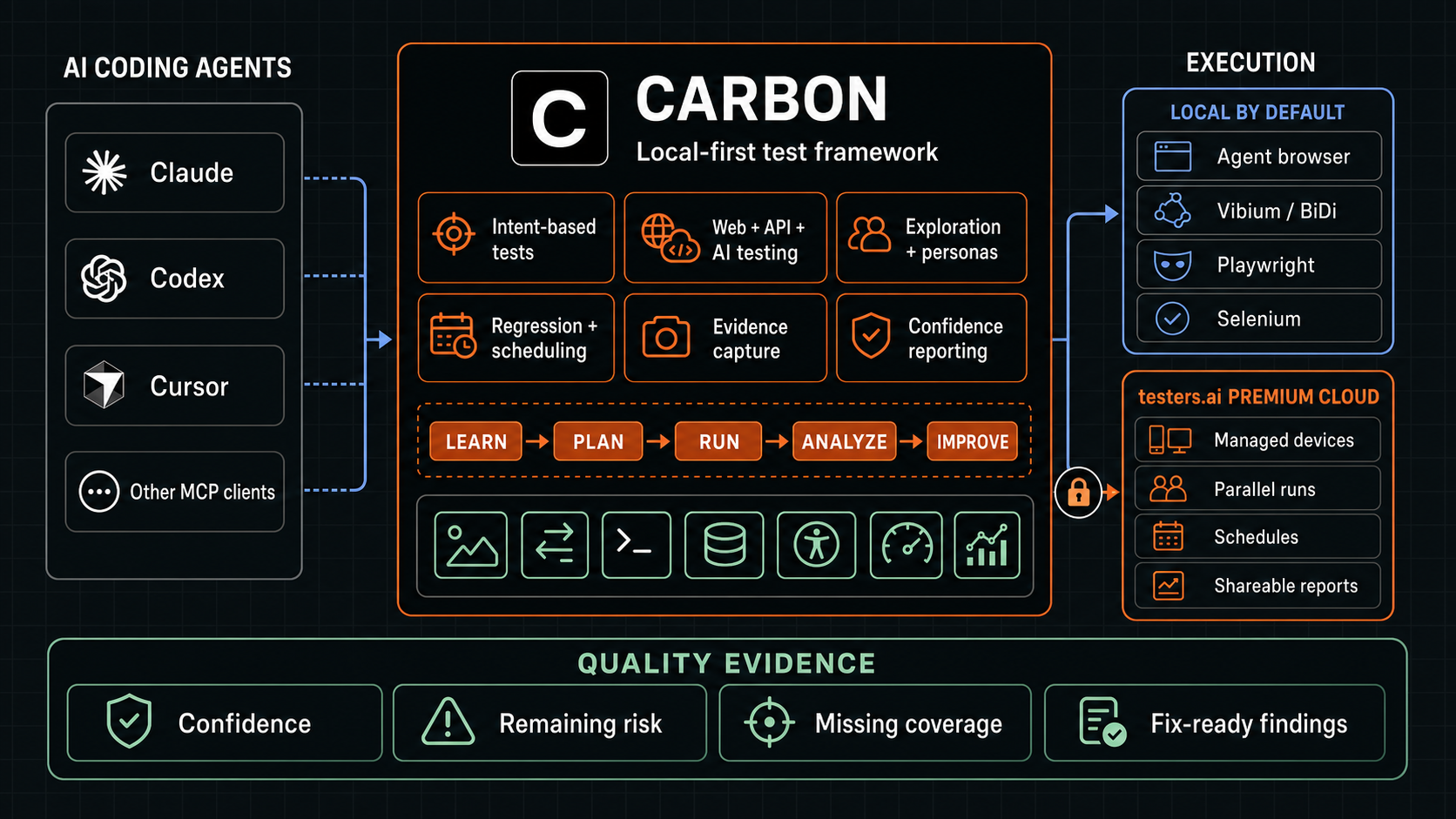
One runtime across coding agents and execution adapters.
Claude, Codex, Cursor, and other MCP clients route test intent into the same CARBON runtime. CARBON keeps local execution as the default and separates optional testers.ai Premium Cloud capabilities behind an explicit path.
Follow the diagram from coding-agent intent, through CARBON's learning and execution loop, to evidence-qualified reporting. Swipe on smaller screens.Open full size
Before execution
See what CARBON will run—and how long it should take.
For an executable local run, CARBON first prepares the test plan and opens a protected link on your computer. The page shows the target, selected breadth or depth, exact tests, priorities, adapters, approval gates, stop conditions, and the initial estimated duration before execution begins.
Before the run
Review the test count, scope, test-level estimates, exclusions, and safety gates. A plan is still a plan: every test remains planned until CARBON records an observed result.
While it runs
Keep the same link open. It attaches to the matching durable run automatically and refreshes every second. Status, percent complete, elapsed time, and remaining time update as test evidence arrives.
Adaptive estimate: the first estimate is the sum of the plan's per-test estimates. Once tests complete, CARBON uses observed durations to revise the remaining-time estimate. Stored passwords, custom execution prompts, and private context are never displayed.
CARBON Browser v1
CARBON owns the semantics. Adapters operate the browser.
carbon-browser/v1 is the stable boundary between CARBON test intent and browser execution. CARBON now includes an executable bridge to the official Vibium CLI and existing Vibium tests. Other host-agent, Playwright/CDP, Selenium/WebDriver, and managed-device integrations use the same capability contract when their execution bridges are available.
Negotiate first
Each adapter declares its operations and evidence channels. CARBON compares those capabilities with the planned run before dispatch. A missing operation, screenshot, network log, trace, or video remains a visible gap; CARBON selects another adapter or explicitly re-plans a smaller run.
Record every result
Every operation returns actual behavior, before/after state, timestamps, adapter identity and version, evidence handles, and unavailable channels. CARBON stores redacted envelopes under .carbon/browser/sessions/ and applies the same E0–E3 truth model used by the rest of the framework.
Safety boundary: the contract classifies actions but never authorizes destructive, paid, public, privileged, privacy-sensitive, or consequential third-party work. The applicable scoped approval is still required.
Executable compatibility
Run native Vibium tests, then use CARBON's higher-level APIs.
CARBON calls the official installed vibium binary and preserves native arguments. It can also run existing JavaScript or Python Vibium tests, or any explicit no-shell project runner. Every invocation records its exit status, redacted output, adapter version, artifact handles, and unavailable evidence channels in a CARBON Browser session.
The carbon_vibium MCP API supports api, doctor, manifest, exec, run-test, and generate. A missing binary is not installed unless the caller explicitly allows the npx fallback.
Additive framework
CARBON adds prompt and project-aware generation, intent CRUD and legacy imports, exploratory and persona testing, API and AI-feature tests, evidence analysis, regression promotion, quality confidence, remaining risk, and visual reports.
Hosts
One workflow, different command syntax.
Host
Main command
Example
Codex
$carbon-help
$carbon-help
Claude Code
/carbon-help
/carbon-help
ChatGPT or MCP prompt
/carbon_help
/carbon_help
Cursor or Antigravity
Natural language
Use CARBON Help to assess this project and recommend next steps
Specialized workflows follow the same mapping: /carbon_tests in ChatGPT or MCP, $carbon-tests in Codex, and /carbon-tests in Claude Code.
Core workflows
Product testing commands.
Workflow
Use it for
Durable result
carbon_help
Analyze the current project and change, then recommend the best CARBON workflow and next steps.
No project mutation; a read-only project-fit summary and prioritized starting plan.
carbon
Automatic product/change mapping, protected live pre-run plan, Plan, Test, Review, Focused, Learn, recording and playback.
A plan link and adaptive estimate before execution, then runs, learning, recordings, framework state and reports under .carbon/.
carbon_browser
Local live-page inspection, interaction, accessibility, persona feedback and exploration.
Observed page evidence, findings, screenshots and fix prompts.
carbon_generate
Generate from discovered controls, built-in flows, code contracts, recordings and custom flows.
Prioritized planned candidates with provenance and oracles.
carbon_tests
Create tests from prompts; open local CRUD UI; import TestRail, Xray, XML, XLSX, DOCX, code, and manual suites; run a full bake; repair converted test definitions; rerun.
Intent library plus attempts, repairs, evidence, activation decisions, and responsive reports under .carbon/tests/bake-runs/.
carbon_auto
Bounded test-fix-retest loops with explicit stop conditions.
Cycle state, evidence and proposed fixes; no mutation without approval.
/carbon-forever
Continuously learn, expand coverage and hunt bugs until stopped or an optional time/cycle/observable-token limit is reached. Two separate human confirmations before starting or resuming.
Protected live mission view with current investigation and rationale, active-runtime counter, coverage growth, findings, learning, Pause/Stop controls and durable HTML checkpoints. The coding agent must remain active; the viewer is not an AI daemon.
Assessment, converted intent, full local bake, bounded definition repair, and evidence-backed results.
carbon_settings
Configure a global local-test username/password, reusable prompt, context documents, or say mute all ads.
Protected settings UI; the password reaches only an approved child runner and never enters chat or reports.
carbon_human
Ask only the human questions that can materially change test priorities, confidence, readiness, or release interpretation.
Durable HUM-* decision context and answered assumptions under .carbon/human/.
Global local-test context. Open carbon_settings to configure one username/password, reusable execution prompt, and document set across CARBON projects. The password stays in Keychain or a locked file and reaches only an approved child runner; the coding agent sees only that it is configured.
AI systems
Confidence engineering workflows.
CARBON operationalizes uncertainty, oracles, judges, statistical design, AI systems, generated software, bias, security, operations, and specialized systems. Use these workflows for prompts, models, RAG, ranking, agents, multimodal features, and AI-generated changes.
Workflow
Purpose
carbon_confidence
Route a trust or ship question to planning, evaluation, review, release, or incident work.
carbon_confidence_init
Create the durable .confidence/ workspace.
carbon_confidence_plan
Map risks, falsifiable claims, populations, decision-changing evidence, monitoring and rollback.
carbon_eval
Design, implement, run and analyze sampled evaluations.
carbon_review
Independently challenge code, behavior, assumptions, interactions and evidence.
carbon_release
Decide SHIP, CANARY, HOLD, ROLL BACK or MORE EVIDENCE.
carbon_incident
Contain an AI incident, preserve traces and promote production failures into regressions.
carbon_eval_design_review
Review populations, cases, repetitions, oracles, dependence and blockers.
carbon_release_review
Independently synthesize code, evals, severe failures, production signals and reversibility.
carbon_security_review
Review prompt injection, untrusted channels, leakage, tenant boundaries, tool permissions and side effects.
carbon_skeptical_review
Find weak evidence, misleading averages, hidden severe failures and confidence theater.
CARBON can inspect source, execute authorized checks, and qualify the evidence it captures. It cannot silently decide business intent, risk appetite, taste, accountability, or whether a technically correct experience solves a customer’s real problem. Near the end of a broad run, CARBON can therefore add an optional Human step. It does not block technical confidence; it makes the missing human context visible.
Ask less, but ask better
CARBON generates a short, project-specific set of questions only when an answer could change an oracle, test priority, safety boundary, or release decision. It avoids generic checklists and questions already answered by the code, requirements, or captured evidence.
Answer in a smart local workspace
Questions remain open until answered. CARBON opens a protected workspace beside chat with quick options, room for nuance, and comments on every question or the overall decision. Every save remains local and refreshes the branded report snapshot.
What it may ask
Which customer outcome matters, and is this a demo, staging milestone, or production release?
What failure is unacceptable, who absorbs the harm, and what recovery is actually available?
Which domain rule, customer workflow, or credibility expectation would be obvious to an expert but invisible in the repository?
What should an AI agent never decide or do without a named human owner?
$carbon-human
$carbon-human answer HUM-003: Production launch; incorrect billing totals must hold release.

Decision context: .carbon/human/decision-context.json
Fast, but not simplistic: each option is a decision starter, never an inferred approval. Choose it, add context where needed, or write a different answer. Comments remain durable context for CARBON’s next confidence, risk, readiness, persona, and test-selection pass.
Confidence semantics: CARBON still provides an evidence-qualified technical confidence assessment when human input is pending. The report explicitly says what human judgment remains open and how an answer could change the recommendation.
CARBON Issues
Hunt bugs with AI-code weaknesses first.
/carbon-issues (Codex: $carbon-issues) checks accessibility, lifecycle/privacy, async ordering, business-state transitions and operations first, then follows other reachable risks. Twenty priority probes cover unnamed dialogs, logout drafts, stale search responses, cross-tab settings, expired inventory holds, pending payments, premature receipts, outages, history ordering, backup validation and dependency health.
Source analysis plus deliberate isolated interactions produce a live plan and a CARBON Issues report. Reproduced bugs, source-proven defects, suspicions and untested gaps stay separate. No automatic fixes, real payments or destructive production tests.
/carbon-issues checkout pending payment and stock-hold expiry
/carbon-issues search races and logout privacy
CARBON Feedback Loop · included plugin feature
Put a human perspective directly back into the build.
$carbon-feedback creates a scoped feedback request around a URL, image, document, API, code surface, or any other artifact. It opens a polished local workspace beside the coding agent so a developer can quickly score, categorize, explain, and annotate what they see. The resulting feedback is durable local context for CARBON’s next plan, confidence interpretation, or focused test pass.
Local by default
The default loop stays under .carbon/feedback/requests.json. It does not upload browser state, source, raw agent context, credentials, or feedback to a public CARBON service. Returned feedback is qualitative evidence, not a synthetic technical pass.
Your reviewers. Your infrastructure.
Remote/ReviewLoop functionality is built into CARBON: reviewer profiles and teams, queues, document-comment channels, context-drift checks, owner-approved fixes, retests, expiry and revocation. Deploy the CARBON-branded container privately or on your own public HTTPS host. Public visibility is a separate opt-in for synthetic reviews; hosting on the internet does not make private feedback public.
$carbon-feedback review this checkout page for first-time-customer trust and clarity
$carbon-feedback ask Priya to review this staging URL for whether the primary value is clear
Rich email, not fragile email forms: the optional private service can send a branded HTML invitation with a protected link to its reviewer workspace. Modern email clients strip interactive forms and scripts, so the response form intentionally opens in the private web page.
Execution
Modes and run sizes.
Mode
What CARBON does
Plan
Creates a prioritized suite and execution plan without claiming runtime evidence.
Test
Exercises an authorized reachable target and records observed results.
Review
Inspects source, screenshots, specifications or diffs and labels executable hypotheses.
Focused
Loads only the named behavior, matching flow, evidenced controls and shared oracles.
Learn
Discovers unfamiliar behavior and keeps hypotheses separate from supported candidates.
Quick, Medium and Large
Quick: smallest decision-relevant set; CARBON chooses breadth or depth from risk and normally uses two user perspectives.
Medium: balanced coverage with four perspectives and adjacent regression checks.
Large: expands the authorized surface, repetitions and six perspectives while retaining explicit cut lines.
Coverage map
See the complete test surface.
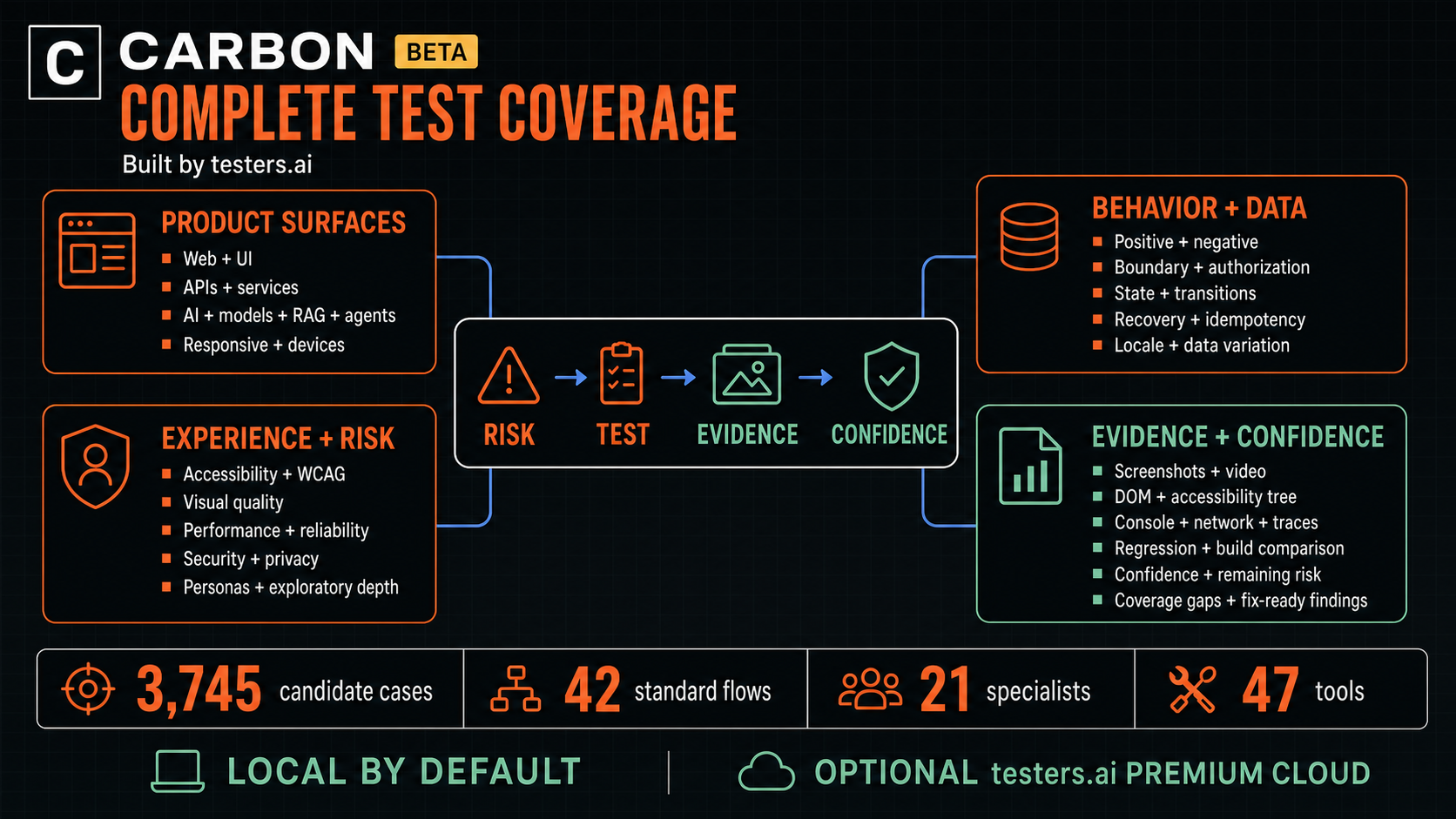
CARBON combines functional, data, experience, security, performance, exploratory, AI-system, and evidence coverage. The map below shows how those checks connect to confidence, remaining risk, coverage gaps, and fix-ready findings.
CARBON includes 3,745 reusable candidate tests for common components and 42 standard product flows. They stay planned—not passed—until CARBON executes them and captures an actual result. Swipe on smaller screens.Open full size
Truth model
Evidence levels prevent false confidence.
Level
Meaning
Allowed claim
E3
Observed live behavior with reproducible steps and captured actual result.
Executed pass or failure within the recorded scope.
E2
Source, request or log evidence corroborated by rendered state.
Corroborated finding, not full end-to-end proof.
E1
Inspected source, screenshot or specification.
Finding or candidate test.
E0
Unknown or unavailable.
Planned, blocked or residual uncertainty.
What every result report says
CARBON reports confidence in quality for the selected, executed scope; remaining risk; conclusive and evidence-backed coverage; coverage missing; and the next evidence that would change confidence. Planned, blocked, skipped, canceled, unsupported and excluded checks remain visible instead of being blended into a reassuring score.
Interpretation: confidence is an evidence-qualified engineering judgment about the tested scope. It is not a probability that the product is correct or defect-free.
Regression lifecycle: a generated case progresses from candidate to observed to repeatable and only then to an explicitly promoted regression.
Surfaces
Web, API and cross-surface testing.
Every tested page
CARBON records the richest safely available bundle: screenshot, URL/title/viewport, DOM and accessibility state, console and page errors, bounded redacted network traffic, performance, synthetic data, storage-safe metadata, traces, recordings and video. Unavailable channels remain explicit gaps.
First-class API coverage
CARBON can learn from OpenAPI documents and authorized redacted traffic, then generate positive, negative, boundary, wrong-type, auth, tenant, idempotency, retry and resilience cases. It maps API failures back to the UI flows that depend on them.
$carbon map the OpenAPI schema and test the changed checkout endpoints
$carbon-browser test checkout and connect network failures to visible UI states
Continuous confidence
Incremental and scheduled testing.
The framework maps recent code changes to affected components, APIs, flows and adjacent regressions. It can prepare Quick, Medium or Large execution based on assessed risk, install a GitHub Actions workflow after approval, and maintain build history.
Pull request: narrow, change-focused validation.
Manual: explicit user-selected scope and size.
Nightly: broader regression and learning coverage.
carbon_auto: bounded local test-fix-retest loop with approval before mutation.
Scheduled execution requires an explicitly configured supported host scheduler. Installing CARBON does not schedule runs.
Project state
Durable local artifacts.
.carbon/
├── framework/     product model, coverage, regression suite, build history
├── runs/          plans, results, events, findings, evidence and reports
├── learning/      unfamiliar-surface observations and candidates
├── recordings/    redacted browser steps, assertions and playback outcomes
├── tests/         prompt-defined and converted AI-intent tests
│   └── bake-runs/ attempts, repairs, evidence and responsive import reports
├── auto/          bounded loop state and stop reasons
├── map/           persistent map identities, observations and human steering
├── confidence-loop/ adaptive investigation and assessment state
├── human/         durable human questions and answers
└── reports/       linked HTML results and snapshots

.confidence/
├── risks/         material risks and affected populations
├── claims/        falsifiable behavioral claims
├── evals/         evaluation definitions and results
├── traces/        prompt, model, retrieval, tool and decision evidence
└── releases/      scoped ship/canary/hold/rollback decisions
External services
Local by default. Sharing by choice.
The default public CARBON command surface runs locally. The current command catalog is authoritative; do not assume older testers_* cloud commands are installed.
Configure supported test-management integrations, approved AI providers, or the self-hosted CARBON Feedback Loop explicitly. External work, reviewer invitations, private artifacts and paid execution require their own authorization. Never put credentials in chat.
No destructive, paid, public, privacy-invasive, privilege, payment or notification action without explicit scope and approval.
No credentials in chat. Test passwords and premium keys are stored through the protected settings UI.
Global prompts and context documents apply across local projects; context files stay local.
No silent switch from local execution to premium cloud.
Anonymous analytics contain only allowlisted major-action names and one first-activation event—never prompts, URLs, credentials, paths, test data, screenshots, logs, or report contents. Disable them in carbon_settings or set CARBON_ANALYTICS=off before startup.
No generated case, persona opinion or screenshot guess reported as an executed pass.
Code fixes are proposed first; mutation requires scoped approval.
Regression promotion and release decisions remain human-controlled.
Need fewer commercial surfaces? Say mute all ads or use carbon_settings. CARBON suppresses optional promotions and removes testers-prefixed tools and prompts from dynamic discovery. Say unmute ads to restore them.