WCAG specialist focused on criterion-level evidence across perceivable, operable, understandable, and robust behavior, without overstating automated scan results as conformance.
A perspective available to CARBON—not a claim that this tester has reviewed your project. Findings require execution evidence.
Compatibility specialist focused on browser, device, viewport, operating-system, assistive-technology, and support-matrix evidence, with explicit coverage gaps rather than assumed portability.
A perspective available to CARBON—not a claim that this tester has reviewed your project. Findings require execution evidence.
Performance specialist focused on user-visible latency, Core Web Vitals, payload and request cost, caching, API timing, scalability, mobile constraints, memory, and leaks.
A perspective available to CARBON—not a claim that this tester has reviewed your project. Findings require execution evidence.
Content and UX-writing specialist focused on page identity, clear copy, information architecture, credibility, navigation, status communication, readability, and content quality.
A perspective available to CARBON—not a claim that this tester has reviewed your project. Findings require execution evidence.
Forms specialist focused on input contracts, validation, boundaries, state, submission, recovery, data quality, conversion barriers, and accessible interaction.
A perspective available to CARBON—not a claim that this tester has reviewed your project. Findings require execution evidence.
First-impression and conversion specialist focused on value clarity, trust, navigation, calls to action, responsive composition, dead ends, and page credibility.
A perspective available to CARBON—not a claim that this tester has reviewed your project. Findings require execution evidence.
Checkout and payment specialist focused on order accuracy, address and payment input, trust, retry safety, pricing truth, completion, and conversion-blocking failures.
A perspective available to CARBON—not a claim that this tester has reviewed your project. Findings require execution evidence.
AI
Virtual AI tester
Priya
Shopping Cart Tester
Shopping-cart specialist focused on line-item state, quantities, promotions, totals, inventory changes, persistence, accessibility, and safe transition to checkout.
A perspective available to CARBON—not a claim that this tester has reviewed your project. Findings require execution evidence.
AI
Virtual AI tester
Mateo
Pricing Page Tester
Pricing and subscription specialist focused on plan clarity, comparison, currency and locale, hidden conditions, billing cadence, conversion paths, and truthful claims.
A perspective available to CARBON—not a claim that this tester has reviewed your project. Findings require execution evidence.
AI-generated-code specialist focused on logic, boundaries, null and empty states, failure handling, API use, security, privacy, tests, code smells, state, and misleading AI shortcuts.
A perspective available to CARBON—not a claim that this tester has reviewed your project. Findings require execution evidence.
An automated testing loop from a single command. CARBON understands your project, chooses high-value tests, runs them, and reassesses confidence as the evidence comes in.
Runs inside your coding agent, locally by default. Scoped by your budget. Consequential actions need approval. No project yet? Start with /carbon-demo.
CARBONILLUSTRATIVE EXAMPLE
Coding-agent chat
/carbon
I’m mapping your change.Checkout, retries, stored state.
I’m testing the risky paths.12 checks planned. 10 run.
I found two failures.Evidence linked to each issue.
Here’s what to test next.Reassess. Prioritize. Continue.
CARBON report
68/ 100
Confidence judgment Evidence strength, not release probability.
8 passed2 failed2 not run
Still needs attention
Retry can lose the cart. A stale total survives reload.
Next useful check
Verify recovery across two tabs.
Illustrative chat trace and report—not measured results. Actual confidence depends on the available evidence and tested scope.
WHAT’S NEW
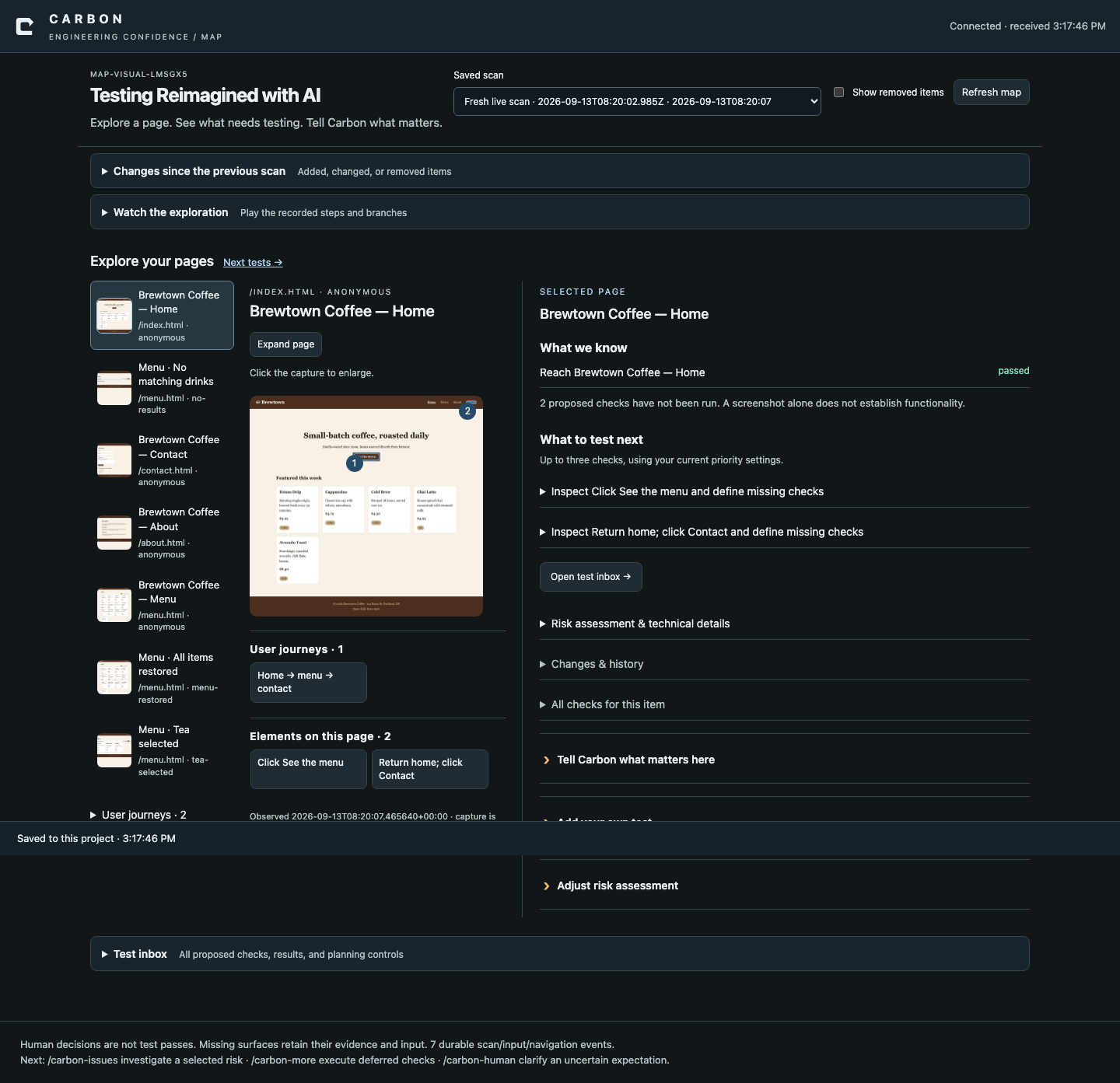
CARBON Map
An interactive way for AI QA experts to understand product risks and guide AI testing. Explore pages, journeys and elements; see the evidence, spot gaps, and steer the next investigation.
Explore what Map can do
Inspect one page at a time, with highlighted elements and recorded journeys.
Compare functional and business risks, then prioritize the next useful checks.
Add notes, priorities and custom tests that remain attached across builds.
Review added, changed, removed and restored surfaces without losing history.
/carbon-map opens the map for your project. Captures show what was observed—not proof that every behavior passed.
Steer cloud testing toward what matters: the user journeys, business risks and questions that deserve attention.
Cloud steering & deployment details
Define the target, scope, priorities and test depth before a run.
Agree budgets, concurrency and stop conditions for approved remote work.
Review findings and feed expert context into the next investigation.
First, steer the plan.
Choose features, checks, personas and test cases. Add the context that makes the investigation useful.
Illustrative cloud steering UI · click to enlarge
Then, inspect the evidence.
Review the findings and use the report to guide your next pass.
Illustrative cloud report · sample values, not a measured CARBON run
Cloud execution is separately configured. Enterprise/private-cloud availability and capacity are agreed with the team; installing the local plugin does not provision cloud workers or upload your project.
Sharing artifacts, using external services and paid execution require explicit approval.
























 CARBONILLUSTRATIVE EXAMPLE
 Expand the captured example →