A-92%
Quality Score
2
Pages
17
Issues
8.2
Avg Confidence
8.2
Avg Priority
9 Critical7 High1 Medium

>_ Testers.AI
AI Analysis
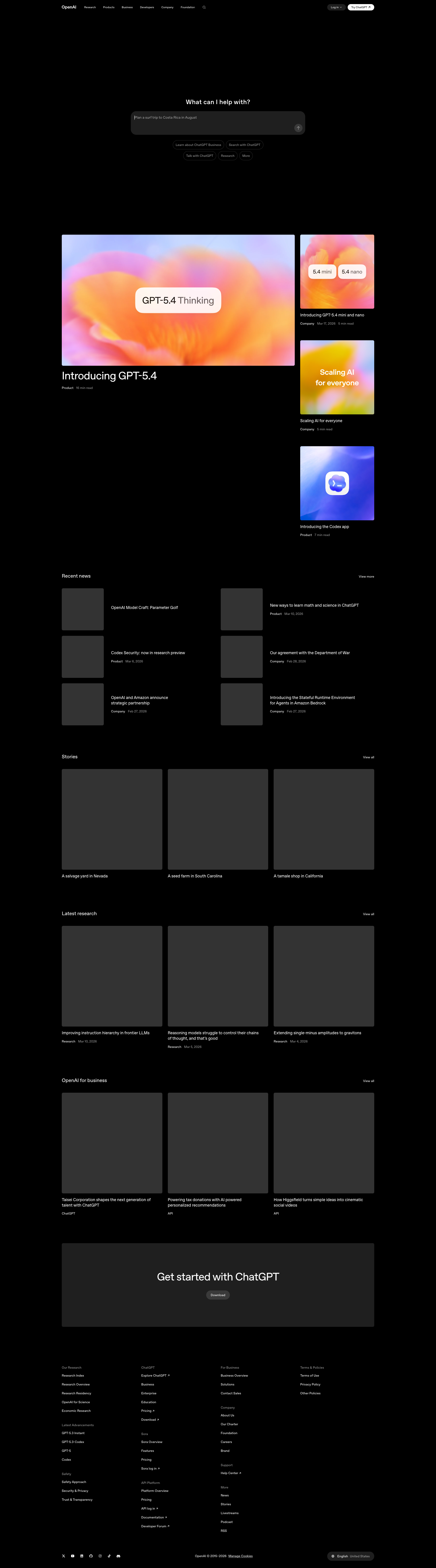
OpenAI was tested and 17 issues were detected across the site. The most critical finding was: Images/media failing to load; page shows gray placeholders across content. Issues span A11y, Performance, Other, UX categories. Persona feedback rated Visual highest (7/10) and Accessibility lowest (5/10).
Qualitative Quality
OpenAI
Category Avg
Best in Category
Pages Tested · 2 screenshots

Homepage
openai.com
Detected Issues · 17 total
1
Images/media failing to load; page shows gray placeholders across content
CRIT P9
Prompt to Fix
The page displays gray placeholder blocks where all image assets should appear (hero images and thumbnails). Fix by ensuring all image URLs resolve correctly (correct domain/DNS), serve valid image files (check file paths and permissions), and provide robust fallbacks (skeletons with descriptive alt text) until images load. Update CSS to properly size placeholders and ensure accessibility with alt text.
Why it's a bug
Critical content sections rely on rich media (thumbnails, hero images, and cards). With images not loading, users cannot preview or understand key sections (e.g., product cards like 'Introducing GPT-4/5'), making the page feel broken and unusable at a glance.
Why it might not be a bug
If the assets are intentionally placeholder or behind an external resource block, it would still degrade UX; given the screenshot shows numerous gray blocks, this appears to be a real loading issue rather than a deliberate design choice.
Suggested Fix
Audit all image/resource URLs referenced on the page, ensure assets are hosted correctly and reachable, implement robust fallbacks (textual placeholders or skeletons) with alt text, and consider lazy-loading with reliable placeholders until images load. Verify CDN and DNS resolution for asset domains. Provide accessible alt attributes for all images.
Why Fix
Restores the ability to view content, preserves trust, and enables users to complete browsing tasks without guessing whether content is missing due to a load error.
Route To
Frontend/Full-Stack Engineer
Page
Tester
 Mia · Usability Tester
Technical Evidence
Elements:
img elements with broken src attributes; skeleton cards; grid layout blocksConsole:
Failed to load resource: net::ERR_NAME_NOT_RESOLVED (for multiple image assets); 403 errors for some resources.Network:
DNS resolution failures for image URLs; some assets returning 403Page Text:
The page shows sections with image thumbnails and hero visuals, but all images are replaced by gray placeholders.2
Informative image(s) have empty alt text
CRIT P9
Prompt to Fix
Prompt for AI helper: In the HTML template, locate all img elements and ensure that every informative image has a non-empty alt attribute describing its content. For images that are decorative, set alt="" and consider adding role="presentation" if appropriate. Update the content management system to auto-populate meaningful alt text for all images. Validate WCAG 2.1.1 conformance and test with a screen reader to verify that image content is announced.
Why it's a bug
Some informative images on the page have an empty alt attribute (alt=""), which prevents screen reader users from understanding image content. This violates WCAG 2.1.1 Non-text Content (A) and can hinder comprehension for users relying on assistive technologies.
Why it might not be a bug
If an image is purely decorative, an empty alt is appropriate; however, the metadata indicates these images are informative (isDecorative: false), so empty alt is not justified.
Suggested Fix
Provide descriptive alt text for all informative images. If an image is decorative, set alt="" and consider role="presentation". Ensure the CMS or templates populate meaningful alt attributes for all images.
Why Fix
Descriptive alt text ensures that screen reader users can access information conveyed by images, improving accessibility and compliance with WCAG 2.1.1.
Route To
Frontend Developer / Accessibility Specialist
Page
Tester
 Alejandro · Accessibility Specialist
Technical Evidence
Console:
[ERROR] Failed to load resource: net::ERR_NAME_NOT_RESOLVED
[ERROR] Failed to load resource: net::ERR_NAME_NOT_RESOLVED
[ERROR] Failed to load resource: net::ERR_NAME_NOT_RESOLVED
[ERROR] Failed to load resource: net::ERR_NAME_NOT_RESOLVED
[ERROR] Failed to load resource: net::ERR_NAME_NOT_RESOLVED
[ERROR] Failed to load resource: net::ERR_NAME_NOT_RESOLVED
[ERROR] Failed to load resource: net::ERR_NAME_NOT_RESOLVED
[ERROR] Failed to load resource: net::ERR_NAME_NOT_RESOLVED
[ERROR] Failed to load resource: net::ERR_NAME_NOT_RESOLVED
[ERROR] Failed to load resource: net::ERR_NAME_NOT_RESOLVED
[ERROR] Failed to load resource: the server responded with a status of 403 ()
[ERROR] Failed to load resource: net::ERR_NAME_NOT_RESOLVED
[ERROR] Failed to load resource: net::ERR_NAME_NOT_RESOLVED
Network:
DNS resolution errors (net::ERR_NAME_NOT_RESOLVED) and 403 responses for several external assets.3
Mass DNS resolution failures prevent loading critical resources
CRIT P9
Prompt to Fix
In DevTools Network tab, identify all resources whose status shows ERR_NAME_NOT_RESOLVED. For each failing resource, capture the URL and host. Verify DNS records (A/AAAA/CNAME) for those hostnames and confirm they resolve from the deployment environment. If using CDNs, check their DNS health and reachability. Replace unreachable external URLs with reachable equivalents or host essential assets on the same domain or bundled assets. Add robust retry/backoff and a user-friendly fallback in the UI for non-critical assets. After applying fixes, run end-to-end tests to confirm all critical resources load and the page remains functional.
Why it's a bug
Multiple resources fail to load due to ERR_NAME_NOT_RESOLVED, likely preventing critical assets (scripts, styles, images, API calls) from loading. This can render the UI unusable or partially functional, directly impacting task completion and data loading.
Why it might not be a bug
If the environment is offline or intentionally sandboxed with restricted network egress, DNS failures could be expected. In production, however, widespread DNS resolution issues indicate infrastructure or configuration problems that must be fixed.
Suggested Fix
Audit every resource URL loaded by the page that references external hosts. Verify DNS A/AAAA/CNAME records for those hostnames, ensure domains resolve from the client network, and confirm CDN/third-party endpoints are healthy. Consider using relative URLs or bundling critical assets to reduce external dependencies. Implement fallback behavior or graceful degradation for essential assets if DNS resolution fails.
Why Fix
Fixing DNS resolution issues restores core functionality and enables users to load and interact with the page as intended, preventing broken UI and interrupted tasks.
Route To
Platform Engineer
Page
Tester
 Sharon · Security Tester
Technical Evidence
Console:
[ERROR] Failed to load resource: net::ERR_NAME_NOT_RESOLVEDNetwork:
DNS resolution failures (net::ERR_NAME_NOT_RESOLVED) affecting multiple resource URLs