B84%
Quality Score
7
Pages
77
Issues
7.7
Avg Confidence
7.6
Avg Priority
23 Critical38 High15 Medium1 Low

>_ Testers.AI
AI Analysis
Google DeepMind was tested and 77 issues were detected across the site. The most critical finding was: Carousel controls are not clearly labelled and may be hard to discover. Issues span A11y, Performance, Other, UX categories. Persona feedback rated Visual highest (6/10) and Accessibility lowest (5/10).
Qualitative Quality
Google DeepMind
Category Avg
Best in Category
Pages Tested · 7 screenshots

Homepage
deepmind.google

deepmind.google

deepmind.google

deepmind.google
deepmind.google

deepmind.google
Detected Issues · 77 total
1
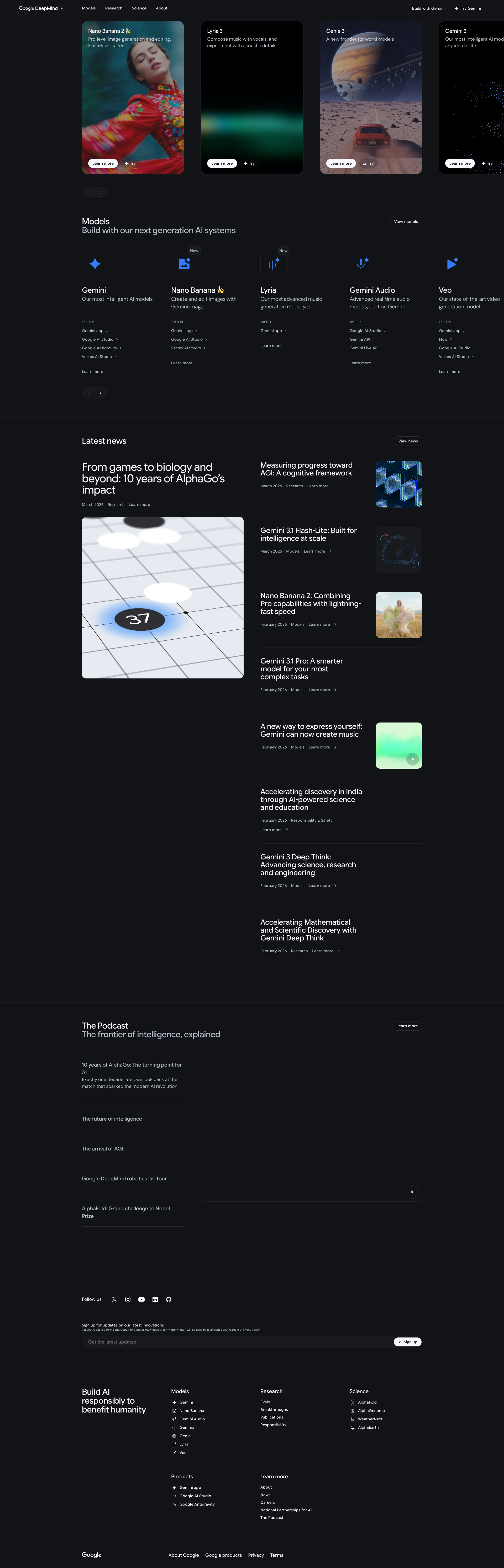
Carousel controls are not clearly labelled and may be hard to discover
CRIT P9
Prompt to Fix
The carousel navigation controls are icon-only and not clearly labeled. Add text labels 'Previous' and 'Next' to the controls, ensure they are accessible via keyboard, and provide explicit ARIA labels (e.g., aria-label='Previous card', aria-label='Next card').
Why it's a bug
The image carousel shows only icon-based navigation arrows with no visible text labels. Users relying on screen readers or keyboard navigation may not understand how to move between cards, risking frustration and missed content.
Why it might not be a bug
Icon-only controls are a common design pattern; some users may rely on visual cues alone. If accessibility labels are provided via ARIA, this may be acceptable.
Suggested Fix
Add visible, text-based labels on carousel controls (e.g., Previous, Next) and ensure each control has an accessible aria-label. Implement clear focus styles and ensure the controls are reachable via keyboard navigation.
Why Fix
Improves discoverability and accessibility for all users, reducing the chance of users overlooking additional models in the carousel.
Route To
Frontend Engineer / Accessibility Specialist
Page
Tester
 Mia · Usability Tester
Technical Evidence
Elements:
Carousel container, left/right arrow controls, card elements with 'Learn more' and 'Try' actionsConsole:
[warn] Failed to execute 'postMessage' on 'DOMWindow': The target origin provided ('https://www.youtube.com') does not match the recipient window's origin ('https://deepmind.google').Page Text:
Large card carousel with left/right navigation and multiple model cards.2
UI: Empty button labels in Page Content (placeholder/unfinished AI-generated UI)
CRIT P9
Prompt to Fix
Provide a patch that (1) removes all button entries with empty text, (2) ensures every button has a meaningful label (or aria-label if icon-only), (3) consolidates duplicate button definitions into a single source of truth, and (4) adds accessibility checks (aria-labels, visible focus states) before deployment.
Why it's a bug
AI-generated code appears to include placeholder buttons with empty text fields in the Page Content data, resulting in inaccessible labels and broken navigation for keyboard and screen reader users.
Why it might not be a bug
Some scaffolding or templating can include placeholders during development, but production should render with meaningful labels.
Suggested Fix
Populate all button text values from a data source or ensure safe defaults; remove duplicate/empty entries; ensure aria-labels are present for icons; validate with accessibility checks (WCAG) before release.
Why Fix
Empty button labels harm usability and accessibility, potentially breaking automated tests and user tasks.
Route To
Frontend/UX Engineer
Page
Tester
 Jason · GenAI Code Analyzer
Technical Evidence
Console:
Page Content: {"buttons":[{"text":"Models","tagName":"BUTTON","type":"button","id":"","className":"main-menu__label-tablet flyout__accordion__toggle text-call-to-action"},{"text":"Research","tagName":"BUTTON","type":"button","id":"","className":"main-menu__label-tablet flyout__accordion__toggle text-call-to-action"},{"text":"Science","tagName":"BUTTON","type":"button","id":"","className":"main-menu__label-tablet flyout__accordion__toggle text-call-to-action"},{"text":"About","tagName":"BUTTON","type":"button","id":"","className":"main-menu__label-tablet flyout__accordion__toggle text-call-to-action"},{"text":"","tagName":"BUTTON","type":"submit","id":"","className":"button open button--background-blur icon-center icon-center--wide"}]}3
Low text readability due to insufficient contrast and small font on dark background
CRIT P9
Prompt to Fix
Increase the body text color to ensure a minimum contrast ratio of 4.5:1 against the background. For example, switch body text from #A0A0A0 on #1A1A1A to #EDEDED on #1A1A1A, and ensure headings use a higher-contrast color (e.g., #FFFFFF) with bold weight. Update CSS variables for theme tokens to maintain consistency across sections.
Why it's a bug
Body text and section titles appear light gray on a near-black background, reducing legibility and increasing cognitive load. This hinders users from quickly scanning content and can exclude users with visual impairments.
Why it might not be a bug
The design may aim for a moody aesthetic with subtle text, but readability remains a core usability requirement for content-heavy pages.
Suggested Fix
Increase foreground text contrast to WCAG AA levels (at least 4.5:1 for body text). Consider using a darker background shade or a lighter text color for body content; ensure all headings have stronger contrast and maintain a consistent color token across the site.
Why Fix
Improved readability directly enables faster task completion and reduces user frustration, especially for long-form content.
Route To
Frontend Developer / UI Designer
Page
Tester
Mia · Usability TesterTechnical Evidence
Elements:
Body text, headings, navigation labelsPage Text:
Body text and section titles are light gray on a dark background, reducing legibility.