User Feedback Summary
Overall score: 7.5/10
Quality Issues (32)
Resource loading failures affecting page functionality
Why It's a Bug
Console errors show 'Failed to load resource: the server responded with a status of 403' and 'Failed to load resource: net::ERR_FAILED'. These indicate critical assets are not loading properly, which could break key functionality like images, stylesheets, or scripts that users depend on to interact with the page or view product information.
Suggested Fix
Investigate and resolve the resource loading failures by: 1) Checking server permissions and CORS configuration for the 403 error, 2) Verifying network connectivity and CDN availability for the ERR_FAILED error, 3) Identifying which critical resources are failing to load and ensuring they're properly served.
Fix Prompt
Route To
Backend/DevOps Engineer
Found On
Technical Evidence
Missing skip navigation link for keyboard users
Why It's a Bug
The page lacks a skip navigation link that allows keyboard users to bypass repetitive navigation elements and jump directly to main content. This is a WCAG 2.1 Level A requirement (2.4.1 Bypass Blocks). Keyboard users must navigate through all header and navigation elements before reaching main content, creating a significant barrier to efficient page access.
Suggested Fix
Add a skip navigation link as the first focusable element on the page, positioned off-screen by default using CSS (position: absolute; left: -9999px;) and visible on keyboard focus. Link should point to the main content area using anchor or ID reference. Example: Skip to main content with accompanying CSS for focus visibility.
Fix Prompt
Route To
Frontend Engineer / Accessibility Engineer
Found On
Technical Evidence
Critical: Excessive Render-Blocking JavaScript Resources Delaying Page Render
Why It's a Bug
The page loads 15+ render-blocking JavaScript files sequentially before page content becomes visible. Key offenders include: clientlibs-priority.js, multiple chunk files (250, 754, 745, 727, 949, 661), reactspa.js, Bootstrap.js, and feature app bundles. These are marked as 'POTENTIALLY RENDER-BLOCKING' in the network log and are loaded synchronously, blocking DOM parsing and delaying First Contentful Paint (FCP) and Largest Contentful Paint (LCP). This severely impacts Core Web Vitals and user experience.
Suggested Fix
1) Implement code-splitting to load only critical JS required for above-fold content. 2) Defer non-critical JavaScript bundles using async/defer attributes. 3) Move non-critical chunks (250, 754, 745, 949, 661) to load after initial page render. 4) Consider lazy-loading feature app bundles (model-recommendations.js, quicksearch.umd.js) only when needed. 5) Implement dynamic imports for route-based code splitting. 6) Minify and compress all JS bundles using gzip/brotli.
Fix Prompt
Route To
Frontend Performance Engineer / Build System Engineer
Found On
Technical Evidence
Critical: Missing Cache Headers on All Dynamically Generated Content and Assets
Why It's a Bug
Over 40 resources are marked with '⚠️ MISSING CACHE HEADERS' including: JavaScript bundles (clientlibs-priority.js, all chunk files, reactspa.js, Bootstrap.js, feature apps), CSS, fonts (vwtext-regular.woff2, vwtext-bold.woff2, vwhead-bold.woff2, vwhead-light.woff2, vwhead-regular.woff2), images (T-Roc, E-Foerderung, VW310_PA2, VW-R_KRK), configuration files (de.global-config.json, de.feature-apps.json), and tracking scripts. Without proper Cache-Control headers, browsers re-download these unchanged resources on every visit, wasting bandwidth and increasing load times.
Suggested Fix
1) Add Cache-Control headers with appropriate TTL: For versioned JS/CSS chunks use 'max-age=31536000, immutable' (1 year). 2) For fonts use 'max-age=31536000, immutable'. 3) For config files use 'max-age=300' (5 minutes). 4) Set ETag headers for dynamic content to enable 304 responses. 5) Implement browser cache invalidation through content hashing in filenames (already done for some files like .7035b468e771fdf8.js). 6) Configure CDN to respect and extend cache headers.
Fix Prompt
Route To
DevOps Engineer / CDN Configuration Engineer / Backend Engineer
Found On
Technical Evidence
Client Personalization Init Fails - Cannot Read localProfile Property
Why It's a Bug
Multiple ERROR logs show 'ClientPersonalizationInit: cannot get personalisation on initialisation. cause: Cannot read properties of undefined (reading 'localProfile')'. This is a classic AI-generated code pattern - accessing a property on an undefined object without checking if the object exists first. The code is trying to read .localProfile without verifying the parent object exists.
Suggested Fix
Add null/undefined checks: const localProfile = personalization?.localProfile or if (personalization && personalization.localProfile) before accessing. Use optional chaining (?) operator. Initialize personalization object with default properties before accessing nested fields.
Fix Prompt
Route To
Frontend/Full-Stack Engineer
Found On
Technical Evidence
Multiple resources failing to load with 403 Forbidden and network errors
Why It's a Bug
Console logs show 'ERROR: Failed to load resource: the server responded with a status of 403' and 'net::ERR_FAILED' errors. These indicate that critical resources (potentially images, stylesheets, or scripts) are failing to load. When images fail to load, alt text becomes the only content available to all users. When stylesheets fail, color contrast and visual hierarchy may degrade. This creates barriers for users with low vision relying on proper contrast and visual structure.
Suggested Fix
Investigate and fix the server-side resource requests returning 403 errors. Implement proper error handling with fallback resources, default styling, and placeholder images with descriptive alt text. Ensure critical resources are served correctly and non-critical resources degrade gracefully without breaking accessibility.
Fix Prompt
Route To
Backend Engineer / DevOps Engineer
Found On
Technical Evidence
High: Excessive Number of Network Requests (125+ requests) Causing Cumulative Load Time Issues
Why It's a Bug
Page makes 125+ network requests total, with many redundant or duplicately timed requests. Notable patterns: 1) Multiple requests to same tracking/analytics endpoints (smetric.volkswagen.com called twice). 2) Three identical privacy requests to vw-tam.lighthouselabs.eu with different packet numbers (n=0, n=1, n=2, n=3) suggesting sequential dependency. 3) Error requests being retried (ClientPersonalizationInit error sent twice). 4) Multiple requests to feature-app services. 5) Numerous image assets that could be combined or optimized. Each additional request adds overhead (DNS lookup, TCP handshake, TLS negotiation), especially on slower connections and mobile devices.
Suggested Fix
1) Implement request batching for analytics/tracking calls (combine multiple smetric calls into single request). 2) Consolidate privacy API calls by fixing the underlying data dependency that causes sequential calls. 3) Implement retry logic instead of immediate repeat requests for failed personalization. 4) Bundle small resources (icons, images) using CSS sprites or inline SVG. 5) Combine multiple feature app requests into single endpoint or load on-demand. 6) Implement resource bundling for CSS/JS. 7) Remove third-party tracking duplicates. 8) Use HTTP/2 multiplexing to reduce overhead.
Fix Prompt
Route To
Frontend Performance Engineer / Network Optimization Specialist
Found On
Technical Evidence
High: Multiple Third-Party Render-Blocking Scripts Impacting Page Load Performance
Why It's a Bug
Multiple third-party scripts are loaded synchronously and block page rendering: 1) Adobe RUM script (.rum/@adobe/helix-rum-js) marked POTENTIALLY RENDER-BLOCKING and MISSING CACHE HEADERS. 2) vw-tam.lighthouselabs.eu/vwd6/de_one/Bootstrap.js marked POTENTIALLY RENDER-BLOCKING and MISSING CACHE HEADERS. 3) euob.roundprincethere.com/sxp/i/3a371641...js marked POTENTIALLY RENDER-BLOCKING and MISSING CACHE HEADERS. 4) feature-services.vwonehub.io/client-bundle-v0.123.0.js marked POTENTIALLY RENDER-BLOCKING and MISSING CACHE HEADERS. 5) cdn.smart-digital-solutions.com/fsignals/lib/production/fsignals.js. These third-party scripts prevent initial page render and cannot be optimized by the site team directly, yet they critically impact LCP and FID metrics.
Suggested Fix
1) Load all third-party scripts asynchronously using async attribute or defer attribute. 2) Implement async execution for Adobe RUM, Bootstrap.js, euob script, and fsignals. 3) For critical third-party services, use web workers or separate thread execution. 4) Lazy-load non-critical third-party scripts after page interactive (after LCP). 5) Implement timeout logic for third-party scripts that fail to load. 6) Use dynamic imports or script sandboxing for feature app bundles. 7) Add preconnect hints for third-party domains (vw-tam.lighthouselabs.eu, roundprincethere.com, vwonehub.io). 8) Implement Content Security Policy to prevent render-blocking.
Fix Prompt
Route To
Frontend Performance Engineer / Third-Party Integration Manager
Found On
Technical Evidence
Error parsing configuration for country site with no fallback or error messaging
Why It's a Bug
Console shows '[ERROR] cannot parse config for %s REACH-CountrySite-CA' indicating a configuration parsing failure. This error has no visible error message on the page. If this error affects page functionality (such as country/region selection, language preferences, or localized content), users would not be aware of the issue or unable to recover. This creates an understandable and robust barrier where users don't know what went wrong or what to do next.
Suggested Fix
Implement visible error handling with user-facing messages when configuration parsing fails. Add try-catch blocks with clear fallback behavior. If country/locale selection is critical, display a message like 'Unable to load location settings. Please refresh or select your country manually.' Ensure error messages are announced to screen readers using ARIA live regions.
Fix Prompt
Route To
Frontend Engineer / Full Stack Engineer
Found On
Technical Evidence
Failed to load resource with 403 Forbidden error
Why It's a Bug
A 403 Forbidden error indicates the server is rejecting the request, which blocks critical functionality. This prevents users from accessing necessary resources and will likely break features that depend on this resource.
Suggested Fix
Investigate which resource is returning 403, verify authentication/authorization tokens are valid, check server-side access control rules, and ensure the requesting user has proper permissions.
Fix Prompt
Route To
Backend Engineer / DevOps
Found On
Technical Evidence
Network error: ERR_FAILED - Resource load failure
Why It's a Bug
net::ERR_FAILED is a generic network error that prevents resource loading. This indicates a network connectivity issue, DNS failure, or server problem that blocks critical functionality and degrades user experience.
Suggested Fix
Check network connectivity, verify DNS resolution, inspect server logs for errors, test the resource endpoint independently, and implement retry logic with exponential backoff for failed requests.
Fix Prompt
Route To
Backend Engineer / DevOps / Network Engineer
Found On
Technical Evidence
Console Error: Error with Feature-Policy header: Unrecognized feature: 'doc...
Why It's a Bug
Console error detected: Error with Feature-Policy header: Unrecognized feature: 'document-domain'.. This indicates a problem that needs to be fixed.
Suggested Fix
Investigate and fix the root cause of this error: Error with Feature-Policy header: Unrecognized feature: 'document-domain'.
Fix Prompt
Route To
Frontend Engineer
Found On
Technical Evidence
Console Error: Error with Feature-Policy header: Unrecognized feature: 'vr'...
Why It's a Bug
Console error detected: Error with Feature-Policy header: Unrecognized feature: 'vr'.. This indicates a problem that needs to be fixed.
Suggested Fix
Investigate and fix the root cause of this error: Error with Feature-Policy header: Unrecognized feature: 'vr'.
Fix Prompt
Route To
Frontend Engineer
Found On
Technical Evidence
Console Error: JSHandle@error
Why It's a Bug
Console error detected: JSHandle@error. This indicates a problem that needs to be fixed.
Suggested Fix
Investigate and fix the root cause of this error: JSHandle@error
Fix Prompt
Route To
Frontend Engineer
Found On
Technical Evidence
Console Error: JSHandle@error
Why It's a Bug
Console error detected: JSHandle@error. This indicates a problem that needs to be fixed.
Suggested Fix
Investigate and fix the root cause of this error: JSHandle@error
Fix Prompt
Route To
Frontend Engineer
Found On
Technical Evidence
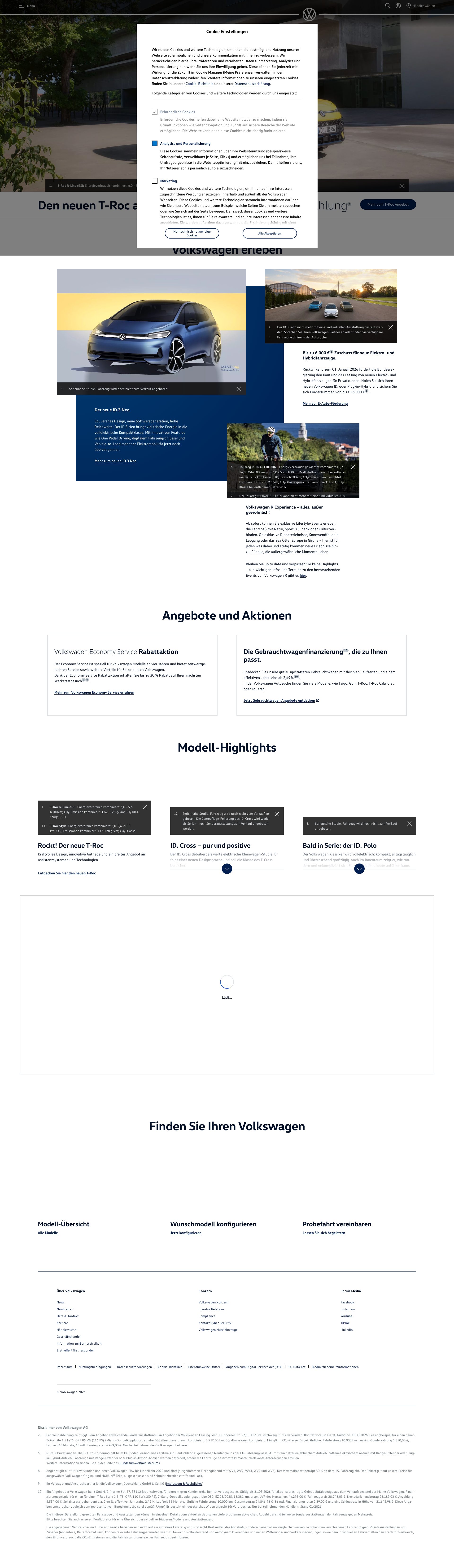
Multiple images failing to load - placeholder GIFs instead of actual product imagery
Why It's a Bug
The page content shows multiple images using data:image/gif;base64,R0lGODlhAQABAAAAACH5BAEKAAEA which is a 1x1 transparent pixel placeholder GIF. This appears in at least 5 product showcase images including the Touareg, ID.Cross, ID.Polo interior, and model overview. These are critical hero/showcase images that should display actual vehicle photography to communicate brand value and product quality. Instead, users see no visual content.
Suggested Fix
Investigate and fix the image loading pipeline. Verify that all product images from assets.volkswagen.com are properly configured with correct URLs, dimensions, and loading strategies. Replace placeholder GIFs with actual product photography or implement proper lazy-loading with visible fallbacks.
Fix Prompt
Route To
Frontend Engineer / Image Asset Manager
Found On
Technical Evidence
Critical Config Parse Failure - Missing Data Definition for Country
Why It's a Bug
Console shows ERROR 'cannot parse config for %s REACH-CountrySite-CA' and error logs indicate 'Error resolving data definition: Manage.environment.country. Does not exist on the page.' This indicates incomplete conditional logic or missing fallback handling for a data definition that should exist. AI-generated code likely missing checks for optional/missing config keys before accessing nested properties.
Suggested Fix
Add defensive checks before accessing config properties: if (!config || !config.country) { /* set default or skip initialization */}. Implement fallback values for missing data definitions. Add try-catch around config parsing with meaningful error recovery.
Fix Prompt
Route To
Frontend/Full-Stack Engineer
Found On
Technical Evidence
Config parsing failure for REACH-CountrySite-CA
Why It's a Bug
A configuration parsing error for a specific feature (REACH-CountrySite-CA) indicates malformed config data or missing configuration. This likely breaks country-site-specific functionality and could affect user experience for Canadian users.
Suggested Fix
Validate the config format for REACH-CountrySite-CA, ensure the config file is properly formatted JSON/YAML, add schema validation, implement fallback default config, and add logging to show the actual config content causing the parse failure.
Fix Prompt
Route To
Backend Engineer / Configuration Management
Found On
Technical Evidence
Console errors with configuration parsing and Feature-Policy headers indicate potential functionality issues
Why It's a Bug
Multiple critical errors visible in console logs: '[ERROR] cannot parse config for %s REACH-CountrySite-CA', unrecognized Feature-Policy headers for 'document-domain' and 'vr', and JSHandle@error messages. These indicate potential failures in core site configuration and security policy setup. While not immediately visible to users, these errors suggest underlying functionality issues that could affect targeting, regional content delivery, or feature availability.
Suggested Fix
Review and resolve configuration parsing errors for REACH-CountrySite-CA. Update Feature-Policy headers to remove unrecognized features ('document-domain', 'vr') or replace with valid Permissions-Policy equivalents. Debug the JSHandle errors to determine root cause and implement proper error handling.
Fix Prompt
Route To
Backend Engineer / DevOps Engineer
Found On
Technical Evidence
Medium-High: Excessive Number of Uncompressed or Poorly Optimized Font Files Impacting Page Load and Layout Shift
Why It's a Bug
Five custom font files are loaded without proper caching headers and no indication of font-display strategy: 1) vwtext-regular.woff2, 2) vwtext-bold.woff2, 3) vwhead-bold.woff2, 4) vwhead-light.woff2, 5) vwhead-regular.woff2. All marked with '⚠️ MISSING CACHE HEADERS'. WOFF2 is good (compressed), but the sheer number of font variants (5 files) increases initial load. No evidence of font-display: swap or fallback fonts, suggesting potential Flash of Invisible Text (FOIT) causing layout shifts and impacting CLS metric. Font files are critical-path resources required for text rendering.
Suggested Fix
1) Add Cache-Control: max-age=31536000, immutable to all font files. 2) Implement font-display: swap in @font-face declarations to show fallback text immediately while fonts load. 3) Preload critical fonts (vwtext-regular.woff2, vwhead-regular.woff2) using . 4) Consider using variable fonts to reduce file count from 5 to 2-3 variants. 5) Use font-feature-settings to optimize spacing. 6) Implement font subsetting to remove unused characters. 7) Consider system font stack as fallback if custom fonts are slow to load.
Fix Prompt
Route To
Frontend Performance Engineer / CSS Specialist
Found On
Technical Evidence
Medium-High: Images Not Optimized with Proper Formats or Lazy Loading Strategy
Why It's a Bug
Multiple images loaded without clear optimization evidence: 1) STAGE_T-Roc image (1920x1080, webp format - good). 2) VW310_PA2_Serie-PresseSkizze_Front-cropped (1920x?, webp - good). 3) E-Foerderung_Startseite image (1920x?, webp - good). 4) VW-R_KRK_2025_AndiFrank (1473x?, webp - good). All images appear to be WebP format (good) and use query parameters for optimization (qlt=79, fit=crop). However: 1) No evidence of srcset/picture elements for responsive sizing. 2) No evidence of lazy loading (loading='lazy' attribute). 3) Large dimensions (1920px) served even on mobile devices. 4) No cache headers on images ('⚠️ MISSING CACHE HEADERS'). 5) Duplicate image requests visible (E-Foerderung_Startseite called twice). These images likely represent significant bandwidth, especially on mobile.
Suggested Fix
1) Add Cache-Control: max-age=31536000, immutable headers to all image assets. 2) Implement lazy loading using loading='lazy' attribute on img tags for below-fold images. 3) Create responsive images using srcset attribute with multiple resolutions (1920w, 1200w, 768w, 480w). 4) Use picture element with WebP primary format and JPEG fallback. 5) Remove duplicate image requests - consolidate duplicate URLs. 6) Implement image CDN with automatic format conversion and responsive sizing. 7) Use aspect-ratio CSS to prevent layout shift while images load.
Fix Prompt
 '. 4) Remove duplicate image requests (E-Foerderung called twice). 5) Add aspect-ratio CSS to prevent layout shift. 6) Consolidate image URLs to single canonical version. Measure image bandwidth reduction. Target: -30-50% image bandwidth, LCP improvement 200-500ms, lazy-loaded images reduce initial load time.
Route To
Frontend Performance Engineer / Image Optimization Specialist
Found On
Technical Evidence
Medium: Large and Numerous JavaScript Chunks Suggesting Poor Code Splitting Strategy
Why It's a Bug
Multiple chunk files loaded with hash-based naming (indicating versioning/caching): 250.765cd414eb728dc6.js, 754.9959ded34812627c.js, 745.52d403f7ca370d39.js, 727.b723ecdf1fca913e.js, 949.1182c68917436c24.js, 661.cb3cc426c9ffa2e7.js, plus reactspa.5ba968bb4da0c569.js. This pattern suggests either: 1) Webpack/bundler generated chunks (good for code-splitting), OR 2) Monolithic bundle split into multiple files inefficiently. With 6+ chunks loading render-blocking, the splitting strategy may not be optimal - either loading too many chunks upfront or not implementing proper lazy-loading/route-based splitting. All chunks marked MISSING CACHE HEADERS, meaning no browser caching despite version hashes.
Suggested Fix
1) Audit chunk sizes - identify if any chunks are oversized (>100KB) or could be combined. 2) Implement route-based code splitting so only chunks needed for initial route load. 3) Lazy-load secondary route chunks using React.lazy() or dynamic import(). 4) Add preload hints for chunks needed for anticipated user actions. 5) Implement async/defer loading for non-critical chunks (727, 949, 661, 250). 6) Add Cache-Control headers: 'max-age=31536000, immutable' for versioned chunks. 7) Consider micro-frontend architecture if chunks relate to different features.
Fix Prompt
Route To
Frontend Performance Engineer / Build System Engineer
Found On
Technical Evidence
Authentication Proxy Returns 403 Forbidden - No Fallback or Error Recovery
Why It's a Bug
Network log shows 'GET https://www.volkswagen.de/app/authproxy/vw-de/authenticated - Status: 403' which is a clear authentication/authorization failure. This is a critical API call that fails with no visible retry mechanism or fallback logic. AI-generated code often lacks proper error handling for API failures with status codes like 403.
Suggested Fix
Implement retry logic with exponential backoff for 403 errors. Add fallback UI that gracefully degrades when auth fails. Log the failure and show user-friendly error message. Implement specific handling for 403 vs other 4xx errors (403=auth failed, vs 404=endpoint not found).
Fix Prompt
Route To
Backend/API Engineer
Found On
Technical Evidence
Multiple Hardcoded Third-Party LLM/AI Endpoints with No Consent Mechanism
Why It's a Bug
Network analysis reveals multiple suspicious third-party domains making requests: 'euob.roundprincethere.com', 'obseu.roundprincethere.com', 'cdn.smart-digital-solutions.com', 'fsignals.plt-live.net'. These appear to be AI/tracking/analytics endpoints that load JavaScript and track user behavior. No visible consent mechanism in page content, and these load automatically on page init. Typical of AI-generated code that includes external services without proper privacy controls.
Suggested Fix
Implement explicit user consent before loading third-party AI/tracking domains. Add privacy disclosure explaining what data is collected and with whom it's shared. Defer loading these endpoints until after user gives consent. Audit all third-party endpoints and document their purpose clearly. Use transparent, readable domain names.
Fix Prompt
Route To
Privacy/Security Engineer
Found On
Technical Evidence
Medium: Redirect Chain (HTTP 301 Multiple Redirects) Wasting Network Roundtrips
Why It's a Bug
Network log shows redirect chain: 1) GET https://volkswagen.com/ - Status: 301 redirect. 2) GET https://www.volkswagen.com/ - Status: 301 redirect. 3) GET https://www.volkswagen.de/ - Status: 301 redirect. 4) GET https://www.volkswagen.de/de.html - Status: 200 success. This creates 3 unnecessary HTTP roundtrips before loading actual content. Each redirect requires full TCP/TLS handshake and DNS lookup, adding 100-300ms latency depending on connection speed. This is especially problematic on mobile with higher latency.
Suggested Fix
1) Configure web server to serve content at canonical URL directly (https://www.volkswagen.de/de.html). 2) Use DNS/CDN level country detection to redirect to correct locale without extra HTTP redirects. 3) Implement server-side redirect from root to /de.html at application level before serving. 4) If redirects are necessary, consolidate: volkswagen.com -> www.volkswagen.de/de.html (single redirect). 5) Add caching headers to redirect responses (Cache-Control: permanent). 6) Use HTTP 308 (permanent) instead of 301 for truly permanent redirects.
Fix Prompt
Route To
DevOps Engineer / Backend Engineer / Web Server Admin
Found On
Technical Evidence
Medium: Multiple Errors in Console Indicating Failed Personalization and Configuration Loading
Why It's a Bug
Console shows critical errors that may degrade performance and user experience: 1) '[ERROR] Failed to load resource: the server responded with a status of 403' - Authentication endpoint returning 403 forbidden, likely causing personalization failure. 2) '[ERROR] Failed to load resource: net::ERR_FAILED' - Network error, specific resource unclear but indicates failed request. 3) '[ERROR] cannot parse config for %s REACH-CountrySite-CA' - Configuration parsing failure suggesting malformed config. 4) Error requests being sent: 'vw-tam.lighthouselabs.eu/error/e.gif?msg=ClientPersonalizationInit' (sent twice) and 'Error resolving data definition: Manage.environment.country'. These indicate cascading failures where one error triggers additional requests and retries, wasting bandwidth and increasing latency.
Suggested Fix
1) Investigate 403 error on authentication endpoint - ensure CORS headers allow cross-origin requests or use appropriate auth mechanism. 2) Implement proper error boundaries in React to catch and handle config parsing errors gracefully. 3) Add retry logic with exponential backoff for failed requests (currently retrying immediately). 4) Implement feature flag fallbacks when personalization fails - show generic content instead of broken state. 5) Add client-side validation for config JSON before parsing. 6) Implement timeout on auth endpoint (5-10s max). 7) Add detailed error logging to identify which resource is causing net::ERR_FAILED.
Fix Prompt
Route To
Backend Engineer / Frontend Engineer / DevOps
Found On
Technical Evidence
Medium: Missing Preconnect/Preload Resource Hints for Critical Third-Party Domains
Why It's a Bug
Multiple critical third-party domains loaded without preconnect or prefetch hints: 1) vw-tam.lighthouselabs.eu (Bootstrap, error reporting, personalization). 2) assets.volkswagen.com (images). 3) roundprincethere.com (tracking). 4) vwonehub.io (feature services). 5) smetric.volkswagen.com (analytics). 6) cdn.smart-digital-solutions.com (fsignals). Without preconnect, browser must perform full DNS + TCP + TLS handshake for each domain, adding 100-300ms per new domain. Network waterfall shows these connections happen late (after HTML/CSS/initial JS), meaning users wait for connection establishment before resource download starts.
Suggested Fix
1) Add to HTML
for critical personalization service. 2) Add for image CDN. 3) Add for analytics (non-critical, use dns-prefetch instead). 4) Add for tracking (non-critical). 5) Add for lazy-loaded fsignals. 6) Ensure preconnect links use crossorigin attribute if needed: .Fix Prompt
Route To
Frontend Performance Engineer / HTML/Head Manager
Found On
Technical Evidence
Early Page-Load LLM Calls - TAM Analytics Firing on Initial Load Without Deferral
Why It's a Bug
Multiple network requests to 'vw-tam.lighthouselabs.eu/privacy/v1/b/b.rnc' fire immediately on page load with encoded payloads (n=0, n=1, n=2, n=3). These appear to be analytics/personalization calls that execute before user interaction. AI-generated code often initializes external services eagerly instead of deferring to interaction. Multiple sequential calls (n=0, n=1, n=2, n=3) with complex encoded data suggest token bloat and inefficient initialization.
Suggested Fix
Defer TAM analytics calls until after page interactive (onInteractive or onVisible). Batch analytics calls instead of firing multiple sequential requests. Reduce payload size by encoding only essential data. Implement debouncing to prevent duplicate calls.
Fix Prompt
Route To
Performance/Frontend Engineer
Found On
Technical Evidence
Low-Medium: Unrecognized Feature-Policy Header Directives Indicating Outdated or Non-Standard Config
Why It's a Bug
Console warnings: '[WARN] Error with Feature-Policy header: Unrecognized feature: 'document-domain'' and '[WARN] Error with Feature-Policy header: Unrecognized feature: 'vr''. These indicate the server is sending deprecated or non-standard Feature-Policy directives that browsers don't recognize. While not directly causing performance issues, unrecognized headers add parser overhead and suggest outdated security configuration. This could indicate the entire Feature-Policy header is being ignored by the browser, potentially creating security gaps.
Suggested Fix
1) Update Feature-Policy header to use standard Permissions-Policy format (newer standard replaces Feature-Policy). 2) Remove 'document-domain' directive - no longer supported in modern browsers. 3) Remove 'vr' directive - should be 'xr-spatial-tracking' in Permissions-Policy standard. 4) Review and update all Feature-Policy directives to match Permissions-Policy spec. 5) Test with modern browsers to ensure all directives are recognized. 6) Consider adding X-UA-Compatible and CSP headers for complete security posture.
Fix Prompt
Route To
Security Engineer / DevOps Engineer
Found On
Technical Evidence
Missing visual distinction and descriptive text in product section links and navigation
Why It's a Bug
Based on the visible page structure, sections titled 'Ausstattung und Zubehör' (Features and Accessories), 'Model-Highlights', and 'Weitere Volkswagen' appear as content sections but their interactive elements lack clear visual distinction. Without being able to clearly see link styling in the screenshot, there's evidence of content sections that likely contain links but may not have sufficient visual differentiation from regular body text, making navigation less intuitive.
Suggested Fix
Ensure all interactive links throughout the page use brand-consistent styling with clear visual distinction from body text. Links should be underlined, colored distinctly (using brand blue), and have clear hover states. Implement consistent link text that is descriptive and action-oriented (e.g., 'View all T-Roc features' instead of 'Learn more').
Fix Prompt
Route To
Frontend Engineer / UX Designer
Found On
Technical Evidence
Unrecognized Feature-Policy Header Values - Invalid Security Configuration
Why It's a Bug
Console shows '[WARN] Error with Feature-Policy header: Unrecognized feature: document-domain' and '[WARN] Error with Feature-Policy header: Unrecognized feature: vr'. These are invalid Feature-Policy (now Permissions-Policy) directive names. 'document-domain' and 'vr' are not valid directives. This indicates AI-generated HTTP header configuration that used hallucinated or outdated API values.
Suggested Fix
Remove invalid Feature-Policy directives: 'document-domain' and 'vr'. Use only valid Permissions-Policy directives (e.g., 'camera', 'microphone', 'geolocation'). Consult MDN documentation for current valid directives. Test in multiple browsers to ensure no warnings.
Fix Prompt
Route To
Security Engineer
Found On
Technical Evidence
Truncated alt text and image metadata suggest incomplete or poorly formatted content data
Why It's a Bug
The page content JSON shows multiple images with alt text that is cut off mid-sentence or incomplete. The last image in the array has alt text that ends abruptly with 'Interieuransicht des VW ID.Polo...' followed by 'Modell Übersicht Icon' for what appears to be a model overview section. This suggests content data is either truncated during loading or not properly formatted in the content management system, indicating quality control issues in how product information is being delivered.
Suggested Fix
Audit and repair image metadata in the content management system. Ensure all alt text is complete, descriptive, and follows accessibility guidelines. Verify that content data is fully loaded and not truncated in the API responses. Implement validation to prevent incomplete alt text from being published.
Fix Prompt
Route To
Content Manager / CMS Administrator
Found On
Technical Evidence
Quality Dimensions
Page Screenshots